
Blogs

Add the best talent on the market, an agile skilled management & seamless involvement.

Blog Main Image
How To Hire the Best CMS Development Company
CMS Web Design & Development

How To Hire The Best CMS Development Company For Your Project

branex-logo Team Branex
Did you know that 68% of California businesses lose potential customers within seconds due to slow, clunky websites? In a state where tech innovation thrives and digital competition is fierce—Silicon Valley startups scaling overnight, LA brands battling for clicks, San Diego entrepreneurs racing to stand out—your CMS isn’t just a tool.  It’s your frontline salesperson, your 24/7 brand ambassador, and your silent revenue driver. Do you know that a poorly built CMS can cost you more than just visitors?  It can tank your SEO, frustrate users, and bleed your budget with endless “fixes.” When you hire the wrong CMS development company, that’s where the real pain starts. Missed deadlines. Overpriced “experts” who ghost post-launch. Templates masquerading as “custom solutions.” In California’s cutthroat digital economy, you can’t afford gambles.  You need precision. This isn’t another vague guide.  We’ll show you how to cut through the noise, dodge the traps, and partner with a California-based CMS team that actually delivers on time, on budget, and with code that scales as fast as your ambition. All set? Let’s get started.

Step # 1 - Start By Defining Your Project Requirements

Project Requirements for CMS To begin your journey to develop the best CMS for your organization, you first need to find which CMS will be well-suited to complement your business. WordPress is ideal for blogging and is mainly used in small-to-medium-sized eCommerce businesses. It works as a user-friendly tool and has a vast plugin ecosystem, which makes it a feasible option. However, if you’re looking to build a more complex enterprise portal-type website with heavy customization, Drupal is great. It also offers high-end security and better scalability. Last but not least, we have Joomla, which offers the perfect balance for social and community-driven websites. However, if you’re looking for a custom-built solution—one that is most suitable for meeting unique requirements and satisfying higher budgets and development teams—then you can definitely choose that option. When choosing a CMS, define the purpose for its use—whether you want a CMS to run your blog or an eCommerce store, or you’re looking to build something more versatile, such as an enterprise portal. While CMS options such as WordPress or Joomla may cost considerably less, custom-built solutions are more time-consuming and can take anywhere between 3 and 6 months. This incorporates the time required to set up, test, and perform content migration. The timeline can be further extended based on requirements. To make your search for the right CMS website development company much easier, start by developing a clear priority checklist—rank your needs from most to least critical (e.g., "eCommerce functionality > multi-language support > SEO optimization"). Next, map your top priorities to the core capabilities of popular CMS platforms. For example, if your goal is to build a robust e-commerce, WordPress paired with WooCommerce or Shopify might be ideal; Drupal or Adobe Experience Manager could be better fits for enterprise-level content and multilingual support. Based on your research, narrow down your options by filtering out any CMS solutions or companies that exceed your budget or timeline.

Step # 2 - Research On Potential Companies

Research on Potential CMS Companies To execute your CMS project effectively, you may want to choose the right development team. If you’re living in California and looking for California-based firms, start by searching for agencies with proven expertise in CMS platforms and strong regional credibility. The best place to find some useful CMS development companies will probably come through platforms such as Clutch, UpCity, and GoodFirms. You can also check DesignRush, where you will find many suitable options to perfectly meet your exact CMS development requirements. You can check Clutch by adding a filter by location (California) with CMS specialization marked as (WordPress, Drupal, etc.); simply go through the list and acquire CMS companies with client reviews. Look for firms with at least 4.5+ ratings and also check their case studies. You can check things like project size, industry focus, etc.  Another way is to check Google Business Profiles, check ratings, and recent client feedback. You can also check the company activity, employee expertise, and get endorsements. One good thing to do is to check their LinkedIn and observe if they have any CMS-specific certifications (e.g., WordPress VIP Partner / Acquia Certified for Drupal). Now, simply prioritize firms with the required experience within your niche and compare pricing models. See if they charge hourly rates or offer a fixed rate, and select one that meets your requirements. You can also check other aspects like time zone compatibility, language proficiency, and team collaboration to streamline your hiring process.

How To Start Your Search on Clutch? 

Since Clutch is one of our go-to options, here’s how you can use it to find the right CMS development firm in California. 
  • Use filters: Location = California, Services = CMS Development, Avg. Hourly Rate = [Your Budget].
  • Review top 10–15 firms, noting their CMS specializations and client retention rates.
  • Cross-reference findings with Google reviews and LinkedIn profiles to eliminate red flags (e.g., unresolved complaints, lack of CMS-focused work).
Pro Tip: Contact 3–5 shortlisted firms for initial consultations. Ask for references from past CMS projects to gauge their problem-solving skills and reliability.

Step # 3 - Evaluate Portfolios & Case Studies

CMS Portfolios and Case Studies Once you have listed the best CMS development firms, it’s time to go through their portfolio and case studies to find the one that perfectly aligns with your project vision. You can scrutinize past work and ensure that technical competence is well met. Check for creativity or search for industry-specific expertise well-suited for your business.  For example, if you’re building a medical portal or need a HIPAA-compliant CMS experience, then look for projects delivered by them within healthcare. See if the website you’re investing in can handle a 500-page enterprise website that can handle complex requirements. For example, a boutique agency might need to scale through a small-business blog in the future. Feel free to confirm expertise within your chosen CMS niche, for example, WordPress or Drupal. Want flexibility in the future? You can avoid agencies which offer services for only a single platform.  It’s also best to seek a custom website design agency that you’re about to onboard that has previously built custom plugins, integrated AI-driven search, or optimized for high traffic.  You may find case studies which will showcase their problem-solving.

Actionable Step:

You can start by analyzing at least 3 to 5 portfolio projects. Based on the information gathered, you can request case studies from shortlisted firms who best match your industry.  Choose a CMS type and use a scoring system to grade them on: 
  • Technical fit - Did they use tools/plugins you need (for instance, headless CMS & SEO frameworks). 
  • User experience - Are the designs intuitive and modern? 
  • Results - Did the project meet deadlines, budgets, and performance metrics (for example, faster load times, higher conversions)? 
Pro Tip: It’s always best to ask for client references from their case studies. You can inquire about post-launch support & how the firm handles challenges such as scalability. 

Step # 4 - Assess Communication & Project Management

Effective Communication Strategies for Project Managers It’s time to gel in with the team if you have decided. Establishing effective communication and setting streamlined workflows is the best way to do it. Early interactions with a potential partner will reveal their commitment and transparency. You will also learn how organized they are and how effectively they collaborate. 

1. The Key Evaluation Areas: 

You can start with the discovery call insights.  Request a 30-60 minute consultation to discuss your project scope.  During this call session, you can ask questions such as: 
  • “How do you typically structure CMS projects (E.g., Agile, Waterfall)?” 
  • “How soon will I receive my project mockups & complete delivery?” 
  • “Who will be my point of contact, and how often will I receive updates?” 
The answers to such questions will help you clarify the requirements & set a timeline. You can also confirm their preferred channels and average response time during this time. Companies mostly use channels like Slack, email, or Zoom to communicate.

2. A Few Red Flags You Need To Look Out For:  

  • Vague answers (e.g., “We’ll get back to you when we can”).
  • No dedicated project manager assigned.
Another way is to search firms using industry-standard tools such as Jira (for Agile workflows), Trello (for task tracking), or Asana (timeline management).  For example, you can seek answers for “how do they handle scope changes or delays?” or “whether clients have real-time access to progress dashboards or not.”  During the evaluation phase, just ensure you receive clear answers to technical questions and don’t face any upfront potential challenges such as budget constraints, platform limitations, and more.

3. Schedule a Discovery Call with Your Top 3 Firms:

  • You can prepare a list of 5-7 questions.
  • Assess capabilities to explain complex processes in simple terms.
  • See if they are enthusiastic & willingly working. 
Pro Tip: Always ask for a sample project roadmap or Gantt chart from a past CMS build. It reveals how much attention to detail they are willing to give & decide milestones.  Your next step…  Negotiate contracts and finalize timelines, which we will cover in the next section. 

Step # 5 - Review Client Testimonials & References 

Review Client Testimonials and References  Client feedback is a goldmine. When it comes to hiring a CMS development firm, reliability & quality work matter. You want to onboard a service provider who not only serves as someone to build you a solution.  What you need is a company to offer you post-launch support. A company that not only provides you with glowing testimonials, but also direct references.  Half the job becomes relatively easier if you know what working with a team is like. 

1. Key Evaluation Areas:

  • Testimonial Sources - You can start by collecting website testimonials mentioning detailed quotes with specific outcomes. (e.g., “They reduced our site load time by 40%”).
  • Third-Party Platforms - You can cross-check reviews on Clutch, Google Business, or G2 to establish consistency. You can check for verified reviews on them for the company. 
  • Reference Checks - You can conduct reference checks by asking the firm 2-3 relevant questions about their CMS experience. 
A few good sample questions to ask:
  • Did the project stay within the agreed timeline and budget? 
  • How did they handle scalability challenges? (e.g., plugin conflicts, scalability issues)
  • Did they offer post-launch support? (e.g., updates, training, etc.) 
  • Did the CMS solve the client’s core problems (e.g., improved SEO rankings, streamlined content workflows)?
  • Did the firm acquire repeated clients based on trustworthiness and adaptability?

2. Compile a List of Reviews and Contact References

It’s always best to compile a short list of reviews and gather necessary contact references by collecting valuable information & organizing them in a single spreadsheet.  The spreadsheet will help you track: 
  • Review Themes (e.g., “responsive support,” “met deadlines”).
  • Red Flags (e.g., vague praise like “Great to work with!” without specifics).
You can cancel out contact references which aren’t useful and reach the ones who are valuable via call or email. You can find clients who have previously worked on similar projects to gather useful insights.  Pro Tip: Ask references about communication gaps or post-launch hiccups. For example: “Did you encounter any issues after launch, and how quickly were they resolved?” This reveals problem-solving speed and accountability.

Step # 6 - Discuss Scalability & Post-Launch Support 

Post-launch CMS Website Support A good CMS is not only stuck within the launch phase; to future-proof the platform, you have to go the extra length and ensure your CMS remains secure, functional, and easy to manage. Therefore, the team building your CMS solution must have technical flexibility, such as knowing how it can handle increased traffic, content volume, or new features. As with the case with WordPress, you can check whether it comes with multi-site management features to launch sites in different locations, or has headless CMS capabilities so you can sell products in the future.  You should also check whether your CMS includes cloud infrastructure capabilities such as AWS & Azure. Certain CMS come with platform limitations, such as WordPress, requiring caching plugins for effective scaling. Drupal excels when implemented in large-scale environments. As far as custom-built solutions are concerned, they require a modular architecture to run updates.  For post launch support, you can always look for regular security updates, vulnerability patches, plugin/module compatibility checks, backups and uptime monitoring. When choosing a digital product development company, avoid firms who charge high hourly basic maintenance or opt for retainer agreements. You can also confirm response times for critical issues (e.g., “24/7 support with 2-hour response SLA”). To establish trust among customers, you can also cover detailed documentation and training guides, including CMS admin manuals, code documentation, & troubleshooting workflows. You can also request tailored sessions for developers (e.g., custom theme editing) and content teams (e.g., SEO best practices). What to Do? Ask Potential Firms These Questions
  • “Can you share examples of CMS projects you’ve scaled for clients over 2+ years?”
  • “What’s included in your post-launch support package, and what costs are not covered?”
  • “How do you handle CMS updates if our team lacks technical expertise?”
Pro Tip: Avoid vendors that use proprietary plugins or lock you into their ecosystem. Ensure you retain full access to source code, databases, and hosting credentials.

Step # 7 - Collect Proposals & Compare  

Once you've successfully shortlisted CMS development companies, the next step is to request formal proposals. These proposals will help you understand how each company plans to approach your project. A structured evaluation of these proposals will make it easier to choose the right partner. This process will also help you align your budget, establish a realistic timeline, and meet your technical requirements. Here are a few key things to look for in each proposal:
  • Does it clearly outline all deliverables (e.g., CMS setup, custom plugins, SEO optimization, training)?
  • Does it avoid vague phrases like “additional features as needed,” which can lead to scope creep if not clearly defined?
  • Does it include future-proofing strategies, such as headless CMS architecture or multilingual support?
During this process, you can also compare other phases, such as discovery, design, development, testing, and launch. This period will also help you understand the timeline for your team’s feedback rounds and study if there will be any content migration delays. For example, you can check a 3-month timeline and break it down into the following phases:
  • 2 weeks: Discovery & wireframing
  • 6 weeks: Development & integrations
  • 2 weeks: Testing & launch
When reviewing proposals, prioritize transparency in pricing. Look for a detailed, itemized cost structure that breaks down expenses such as CMS licensing, hosting, custom development, and third-party integrations. Be cautious of lump-sum bids, as they often obscure hidden costs. It's also wise to ask upfront about charges for post-launch updates, unexpected revisions, or the use of external tools—these often become pain points later. Evaluate payment terms carefully; milestone-based structures (e.g., 30% upfront, 40% upon delivery, 30% post-launch) provide more financial control and ensure the agency stays accountable at each stage. Beyond delivery, assess what kind of post-launch support is included. A good proposal should outline maintenance plans covering regular updates, performance monitoring, and security patches. Additionally, ensure there's a clear bug-fixing warranty—most reputable companies offer 30 to 90 days of free support for critical issues. Don’t overlook training: confirm whether admin training for your CMS is part of the package or treated as a separate billable service. This support phase is crucial to ensuring long-term functionality and self-sufficiency for your team.

Step # 8 - Review Legal & Contractual Terms 

Review Legal and Contractual Terms When you have a poorly structured contract, it can lead to multiple disputes or add more hidden costs. This way, once the contract concludes, you can actually end up losing control over your CMS. You can always check the agreement to protect your business, data, and IP.  A few things you need to address include: 
  • Non-Disclosure Agreements (NDA) - The NDA normally covers your business processes, data, and proprietary CMS customization. 
  • Service-Level Agreements (SLAs) - Define uptime guarantees (e.g., 99.99% uptime), response time for support requests, and penalties for breaches. 
  • IP Ownership -  Demand complete ownership of the CMS source code, custom plugins, and design assets using open-source platforms (such as WordPress themes/plugins under GPL). 
You can also look at the pricing, including CMS licensing, hosting, custom coding, and more. In fact, you can also add fees for post-launch updates, third-party tools, or other unexpected revisions. You can also compare upfront deposit amounts vs. milestone-based payments, which you can categorize into 30% upfront, 40% on delivery, and 30% post-launch. 

Things You Need to Do For Legal Checklist: 

  • You can start with drafting a list of non-negotiable terms (E.g., “Retainer ships amount which sums to 100% IP ownership.”) 
  • You can work with a lawyer to:
    • Review termination rights and liability limitations.
    • Confirm compliance with regional data laws.
    • Ensure warranties cover code quality and security audits.
Pro Tip: For mission-critical projects, include an escrow agreement for source code. This ensures a third party holds your code if the vendor goes out of business.

Final Thoughts

A sluggish CMS is more than an inconvenience in a market moving this fast; it’s a liability. But with the right development partner, your CMS becomes a scalable asset—one that grows with your brand, drives revenue, and gives your team full control over content. So don’t settle. Get precise. Ask tough questions. And hire a team that understands the stakes of building digital experiences at the heart of innovation.  At Branex, we don’t do templates—we craft tailored CMS solutions using the best CMS platforms for your website that align with your goals, scale with your growth, and give you full control from day one.

Let’s turn your vision into a high-performance content platform.

FAQs Related to CMS Development

1. How do I choose the right CMS without getting stuck in analysis paralysis?

Start by treating your CMS selection like a high-stakes draft pick — only the essentials cut. List your top 5 must-haves (like SEO, scalability, ease of use), assign priority weights, and score each CMS option (like WordPress, Shopify, Webflow) from 1–10. Multiply and total the scores — the highest wins. Lock your top 3 needs in under 10 minutes, then execute your scoring within 48 hours. Don’t overthink it — clarity comes through action.

2. Should I migrate my current CMS if it's underperforming?

If your CMS is dragging down site speed or flexibility, it’s time to run the OODA Loop: Observe (where it hurts), Orient (map risks and benefits), Decide (weigh 12-month ROI), and Act. If you can gain 20%+ efficiency, migration is a go. Test a small content batch first, then launch in two quick sprints. Run the ROI calc now. If it checks out, don’t wait — schedule migration within 72 hours. Speed wins.

3. How can I boost my CMS performance without diving into endless tweaks?

Apply the 80/20 Rule: 20% of fixes will give you 80% of the performance gains. Start with caching, image compression, and script optimization. Run a quick stress test using GTmetrix or PageSpeed Insights to find what’s slowing you down. Fix one big issue a day and track the impact. Your goal: cut load time by 30% in 72 hours. Don’t chase perfection — chase progress.

4. What’s the fastest way to train my team on a new CMS?

Ditch the manuals — learning happens under pressure. Launch a 3-day boot camp:
  • Day 1: Publish a blog post.
  • Day 2: Simulate a CMS emergency — break the layout and fix it in 15 minutes.
  • Day 3: Automate something, like SEO tagging or social sharing.
Let them fail, adapt, and repeat. Momentum beats memorization every time.

5. How do I lock down my CMS before things go wrong?

Assume you’ll get breached — then build from there. Start with the essentials:
  • Enable 2FA (Two Factor Authentication)
  • Set user permissions to “least necessary”
  • Install a web application firewall (Sucuri is solid)
  • Run daily automated backups
Do these within 24 hours, not next week. Security isn’t a feature; it’s a discipline.
Staff Augmentation Changing Remote Work
Business Tips Staff Augmentation

Impact of Staff Augmentation on Remote Work

branex-logo Team Branex
In the dynamic job market of tomorrow, remote work isn't just a fad but an enduring paradigm shift by 2025. According to a recent study, 72% of companies believe staff augmentation improves access to specialized skills. Staff augmentation is the table-turner, rewriting the employment rules as we know it.  Consider a scenario where the world is your talent pool, and physical borders do not constrain you.  This is the power of staff augmentation, taking remote collaboration to amazing heights.  Soon, your team might consist of experts worldwide, all working together effortlessly as if distance was never a constraint.  The standard office setup environment breaks the employee free from the bounds of working in a fixed workspace.  In this article, we are going to take you on a journey of staff augmentation to unlock newer opportunities and reshape the future of your career.  Industry insights and research back everything we do.  So, without further ado, let’s begin. 

The Rise of Staff Augmentation

Rise of Staff Augmentation Ever wished you could snap your fingers and have a senior developer or a seasoned UX designer join your team—just for as long as you need them? That’s staff augmentation: a savvy way to bolster your core crew with off‑site experts (often working remotely) who step in to tackle specific project challenges. You skip the drawn‑out hiring process, plug these specialists directly into your workflow, and then scale back when their part is done. No long‑term contracts, no extra office overhead—just the exact skills you need, exactly when you need them. In today’s remote‑first world, this on‑demand approach empowers organizations to tap into a global talent pool—whether it’s a fintech startup that onboarded three QA engineers in just two weeks to meet a critical deadline or an e‑commerce platform that brought in a security specialist within a month to clear a compliance audit. By scaling your team up or down as project needs evolve, you eliminate overhead on office space and benefits, hand‑pick candidates to maintain quality, and end contracts the moment deliverables are met—keeping your core staff laser‑focused on the big picture.

How Staff Augmentation Redefines Team Dynamics? 

Staff Augmentation Define Team Dynamics Staff augmentation doesn’t just fill skill gaps—it transforms your team into a fluid network of in‑house and remote specialists. Traditional silos disappear when a UX designer in Buenos Aires, a QA engineer in Bangalore, and your product manager in New York converge on the same sprint. Digital tools—Slack channels, shared whiteboards, daily stand‑ups via Zoom—become the glue that fosters trust and cohesion. 75 % of remote workers report feeling connected to their colleagues or clients, challenging the myth of isolation. And companies that proactively build community—through virtual coffee breaks or quarterly in‑person meetups—see engagement and collaboration improve dramatically. Tapping into global talent doesn’t just plug holes—you turbocharge innovation. A Harvard Business Review analysis of global teams found that diverse perspectives lead to more creative solutions and deeper market insights. Another study shows that distributed teams excel at decision‑making and adaptability, spotting blind spots and pivoting faster than homogeneous groups. One remote professional said, “I've worked with an amazing designer from Argentina, and our distance never hindered our collaboration.” Imagine what could happen when distance isn’t a hurdle but a launchpad for your next big idea.

1. Dramatically Lower Staffing Costs

Imagine saving almost half (or more) of what you’d pay a full‑time U.S. developer—just by tapping into talent in Eastern Europe or India. Same skills, way lower cost. Instead of bearing the $200 K+ annual cost for a full‑time senior developer in the U.S., companies can engage equivalent talent via staff augmentation in Eastern Europe or India for roughly $96 K or $57 K per year, respectively—cutting total staffing spend by 40–70 % without compromising on expertise.

2. Faster Time‑to‑Market

Need to hit the market yesterday? Bring on three QA pros in two weeks and shave 25 % off your release cycle. You get the speed without the scrambling. When a fintech startup needed to hit a tight release window, they onboarded three QA engineers in just two weeks. This rapid scaling shaved 25 % off their development cycle, letting them launch ahead of competitors and seize early adopters.

3. On‑Demand Skill Gap Coverage

Stuck on a HIPAA compliance headache? Snap your fingers and have a specialist on call within days—no more “waiting for approvals” slowdowns. Projects with niche requirements—like HIPAA compliance in healthcare—often stall for want of expertise. One provider plugged in a remote compliance specialist within days, avoiding costly delays and ensuring regulatory adherence from day one.

4. Seamless Team Scaling

Want to jump from 10 to 50 engineers in three months? Done. No HR bottlenecks, no endless interviews—just match the people to the workload. Imagine expanding your development crew from 10 to 50 engineers in under three months—no endless interviews, no HR logjams. That’s exactly what companies partnering with staff augmentation firms achieve, matching talent to demand and slashing backlog by over 60 %.

5. Zero Office‑Space Overhead

Why lease more desks when you can have remote UX designers collaborating from home? Save on real estate and redirect that cash into product innovation. By tapping remote experts, you sidestep the need to lease additional desks or equip new workstations. Virtual offices and home‑based setups can reduce facilities costs by up to 50 %, freeing capital for R&D instead of real estate.

6. Turbocharged Innovation Through Diversity

Mix a designer in Argentina, an engineer in Bangalore, and your PM in New York—and watch those fresh perspectives fuel breakthrough solutions. Diverse management teams—spanning ethnicity, gender, and geography—are 35 % more likely to outperform industry financial medians, and gender‑diverse groups are 15 % more likely to do so. Firms with “2‑D” diversity report 45 % higher market‑share growth, showing how global perspectives spark breakthrough ideas.

7. Focus on Core Competencies

Offloading specialized, time-consuming tasks—like API integrations or backend performance tuning—to augmentation experts allows your in-house team to double down on what they do best. One SaaS company reported a 40% jump in product development velocity after shifting operational burdens to contracted specialists, freeing their core team to focus on long-term growth strategies.

8. Built-In Quality and Compliance

When audit season rolls around, you need your airtight documentation and security protocols spotless. Augmented professionals—whether ISO-certified compliance officers or seasoned DevSecOps engineers—ensure every box is checked. One healthcare provider passed a surprise HIPAA audit with zero violations after bringing in an external compliance lead for six weeks.

9. Burnout Prevention During Peak Periods

Instead of pushing your core team to the brink, you bring in reinforcements. One global e-commerce company staffed up temporarily during its holiday sales surge, reducing employee overtime by 65%. The result? Happier teams, better performance, and no missed deadlines—even in crunch mode.

10. Rapid Market Expansion

Expanding into new territories isn’t just about translation but cultural fluency. A mobile app developer aiming to enter the Latin American market onboarded native-language UX testers through staff augmentation. The result? A 15% jump in user satisfaction and a 30% faster go-to-market time across Spanish-speaking regions.

11. Access to Global Innovation

Tapping into global talent doesn’t just bring more hands on deck—it brings fresh thinking. An AI startup paired its USA-based engineers with a team of machine learning specialists in Eastern Europe, and within months, they’d cut model training time by half. Different time zones, different schools of thought, and one shared outcome: breakthrough performance. Also Read: Benefits of Staff Augmentation For Your Business

What Are the Challenges Associated with Staff Augmentation? 

Challenges of Staff Augmentation

1. Cultural and Communication Gaps

When working with augmented staff, especially remotely, cultural differences and communication styles can cause misunderstandings. Time zone differences, language barriers, and varying work hours can lead to slower response times and missed opportunities for collaboration. Sometimes, team members struggle to interpret feedback or company culture, affecting productivity and project alignment.

Example:

A USA-based company working with a software development team in India experienced delays in project delivery due to miscommunication about project timelines and expectations. The different work hours and lack of immediate feedback led to confusion, ultimately pushing deadlines back by weeks.

Solution:

  • Establish Clear Communication Protocols: Use collaboration tools like Slack or Microsoft Teams, and set up regular check-ins (e.g., weekly video calls) to maintain alignment.
  • Invest in Cultural Sensitivity Training: Provide teams with resources to understand cultural differences and working styles.

2. Integration with In-House Teams

Integrating augmented staff with in-house employees can be a challenge. Augmented staff might feel disconnected or struggle to understand the company's internal processes and culture. Collaboration becomes risky, especially if the augmented team doesn’t fully align with in-house workflows. 

Example:

A marketing firm hired augmented designers to help with a high-priority project. However, the designers had difficulty adapting to the in-house team’s project management tool, leading to delayed progress and frustration on both sides.

Solution:

  • Create an Onboarding Plan: Develop a clear onboarding process that includes introductions to tools, workflows, and company culture.
  • Assign a Liaison: Designate someone on the in-house team to act as the go-to person for augmented staff.

3. Quality Control and Oversight

Ensuring that external workers maintain the same level of quality as in-house employees can be tough. Without direct supervision, it’s harder to monitor their output closely. This makes it essential to establish clear guidelines, checkpoints, and frequent reviews to ensure that the quality of work matches expectations.

Example:

A health-tech company outsourced the development of an app to an external team. Despite the team’s experience, they didn’t fully adhere to the company's rigorous quality assurance processes, resulting in multiple bugs and glitches when the app was rolled out to users.

Solution:

  • Implement Progress Reviews and Checkpoints: Set up frequent code reviews, project milestone check-ins, and a process for feedback.
  • Use Project Management Tools: Tools like Jira can help track progress and ensure the team meets quality standards.

4. Dependence on External Talent

When businesses rely too heavily on augmented staff, they risk creating a dependency on external talent, which can be problematic if the talent leaves or is unavailable. This can also create challenges in transitioning knowledge back to the in-house team when the augmented workers are no longer involved.

Example:

A fintech company hired a contractor to develop a critical module for their platform. The contractor left halfway through, leaving the in-house team to pick up the pieces without proper documentation or knowledge transfer, causing a significant delay in the project.

Solution:

  • Knowledge Transfer Process: Document key workflows, knowledge, and project nuances. Encourage regular knowledge-sharing sessions to ensure in-house teams can take over seamlessly after the augmented team completes their tasks.
  • Cross-Training: Train in-house teams on augmented team responsibilities to avoid knowledge silos.

5. Security Concerns

Sharing sensitive data and intellectual property with remote workers or external agencies always carries security risks. Without robust security protocols in place, businesses risk data breaches, misuse of confidential information, or other cybersecurity issues. Businesses must ensure that augmented staff are trained on security policies and sign appropriate non-disclosure agreements (NDAs).

Example:

A healthcare company employed augmented developers to help build a new system. Despite using secure channels for data transfer, one of the external contractors inadvertently shared sensitive patient information with unauthorized personnel, leading to a breach of privacy regulations. Solution:
  • Implement Strong Security Protocols: Use secure communication channels like encrypted emails and VPNs. Ensure that augmented staff adhere to strict confidentiality agreements (NDAs).
  • Monitor Access Levels: Limit access to sensitive information and ensure that only authorized personnel can access key data.

6. Managing Multiple Contracts and Vendors

If a business is working with more than one staff augmentation agency or hiring contractors individually, managing multiple contracts can become complex. Different payment structures, timelines, and legal considerations need to be tracked carefully to avoid mismanagement or oversight.

Example:

An e-commerce company hired three different vendors to supply augmented marketing professionals, developers, and data analysts. This confused overlapping timelines and payment schedules, and the HR team struggled to ensure smooth collaboration between the various contractors.

Solution:

  • Use Vendor Management Tools: Centralize contract management using software like SAP Ariba or a vendor management system (VMS) to streamline payments, timelines, and communications.
  • Appoint a Vendor Manager: Designate a specific team member to oversee vendor relationships and ensure all parties stay aligned.

7. Scalability Issues

While staff augmentation offers flexibility, scaling up quickly to meet project demands can be challenging if the talent pool is limited or specific skills are required. If an urgent need arises but the right talent isn't available at the right time, businesses may experience delays or quality compromises.

Example:

A SaaS company needed to scale its development team from 10 to 40 engineers within three months to meet an urgent product deadline. However, the company struggled to find enough qualified developers within the short timeframe, delaying the project by a month.

Solution:

  • Work with Agencies with Large Talent Pools: Partner with staff augmentation services with a broad network, allowing for quick scaling when necessary.
  • Assess Project Needs Regularly: Continuously evaluate project demands and adjust your team size accordingly to avoid over-staffing or under-staffing.

8. Lack of Long-Term Commitment

Augmented staff are often brought in for short-term projects, which can lead to a lack of long-term commitment or investment in the company's future goals. They might be less motivated to go the extra mile compared to full-time, permanent employees who are directly invested in the organization’s success.

Example:

A tech startup hired a senior developer through staff augmentation to help with a time-sensitive product launch. Once the project was completed, the developer moved on to another project, leaving the startup with no one to maintain or improve the product, causing a disruption in post-launch support.

Solution:

  • Set Expectations from the Start: Ensure that the augmented staff understands the temporary nature of their roles, with clear project timelines.
  • Knowledge Transfer: Encourage knowledge sharing to reduce the dependency on one person, preparing the in-house team to take over if needed.

9. Legal and Compliance Challenges

Different regions and countries have varying labor, tax, and contract laws. When businesses hire remote workers from other countries, they must navigate a complex web of legal requirements, such as international labor laws, tax regulations, and benefits obligations. These complexities can expose businesses to legal risks if not managed correctly.

Example:

A U.K.-based company hired remote workers in the Philippines but failed to comply with the country’s local tax and labor regulations. This resulted in unexpected fines and a lengthy legal process to correct the oversight, impacting the business’s reputation.

Solution:

  • Ensure Augmented Staff Are Certified: When dealing with highly regulated industries (e.g., healthcare, finance), ensure the external talent is certified or well-versed in the required compliance standards.
  • Regular Audits: Conduct regular audits to ensure the augmented team meets industry regulations and compliance benchmarks.

10. Skill Mismatch

Although staff augmentation provides access to a broad talent pool, there’s always the risk of a skill mismatch. Even with extensive vetting, augmented staff may not have the exact expertise needed for certain tasks, causing delays and possibly requiring additional training or adjustment to meet project goals.

Example:

A digital marketing agency hired a remote SEO specialist through staff augmentation. Despite their strong resume, the specialist was unfamiliar with the agency’s specific SEO tools and methods, leading to initial delays in optimizing the client’s website for search engines.

Solution:

  • Foster a Unified Team Culture: Encourage social activities or team-building exercises that include in-house and augmented staff to create a more cohesive unit.
  • Communication and Transparency: Maintain open lines of communication between in-house and augmented staff to prevent isolation or feelings of exclusion.

Wrapping Up

In conclusion, staff augmentation transforms remote work by helping businesses grow, innovate, and access specialized talent from anywhere.  It allows companies to quickly adapt to changing needs, cut costs, and tap into a global talent pool.  However, challenges like communication gaps and quality control need attention.  With the right tools and strong collaboration, companies can overcome these challenges and fully benefit from staff augmentation in today’s remote work environment. Ready to upgrade your team’s capabilities? Contact Branex, a leading staff augmentation service provider in the USA, to find the right talent for your business needs today!
How to Build a WordPress Website
Guide Web Design & Development WordPress

How To Build A WordPress Website From Scratch – A Step-by-Step Guide

branex-logo Team Branex
You recently came across a store and considered purchasing a bunch of Adidas or Nike shoes. The moment you walk in, the store feels heavily inviting to you. It appears the store was all geared up to attract, convince, and convert you. Isn’t that the standard terminology all of our digital marketing enthusiasts often use to communicate value to each other and customers? Speaking of digital, what if you could replicate the same experience online? This is only possible if you invest in a digital front, probably a website powered by WordPress WordPress isn’t easy, they said! Well, nah, I believe there’s an entirely different side to the story. In reality, WordPress is one of the easiest platforms on which to build your digital presence, especially when partnered with a digital product development agency that understands how to make the most of it. Curious, aren’t we? In this article, we will find out everything we know about WordPress.  From choosing the right platform to installing and configuring the WordPress website, let’s learn everything we know about WordPress and how it can give you a thriving digital presence. 

How Do You Build a Custom Website Using WordPress? 

Custom WordPress Website

Step # 1 - Choosing the Right Platform 

Building a website requires choosing the right platform. And WordPress tops the list by engaging almost 60% of the entire web space.  It’s easy-to-use and highly customizable. You can choose from many themes and install valuable plugins to make it work. So, before proceeding with designing your website, you need to come up with a goal. What do you think is the purpose of your website? Why do you need an online store, or will a website simply present what your company is about, and is it only a simple blog or portfolio?  WordPress Platform When you decide on your goal behind setting up your website, choosing the best theme and configuring its presence with the right plugins becomes easy. Although you can invest in building a website from scratch using languages such as HTML & CSS, you must improve your coding skills. By far, the easiest way is to invest in a drag-and-drop builder such as an Elementor running on a CMS like WordPress. Platforms like WordPress can become more flexible & let you fully customize.  Also Read: Top 8 CMS Platforms For Your Website Development

Do You Have a Technical Team Backing You? 

With WordPress, it’s important to understand how much technical knowledge you hold. There are plenty of drag-and-drop editors and pre-designed templates where your technical knowledge doesn’t matter much altogether. You can have a professional-looking website without having any prior knowledge of coding. All you need is some base-level understanding of WordPress and voila! Some of the most useful website builders available are none other than SeedProd, Thrive Architect, Beaver Builder, Divi, Elementor, Visual Composer, and Themify Builder. Apart from WordPress, there are brands such as Wix, Duda, and Web.com, which are often limited in functions. But when it comes to WordPress, there’s plenty of room for customization, and you can build the store to your preference.

Step # 2 - Buy Domain & Hosting 

WordPress Website Hosting If you want to start a website, two essential things must be addressed. Choosing the Right Domain Name - it’s what you will name your website.  Your domain name will appear as your site’s address, like www.yourwebsite.com. Therefore, when you choose your domain name, you can choose one with which your brand can perfectly resonate.  Choosing the Best Web Hosting - to run a website, you need to host it on a server.  Your server is the space where you will be setting up your website instance. There are plenty of website hosting services available, and we recommend you choose the one that satisfies your budget. 

How to Get Your Custom Domain Name? 

To get your custom domain name, visit a website like GoDaddy.com or NameCheap.com Search for your desired domain name and check its availability.  If the domain name is available, then go ahead and make a purchase.  Since the Internet space has become overly crowded and millions of websites launch almost every day, there’s a significant chance you won’t find any common names for custom domains. Either you will have to make a deal with an existing vendor, or you can test out different variations.  For example, if www.mywebsite.com is not available, you can always check for other variations, such as www.mywebsiteisonline.com, www.mywebsiteishere.com, or www.mywebsitelaunch.com

How to Choose a Website Hosting Provider? 

An essential step in setting up a WordPress website is to find an exemplary hosting service. Hosting servers often come with their pre-designed plan options to deliver an optimized experience.  HostNoc is a decent hosting service with various server types for hosting websites on WordPress. The plans usually include flexible rates and a pre-installed WordPress presence.  If you're just starting and unsure which hosting option to choose, shared hosting is a great choice. It’s affordable, easy to manage, and ideal for beginners. Other options, such as VPS, dedicated servers, and eCommerce hosting, provide advanced features, but if it's your first time, consider hosting plans with personalized features like product management, security, and payment integrations—especially if you're working with a WordPress website development companyto build a scalable website.

Step # 3 - Install CMS on Your Desired Host 

Install WordPress Once you have successfully set up your hosting and domain, your next task will be to install WordPress on your system. Many hosting providers simplify the process by introducing built-in tools that allow them to install WordPress in just a handful of clicks - no technical knowledge is required.  Here’s a step-by-step process on how a user can install WordPress. 
  • Log into Your Hosting Account - Start with your control panel, such as the cPanel, and use the login info your host sent when you signed up. 
  • Find the Installer - Search for a tool called Softaculous Apps Installer (or something similar). You will find a list of several content management systems. 
  • Install the WordPress Software - Click on WordPress, add the desired details about your website, & simply hit the install button. 
And there you have it, WordPress is now automatically installed; you’re only just a few steps away from running your website live. 

Step # 4 - Choose Your WordPress Theme

Choose WordPress Theme The theme you choose sets the foundation in stone for your WordPress website.  The platform has multiple themes; there are thousands of WordPress themes. Some of these themes are free, while the others are premium options. Based on your specific budget, you need to find & purchase a theme which comes with all the essential features and customizability options.  Themes are flexible!  WordPress themes are reliable, and you can change them whenever you want without losing content. You can simply add or remove posts or pages without making any such customization. 

How to Install a Free WordPress Theme? 

To set up a WordPress theme, you need to gain access to the WordPress admin dashboard You can start by going to Appearance > Themes. Now, click on “Add New”  You will come across a complete directory of WordPress themes. Use the search bar to find the theme that complements your business. As soon as you decide on the theme you wish to install, now hover over it and click Install. Click Activate and apply the theme to your WordPress website.  Customize your WordPress theme to suit your preferences.  If you’re going for a premium option, then you will first have to make a purchase and then complete the necessary steps. Premium themes have higher quality, better performance & ongoing support. 

Step # 5 - Install Plugins 

How to Install a WordPress Plugin A WordPress website only works flawlessly when it adds more functionality.  There are plenty of things you need to do on a website, such as perform SEO, create contact forms, add social sharing buttons, and more. The easiest way to get it done is by adding a WordPress plugin.  WordPress has a relatively extensive library of mostly free and premium plugins. Browse from the collection of plugins.   Some of the popular plugins to consider include: 
  • WPForms: A super simple tool for creating contact forms. 
  • Yoast SEO: Perfect for boosting WordPress site’s visibility on search engines. 
  • WooCommerce: Great for turning your WordPress website into an online store. 
  • MonsterInsights: Get Google Analytics insights to track how your website performs. 

How to Install WordPress Plugins? 

If you want to install a WordPress plugin, you simply need to navigate to the WordPress dashboard.  Go to Plugins > Add New. Search for the plugin you wish to add to your WordPress website and install it. Once the plugin is installed, simply Activate it. WordPress makes it super easy to supercharge your WordPress site with extra features. When it comes to WordPress, you don’t have to invest in any coding practice. 

Step # 6 - Customize Your WordPress Website 

How to Customize WordPress Website For now, we believe you’ve already found a suitable domain name and hosting. You may have also picked a website theme and performed adequate customization for your site.  Now, there are certain pages that you need to add to your website to ensure it has a proper structure.  A few must-have pages on your website include: 
  • Homepage - Your homepage is the first impression. 
  • Service Pages -  Your site needs service pages to sell different services. 
  • Contact Us - You let people know how they can reach you. 
  • About Page - Your site shares your story or talks about your business. 
  • Blog Page - To keep your website running, you want to plan and publish content. 

How to Add Pages to Your Site? 

You can use any page builder, such as Elementor or Beaver Builder. Once you’re happy with your website design, go to the dashboard and navigate to Pages. Click “Add New.”  You can edit the website page in the future to change text, add images, or add any other media.

Step # 7 - Add Blog to Your WordPress Website

How to Create a Blog on WordPress You will also want to add a blog to your WordPress website. You can start simply by adding a regular page. Here are some of the steps that you need to take:  Start by visiting the dashboard. Go to Posts > Add New.  Write the blog post that you wish to write. Add a catchy title, write content, and add images. Add whatever elements you wish to include. Happy with what you’ve written?  Now, it’s time to publish. Hit the “Publish” button & your post goes live. 

All Set - Your WordPress Website is Ready to Launch

Once you've launched the essential pages and customized your theme, your website is well on its way to going live. But the journey doesn’t stop there! Keep experimenting with different options and refining your design as your WordPress site evolves. When you're satisfied with its looks and functions, it's time for the exciting moment—your official launch. If you've followed all the steps, your site is already live. Simply type your URL into a browser, and just like that—you're online! Take the next step—promote your website, optimize for SEO, and start engaging with your audience. Need help to grow your site? Explore all our resources for expert tips and strategies.  
Advanced SEO Techniques to Improve Search Rankings
Guide SEO

10 Advanced SEO Techniques To Improve Your Search Rankings on Google

branex-logo Team Branex
Raising search rankings for businesses, brands, and companies via proper SEO techniques in Google requires more than just basic knowledge. This is why delving into advanced SEO methods and techniques helps. It can help one outpace competitors in an instant. Tactical keyword clustering is important. This helps make good use of authority via pillar content made via Google’s E-E-A-T rules (Experience, Expertise, Authoritativeness, and Trust). Then content marketers can harness organized data for rich snippets, conduct deep analysis of competitors, and become fluent in technical SEO audits. Link-building tactics, analyzing content gaps, and optimizing for voice search are also part of advanced SEO techniques that help make good use of user intent and behavioral signals. They will help in the creation of worthwhile SEO techniques, bringing in organic traffic and improving the website’s visibility.

Understanding Advanced SEO Techniques - Key Methods that can Improve Search Rankings on Google

The year 2025 began two months ago. Digital marketers today are now reflecting on Search Engine Optimization (SEO) and the way it can do the following:
  • Boost rankings.
  • Bring in traffic.
  • Amplify a brand’s visibility.
  • Ultimately connecting with customers.
AI is reshaping search and Google’s core updates are constantly changing things. Best practices in SEO plus best SEO techniques are changing daily. This has hence made SEO quite challenging. However, there is a notion that the more things change, the more they stay the same. Meaning there are still many opportunities for SEO professionals and digital marketers to improve their SEO services this year.  They can do so by focusing on fundamentals whilst keeping in sight the technological advancements taking place.

1. On-page SEO is Important

Importance of On-page SEO When people search for something online, it all starts with a question. Websites providing the best answers and solutions to the questions asked by customers (plus problems faced) are the ones that get rewarded with improved rankings. This is where on-page SEO comes in handy. Optimizing web pages through it helps search engines recognize the value of those web pages and connect them with users who are searching for relevant information, queries, and topics. Off-page SEO is different. It focuses on backlinks and external signals. On-Page Search Engine Optimization is part of advanced SEO techniques. It covers everything from a page’s structure to the page’s content. Titles, headings, internal links, and image labels affect the way search engines interpret and rank a website. Once pages are properly optimized, they become more visible in search engines’ results pages (SERPs). The outcome? They begin attracting more organic traffic. This is where a robust strategy comes in handy. It helps prospective customers find their requirements precisely whilst ensuring search engines can understand the website’s content with ease. The perfect balance between technical improvements and user-friendly content is the key factor separating average websites from top-ranking ones.

2. Reoptimizing Old Content

Reoptimize Old Content It is not a surprise that more than 50% of companies are using content marketing. Many of them have content that is a few years old at least. Many are also asking why they should re-optimize old content. Experienced professionals from Branex reveal that old content and underperforming is like a car with a flat tire. It is present but it cannot be used. Conducting a Google position check can reveal that a page that once fell in rankings can be re-optimized. Optimizing content that receives low traffic, low conversions, or lacks another metric (that matters the most) can help the business make the most of that content. They can build on the initial time spent in writing and publishing it, and then they can get it back at the top of the search engine results pages (SERPs).

3. Using an SEO-centered Content Strategy

SEO Content Strategy It is high time that a focus on SEO content be created and developing a strategy for the website should also be in place. An SEO-centered content strategy helps in the development of content that will help businesses attain higher ranking in search engines.  They can begin through the creation of content clusters with bedrock content and supporting topics. Keyword mapping should be implemented to help track and organize all efforts. Blogging is a robust tool for promoting a brand. Content marketers can have professional bloggers in their teams to create high-quality content with a core focus on driving traffic in the right direction and building the brand’s value. Blog posts that are updated timely help with the following:
  • Bring visitors on board.
  • Encouraging return traffic.
  • Helping improve the SERPs and Search Engine Ranking.

4. Giving Voice Search Optimization Due Consideration

Voice Search Optimization Voice search is becoming more popular. Smart speakers such as Amazon’s Alexa and Google Home are now household staples. By 2025, 60% of online searches will be voice-based. This opens a new door for SEO. There is no need to worry about keyword stuffing. Voice search optimization is about conversational language and tone. People will ask questions as if they are talking to a friend. This is what should be done:
  • Using long-tail keywords reflective of natural speech.
  • Thinking about the way people phrase their questions.
  • Adding common phrases used in daily conversation.
A lot of voice searches have local intent. Meaning, people will ask for the nearest dentist or a nearby car dealership. They will avoid national chains but will desire something close. This can be optimized via the following tips:
  • Keeping the Google My Business Profile up-to-date.
  • Making good use of location-based keywords in content.
  • Encouraging customer reviews in creating authority, expertise, and trust.
Staying ahead of the curve in Voice Search Trends is important. The trends evolve constantly and marketers must keep up. They should focus on the following:
  • Monitoring changes in voice search technology.
  • Adjusting the content tactics as per users’ behavior.
  • Experimenting with various formats (especially Q&A sections on the website).

5. Improving Core Web Vitals and Webpage Experience

Improve Core Web Vitals User Experience (UX) is king in terms of SEO. Google made it clear multiple times that Core Web Vitals are important and they are here to stay. Those who are wondering how to improve core web vitals are in luck! These metrics measure how well the website works in terms of the following factors:
  • Loading Speed.
  • Interactive Factors.
  • Visual Stability.
Those who desire to rank well this year should focus on three key areas. The first one is improving the website page loading times. Here are the factors to check:
  • Aiming for the website to load in less than three seconds.
  • Using Google PageSpeed Insights to check webpage loading speed and obtain tips on improving it.
  • Optimizing images and reducing server response times to improve a website’s speed.
Enhancing user experience (UX) on mobile is equally important. It can be done through the following methods:
  • Ensuring the website is mobile friendly, as more than 60% of online traffic comes from mobile devices.
  • Testing the website on numerous devices to ensure the website fits each device perfectly.
  • Simplifying navigation to make it easy for users to find what they need.
Visual stability of websites is also necessary. Here are some tips on ensuring it:
  • Avoid using confusing layout shifts.
  • Using fixed dimensions for both images and videos. They keep the layout stable.
  • Checking the site regularly for elements causing shifts. If found, they should be fixed
It should be understood that a smooth user experience (UX) keeps visitors happy and improves the website’s ranking.

6. Advanced Keyword Glossary Helps in Keyword Planning

Google Keyword Planner Most keyword glossaries often are ignored because they lack utility. However, a properly designed keyword glossary is invaluable in content planning. Incorporating advanced data can help identify terms that bring in qualified traffic instead of zero-click placements. The data that helps are
  • Competitor rankings.
  • Funnel stages.
  • Search intent.
52% of Google Searches are informational Searches. AI features answering queries without visits. It is hence key to focus on keywords offering real prospects of qualified traffic. Also Read: How To Use Google’s AI Overviews For Search

7. Bringing into the Spotlight the Most Visible Content

Fresh Content for SEO Revisiting old content is never a bad thing. Both the audience and search engines value fresh content. But regular content audits are wise. The most visible content should be updated by ensuring the following:
  • The brand POV is correct.
  • Relevant statistics are added.
  • New insights are added.
  • The format is improved.
  • Updating calls to action (CTAs) with recent assets or relevant further reading material.

8. Checking & Monitoring the Technical Optimization

Monitor Technical Optimization An optimized website is key to creating a seamless user experience (UX). It also helps the website get improved search engine rankings. Focusing on the following key elements can ensure optimal performance:
  • Crawlability of crawlers.
  • Website mobile-friendliness.
  • Fast loading page speed.
  • Schema markup should be implemented.

9. Prioritizing E-E-A-T

Prioritize E-E-A-T Although Google is now facing competition, prioritizing its E-E-A-T principles is necessary:
  • Experience
  • Expertise
  • Authority
  • Trust
Content Marketers and digital marketing teams should highlight human authorship and experience in their content. They can tackle challenges, add author bylines, and double-check the content in line with the principles. E-E-A-T audits are needed to help assess content performance. 

10. Developing an Internal Linking Process

Internal Linking Process Internal linking should be done smartly. Crawlers are like robot vacuum cleaners. When they roam a site, and index the pages; it clears the floors. It requires internal links as search engine crawlers won’t work. A lack of internal links means the website won’t be in search engine results. Consequently, it won’t earn clicks, online organic traffic, sales, leads, and revenue. This leaves SEO in a lurch. Developing a proper internal linking strategy for websites helps in:
  • Showing the relation between pages.
  • Passing the links from high-authority pages (homepage) to lower-authority pages.
  • Demonstrating the value of older or newer pages.
  • Improving page rankings.

Over to You

In 2025 and beyond, these advanced SEO techniques will not only be proven to be worth their money but also worth implementing. They will certainly help websites get improved search engine rankings on most search engines, especially Google.
CMS Platforms for Website Development
CMS Web Design & Development

Top 8 CMS Platforms For Your Website Development in 2025

branex-logo Team Branex
If building or updating your website is on your to-do list, then you’ve probably already started Googling the best CMS platforms out there.  CMS stands for Content Management System, but let’s break it down and make it even simpler - a good CMS works as the backbone of your website, the invisible tool that lets you create, edit, and publish content without needing to master complex code. However, not all CMS platforms are created equal especially when you’re searching for the right CMS website development company With 77 million websites powered by WordPress alone, and the CMS market projected to hit over $14 billion by 2025, it’s no wonder there are a ton of options out there.  And guess what? It’s not just about WordPress anymore. From AI-powered platforms to headless CMS solutions, the realm has evolved; it’s brimming with tools to help you create anything from a decent blog to a fully functional e-commerce web store.  So, where do you even start? Whether you’re a solo entrepreneur, a marketing pro, or a developer, the right CMS can make or break your project.  It’s like choosing the right car for a long road trip—you want something reliable, customizable, and (ideally) easy on the eyes. That’s why we’ve done the heavy lifting for you.  In this article, we’re diving straight into the top 8 CMS platforms for 2025, uncovering the ones that are pushing the boundaries of what’s possible in web development.  Let’s talk about platforms that are fast, secure, and loaded with features to help you stand out in the digital crowd.  Let’s roll up our sleeves and explore the CMS world where creativity meets technology—and find the one that’s destined to be your new best friend.

WordPress 

WordPress CMS Platform WordPress, a leader in the content management systems (CMS) domain, stands out for its exceptional user-centric design and intuitive interface.  Its ease of use has democratized website creation and management, making it accessible to a broad spectrum of users, from novice bloggers to seasoned web developers.  The heart of WordPress lies in its Admin Dashboard, a centralized hub that grants users complete control over their websites.  The dashboard offers simplicity and user-friendliness. 
  • Content Creation Made Simple:  At the core of WordPress's interface is its intuitive content editor. The native Gutenberg editor, built on the React JavaScript library, provides a modern, mobile-friendly, and responsive design experience. This editor allows users to effortlessly create and format content, ensuring that websites remain visually appealing and engaging.
  • Comprehensive Site Management: WordPress's dashboard goes beyond content creation. It empowers users to manage various aspects of their websites, including menu customization, user administration, and site configuration. This centralized management system simplifies website maintenance, making it efficient and straightforward.

Advantages of Using WordPress

Advantages of WordPress
  • Easy To Install And Setup

WordPress is designed for both total beginners and seasoned professionals. With just a one-click installation, you can have your site up and running—no coding required!
  • Simple, Straightforward, And Easy To Use

WordPress is built for everyone, even those who aren’t tech-savvy. Its intuitive design, clear directions, and easy-to-follow tutorials make website management a breeze.
  • Cost-Effective And Cheap 

You can get started with WordPress for free! Even if you go for paid themes, plugins, or hosting, your total cost will likely be under $100 Compared to other platforms, that’s an absolute steal!
  • SEO-Friendly And Built For Search Engines

WordPress is structured to be search engine friendly right out of the box. It makes it easier for Google, Bing, and Yahoo to crawl your site and boost your rankings.  With WordPress, you get long-term organic traffic without extra effort.
  • Responsive Website Design

Your website needs to look great on all devices—desktops, tablets, and smartphones. WordPress has built-in responsive designs and themes that ensure experience everywhere.
  • Mobile Friendly

More than 50% of internet traffic comes from mobile devices. Search engines now prioritize mobile usability—if your site isn’t mobile-friendly, your rankings will suffer.  WordPress themes are designed to be mobile-first, keeping your site looking great on any screen.
  • Access Your Site From Anywhere In The World

All you need is an internet connection, and you can access your website from any computer, anywhere.  Perfect for digital nomads, remote workers, or anyone who loves the freedom to work on the go.
  • Regular Automatic Updates

The internet is constantly evolving, and WordPress keeps up with the latest trends and technology. Automatic updates ensure your site is always secure and running smoothly—no manual work is required.
  • Easy, One-Click Updates

Updating WordPress, themes, and plugins is as easy as clicking a button. You don’t need to worry about maintaining your site—WordPress has your back.
  • The Largest Plugin Library

WordPress has over 54,000+ plugins that let you add any feature you want. From email marketing to speed optimization to eCommerce, there’s a plugin for everything. No other CMS offers this level of flexibility and customization.
  • Built-In Security Features

WordPress includes built-in security features like HTTPS and additional security plugins. You can easily protect your site from hackers, vulnerabilities, and cyber threats with a few clicks.
  • Endless Design Options

WordPress comes with thousands of themes to match any niche or industry. You can change your site’s look and feel effortlessly, without touching a single line of code.

Magento

Magento CMS Magento is a powerful open-source eCommerce platform built on PHP, designed to provide businesses with maximum flexibility, scalability, and customization.  Since its launch, it has become a favorite among online retailers, providing features like multi-store management, mobile-friendly design, and a vast marketplace of extensions.  Acquired by Adobe in 2018 for $1.68 billion, Magento continues to evolve, empowering over 150,000 online stores worldwide.  With a strong developer community and enterprise-level capabilities, it remains a top choice for businesses looking to create high-performing digital storefronts. There are two reasons why we believe Magento earns the top spot in the CMS market. 
  • Greater Flexibility: Magento has a modular architecture which means there’s more room for flexibility giving businesses plenty of space to meet specific business needs. Whether you're a small business or a large enterprise, Magento supports thousands of products, bringing high traffic volume & complex integrations without compromising on the website’s overall performance.
  • Rich Features & Extensive Marketplace: Magento comes packed with powerful features, including multi-store management, advanced SEO, mobile optimization, and a vast selection of third-party extensions. Its marketplace provides thousands of plugins for payment gateways, shipping solutions, analytics, and more, making it easy to increase and expand the store's overall functionality.

Advantages of Magento 

Advantages of Magento
  • Versatile Content Management

Magento’s content management system (CMS) allows you to easily create and modify content. Whether it’s product descriptions, blog posts, or custom landing pages, Magento’s intuitive drag-and-drop interface makes content management. 
  • Mobile-Friendly Configuration

A mobile-friendly store is no longer optional—it's a necessity. Magento’s responsive design automatically adjusts your store’s layout for an optimal mobile shopping experience. Plus, you can create a custom mobile app to enhance customer engagement.
  • Superior Performance & Scalability

Magento’s modular architecture ensures that your store can grow with your business. Features like full-page caching and indexing improve site speed, while Magento 2 can handle high traffic volumes without performance issues.
  • Robust Security Features

Security is a top priority for online businesses. Magento provides strong security measures, including protection against data breaches and malware attacks. Regular updates make sure that your store stays ahead of emerging threats.
  • Advanced SEO Capabilities

Magento is designed to help your store rank higher in search results. Custom meta titles and descriptions, built-in URL rewrites, and improved crawlability make it easier for search engines to index your site, boosting visibility and organic traffic.
  • Large & Active Magento Community

Magento has a vast community of developers, designers, and merchants constantly developing new modules, themes, and extensions. If you ever run into an issue, you’ll likely find a solution from the community’s extensive knowledge base.
  • Seamless Marketplace Integration

Expand your reach by integrating your store with marketplaces like Amazon and eBay. Magento makes it simple to manage inventory across multiple platforms from one central location, increasing visibility and sales.
  • High-Level Customization

Magento allows you to tailor your store’s appearance and functionality to meet your unique business needs. With thousands of extensions and themes available, you can create a truly one-of-a-kind shopping experience.
  • Customizable Security Permissions

With Magento’s security permission settings, you can control backend access for employees. Assign different roles and limit access to protect sensitive business data and prevent unauthorized changes.
  • Easy Third-Party Integrations

Magento integrates with payment gateways, shipping carriers, and other third-party services. It streamlines your operations, improves checkout efficiency, and reduces costs through partnerships with service providers. 
  • Built-in Upselling & Cross-Selling Features

Increase your average order value by leveraging Magento’s upselling and cross-selling capabilities. Show related or complementary products during the checkout process to motivate customers to add more to their cart.
  • Magento Mobile App Framework

Magento makes mobile app development easy with its built-in framework. You can create iOS and Android apps without needing a separate development team, making the shopping experience seamless across all devices. 
  • Advanced Search Functionality

Help customers find what they’re looking for with Magento’s smart search engine. Users can search by keyword, SKU, category, or price range, making navigation quick and intuitive.
  • Simplified PCI Compliance

While Magento Open Source is not inherently PCI compliant, it offers features that help businesses meet PCI compliance requirements. Choosing a PCI-compliant hosting provider keeps secure payment transactions and increases customer data protection.

Wix

Wix CMS Introducing Wix, a revolutionary website builder and a game-changer in the digital world, offering an all-in-one solution for businesses and individuals alike.  Wix uses Wix ADI (Artificial Design Intelligence) to create fully functional websites in minutes by analyzing user preferences, making website creation easier for beginners.  As of recent years, Wix has powered more than 200 million websites worldwide, making it one of the most popular website builders.  Wix is a powerful platform that democratizes website creation, making it accessible to everyone, regardless of technical expertise.  With Wix, the process of building an online presence is not just simplified but also packed with several interesting features.

Advantages of Wix 

Benefits of Wix
  • Ease of Use with Drag-and-Drop Functionality

Wix’s intuitive drag-and-drop editor allows even those with no coding experience to build stunning websites. It’s perfect for entrepreneurs and small businesses looking to get online quickly without technical hassle.
  • Extensive Customization Options

Wix offers a wide range of templates, features, and third-party app integrations, enabling users to create a truly unique and professional website tailored to their needs—whether it's for eCommerce, portfolios, blogs, or personal sites.
  • User-Friendly Interface

Wix offers an intuitive platform that guides you through the website creation process with a simple questionnaire. Its drag-and-drop editor makes designing your site a breeze, even if you have no prior experience with web development or coding.
  • Wide Range of Design Templates

Wix provides hundreds of customizable templates designed for different industries and aesthetics. Whether you're going for a modern, minimalist look or something more timeless, there’s a template that fits your style, and they are organized by category for easy browsing.
  • AI-Based Website Design

If you want to skip templates, Wix's AI-driven ADI can create a custom website for you based on your preferences. Just answer a few questions about your design tastes, and Wix ADI will generate personalized site layouts to get you started quickly.
  • Cost-Effective Pricing Plans

Wix offers a free plan for testing the platform and building your site without financial commitments. As your business grows, you can switch to one of their tiered paid plans to unlock additional features and benefits that align with your needs.
  • Robust Customer Support

Wix provides a rich knowledge base and help center for easy access to guides and tutorials. For more personalized support, you can reach out to their 24/7 phone support, with priority assistance for premium plan users.
  • Wix App Market

The Wix App Market offers a wide range of third-party apps and add-ons that can enhance your site’s functionality. From adding live chat to creating loyalty programs or integrating reviews, the app market allows you to boost your site’s performance with ease.
  • Powerful SEO Tools

Wix has built-in SEO features that help improve your website’s visibility. The platform is optimized for search engines, and with the Wix SEO Wiz checklist, even beginners can easily customize meta information, URLs, and tags to boost rankings.
  • Flexibility and Customization

Whether you start with a template or an AI-designed site, Wix allows you to fully customize your website. You can modify your theme, layout, and design elements whenever you need to, giving you complete control over your site’s look and functionality.
  • Comprehensive E-commerce Capabilities

Wix offers a variety of features for managing an online store, including inventory management, payment processing, and the ability to integrate your sales with social media platforms. It’s an all-in-one solution for launching and growing your eCommerce business.
  • Mobile Optimization

Wix ensures that your site is mobile-friendly by allowing you to easily switch between desktop and mobile views in the editor. You can optimize your content for mobile devices by hiding unwanted elements and adjusting menus, ensuring a seamless mobile experience.

Joomla

Joomla CMS Joomla stands as a powerhouse in the world of content management systems (CMS), offering unparalleled flexibility, security, and ease of use.  Since its inception in 2005, Joomla has been continually improved by a passionate community of developers, making it one of the most reliable platforms for building everything from personal blogs to complex business websites and online communities.  Its open-source nature, combined with thousands of free extensions and templates, ensures that your site can be personalized to your unique needs, all while maintaining top-tier performance and security.  Whether you're launching a small portfolio or managing a large eCommerce platform, Joomla’s robust capabilities and vibrant community make it an ideal choice for anyone looking to create a dynamic, customizable online presence.

Advantages of Joomla

Benefits Joomla CMS
  • Publishing Blogs Made Simple

Joomla makes it incredibly easy to publish blogs, even for beginners. You don’t need to worry about complex coding languages like CSS, PHP, or HTML—simply copy-paste your content, click "publish," and your post is live! This simplicity makes Joomla! an ideal choice for bloggers looking for a hassle-free platform.
  • Open Source Power

As an open-source CMS built on PHP and MySQL, Joomla! leverages the power of the internet’s most popular programming languages. Its open-source nature makes it easy for developers to create extensions and contribute to the CMS’s continuous improvement. This ensures the platform remains secure, scalable, and adaptable to any project’s needs.
  • Limitless Flexibility

With over 8,000 extensions available, Joomla offers immense flexibility in how you can customize and enhance your website. Whether you need to integrate social media, build complex forms, or improve marketing efforts, Joomla!’s vast collection of extensions ensures that there’s no limit to what you can do.
  • Effortless Content Management

Content management in Joomla! is straightforward and highly intuitive. You can hierarchically organize your website’s structure, allowing for easy access and management of pages, blogs, and articles. Plus, the platform doesn’t require coding experience, giving you complete control through its user-friendly administrative panel.
  • E-commerce Made Easy

Joomla is a fantastic choice for e-commerce websites. It comes with built-in components like Virtuemart and RokQuickCart, which allow you to manage products and payment gateways, and even integrate third-party solutions like PayPal. These tools make running an online store smooth and simple, without the need for complex configurations.
  • Thriving User Community 

Joomla boasts a vibrant community of over 200,000 users and developers. This robust network ensures that help is always just a forum post away. Whether you're troubleshooting an issue or looking for security updates, the community is active in providing fast solutions and support.
  • SEO Built-In

SEO is made easy with Joomla! Features like Search Engine Friendly URLs, customizable meta tags, and built-in SEO tools help your site rank better on search engines. For more advanced SEO needs, you can easily integrate Joomla! with plugins that take your site’s optimization to the next level.
  • High Security

Security is a priority with Joomla! From the moment you install the CMS, it’s designed to be secure. While routine updates are essential to maintain security, Joomla! provides a strong foundation to protect your website from potential vulnerabilities, ensuring peace of mind for site owners.
  • Extensive Extensions

Joomla offers over 8,000 extensions across 33 categories, including communication, marketing, and social media. These extensions are clearly labeled and rated based on their utility, making it easy for you to find exactly what you need to enhance your site.
  • Abundant Templates

Joomla provides a wide range of templates, allowing you to create the perfect design for your site. Whether you’re developing a personal blog, a corporate site, or a portfolio, you’ll find templates that are specifically designed to meet your needs.  Just be mindful that templates are version-specific, so you’ll need to match them with the appropriate Joomla! version.

WooCommerce

WooCommerce CMS When it comes to creating an online store, WooCommerce stands out as one of the most powerful and flexible solutions available.  As an open-source e-commerce plugin for WordPress, WooCommerce allows small to large-sized merchants to easily build, customize, and scale their online stores.  Since its launch in 2011, WooCommerce has gained massive popularity for its user-friendly installation process, extensive customization options, and its position as a free, yet highly extensible platform.  What sets WooCommerce apart is its vast ecosystem of developers, offering innovative solutions through extensions, custom functionality, and a robust REST API, making it a perfect fit for any business looking to grow online.  Whether you’re starting a small shop or building a complex, high-traffic store, WooCommerce provides the tools and flexibility you need to succeed.

Advantages of WooCommerce

Advantages of WooCommerce
  • Seamless Integration with WordPress

WooCommerce integrates effortlessly with WordPress, utilizing its user authentication, content management, and customization features. Over 1,000 plugins extend its functionality, making it versatile for all types of stores.
  • SEO Friendly

WooCommerce helps improve rankings with customizable permalinks, metadata control, mobile optimization, and optimized image management. It also supports XML sitemaps and integrates with SEO tools like Yoast.
  • User-Friendly Interface

WooCommerce features an easy installation process and a setup wizard for beginners. The dashboard gives users access to key metrics, such as sales and orders, and allows for easy product categorization.
  • Secure and Trustworthy

WooCommerce offers robust security, including SSL encryption and secure payment gateway integrations. Regular updates ensure continuous protection for your site and customer data.
  • Easily Customizable

WooCommerce supports numerous WordPress themes and widgets for easy store customization. Users can adjust the layout, colors, and typography to match their brand’s style.
  • Plugins

WooCommerce provides a wide variety of plugins for payment gateways, marketing, product management, SEO, and performance optimization, allowing for a tailored shopping experience.
  • Effective Inventory Management

WooCommerce enables real-time inventory updates, low stock indicators, and automatic stock reduction. It also supports backorder management for accurate stock tracking.
  • Flexible Payment Options

WooCommerce supports various payment methods, including mobile wallets, offline payments, and recurring subscriptions. Extensions allow integration with local and regional payment gateways.
  • Comprehensive Analytics and Reporting

Built-in analytics offer insights into sales, orders, refunds, and customer behavior. This helps store owners track performance and make data-driven decisions.
  • Scalability

WooCommerce scales effortlessly with growing businesses, managing increased traffic, expanding product catalogs, and integrating with third-party tools to meet evolving business needs.

Shopify

Shopify CMS Shopify Inc. is more than just an e-commerce platform—it’s a global commerce ecosystem empowering businesses of all sizes to sell, manage, and scale Founded in 2006, Shopify has revolutionized online retail by offering a seamless, user-friendly experience that enables merchants to build and grow their digital storefronts without needing extensive technical expertise.  Beyond its core platform, Shopify provides a robust suite of tools, including AI-driven marketing automation, integrated payment processing, and advanced logistics solutions, making sure businesses can operate in a competitive market.  With a focus on innovation and merchant success, Shopify continues to redefine the future of commerce. Do you want to start your eCommerce business? Here’s an article that will help you learn.

Advantages of Shopify

Benefits of Shopify
  • Easy-to-Use eCommerce Platform

Shopify is designed for beginners, allowing merchants to set up an online store without coding knowledge. The drag-and-drop builder makes adding products, managing discounts, and processing orders effortless. With built-in hosting and infrastructure, a store can be launched in minutes.
  • Support for a Wide Range of Businesses

Shopify caters to various business models, including physical products, digital goods, dropshipping, and online services. Sellers can market everything from handcrafted items to online courses, with minimal restrictions aside from legally prohibited goods. Shopify constantly updates its policies, expanding opportunities for different industries.
  • Low Startup Costs

Shopify offers affordable plans starting at $29 per month, with SSL and web hosting included. The platform also provides a 14-day free trial, making it easy for new entrepreneurs to test the waters. Additional costs apply for custom domain names and premium features, but entry-level packages still offer robust functionality.
  • Beautiful and Customizable Themes

With over 70 free themes and numerous paid options, Shopify makes it easy to create a visually appealing store. The themes are professionally designed, mobile-responsive, and customizable. Merchants can enhance their store’s look without needing extensive web design experience.
  • Great for Dropshipping

Shopify is one of the best platforms for dropshipping, with built-in integrations for services like Spocket and Oberlo. These tools simplify product sourcing, order fulfillment, and inventory management. This makes Shopify ideal for businesses looking to sell products without managing physical stock.
  • Capable Support

Shopify provides 24/7 customer support via phone, live chat, and email, ensuring merchants get help when needed. Additionally, Shopify has a vast knowledge base and community forums for self-help options. This ensures that businesses can operate smoothly with minimal disruptions.
  • Support for Multichannel with Shopify POS

Shopify allows businesses to sell both online and in-person using its built-in POS system. Inventory and sales data sync seamlessly between online stores and physical retail locations. This makes it easy for merchants to manage stock across multiple sales channels.
  • Shopify’s Marketplace

Shopify’s App Store features over 3,500 add-ons, including shipping tools, payment gateways, and marketing integrations. Merchants can customize their store’s functionality using free or paid apps. This flexibility allows businesses to tailor Shopify to their specific needs.
  • Safety and Reliability

Shopify provides top-tier security with SSL certification, PCI compliance, and regular system updates. The platform ensures fast load times and minimal downtime, even during high-traffic events like Black Friday. Built-in hosting also eliminates the need for merchants to manage external servers.

Drupal

Drupal CMS Drupal is a powerful open-source content management system (CMS) known for its flexibility, scalability, and security. Written in PHP, it supports a wide range of websites, from personal blogs to large-scale government and enterprise platforms. With thousands of modules and themes, Drupal allows extensive customization without requiring advanced coding skills. Its strong developer community continuously enhances its functionality, making it a preferred choice for businesses seeking robust digital solutions. Whether for content management, knowledge sharing, or online collaboration, Drupal remains a leading CMS for modern web development.

Advantages of Drupal 

  • Open-Source & Collaborative Community

Drupal’s open-source nature has attracted a massive community of developers and users who continuously improve the platform. With over a million members, you can easily find solutions, ask questions, and leverage PHP-based libraries for customization.
  • Enterprise-Level CMS

Drupal Enterprise CMS (ECM) provides businesses with ready-made solutions, including SEO, content moderation, and multisite configurators. It’s designed to handle complex enterprise needs while maintaining flexibility and scalability.
  • Future-Proof Development

Drupal evolves with web technology, incorporating RESTful services and JSON: API for seamless integrations. Its mobile-friendly and SEO-optimized architecture ensures long-term relevance in a fast-changing digital world.
  • Unmatched Flexibility

Whether building a blog, eCommerce site, or knowledge base, Drupal adapts to various needs. With over 36,000 modules available, organizations can customize and scale their sites efficiently.
  • High-Quality Code Standards

Drupal enforces best coding practices, ensuring faster load times and a seamless user experience. Automated updates maintain code integrity, reducing human errors and keeping sites optimized.
  • Visually Appealing Designs

Thousands of professionally designed themes allow for extensive customization without coding. Users can modify layouts, colors, and fonts or create unique templates from scratch.
  • Robust Security

Drupal’s dedicated security team continuously patches vulnerabilities, making it one of the most secure CMS options. Additional modules like CAPTCHA and honeypots further protect against bots and cyber threats.
  • Scalability for Growth

Drupal supports multi-site management, automation tools, and configuration deployment across environments. Its scalable nature makes it ideal for enterprises managing multiple online properties.
  • Advanced Content Moderation

Teams can collaborate effectively with Drupal’s content moderation workflows, preventing premature publishing. Structured content can be displayed in multiple formats, enhancing content management.
  • Optimized Performance

Features like caching, JavaScript minimization, and image optimization ensure fast-loading websites. A well-optimized Drupal site improves search rankings, user experience, and conversion rates.

Kentico 

Kentico CMS Kentico is an integrated content management system (CMS) that combines website management, online marketing, and e-commerce functionalities into one unified platform. It enables businesses to create, manage, and optimize digital experiences across multiple channels.

Advantages of Kentico:

  • Integrated Platform: 

Combines CMS, e-commerce, and marketing tools, reducing the need for multiple systems.
  • User-Friendly Interface: 

Intuitive backend design simplifies content management for both technical and non-technical users.
  • Scalability: 

Supports growth with robust features suitable for small businesses to large enterprises.
  • Customization: 

Offers extensive customization options through templates, modules, and APIs, allowing tailored solutions.
  • SEO & Marketing Tools: 

Built-in features for SEO optimization and digital marketing enhance online visibility and engagement.
  • Security & Reliability: 

Regular updates and strong security measures help protect websites and sensitive data.

Summary

If you can’t decide which CMS is going to be the best fit for your digital presence, here are the top 8 CMS which you can choose for your next website. At Branex, we can provide you with the right digital solution featured on your favorite CMS.
How to Create a User-Friendly Mobile Application
Guide Mobile App Development

How To Create A User-Friendly Mobile Application in Easy Steps

branex-logo Team Branex
Everyone knows where digitalization is going. It is going in the right direction and taking over more businesses worldwide as we speak. Numerous leading publications indicate that the global digital transformation market will grow to around USD 1,009.8 billion by 2025. Though the market does seem to be oversaturated, users still desire to see innovative products. Companies must develop their platform if they also think of starting businesses online. They should make it as functional and user-friendly as possible. Hence, they should also check the tips to make a user-friendly mobile application from ground zero.

What is a User-friendly Mobile Application?

User-friendly Mobile Application Those who want to create a successful business must first have a good look at both recognition and reputation. They should achieve and take care of the former, and improve the latter among a wider audience.  Marketing helps advertise a business. If the business has an app/software, it will help them sell and interact with buyers at any time of the day. It is true that people pick up and check their phones on average around 2600 times a day. This is why a mobile application comes in quite handy. They are a viable solution for not just existing companies but for startups too. Creating an app is a complicated task. It requires a lot of preparation, perseverance, and development.

1. What does the creation of user-friendly mobile apps entail?

The creation of user-friendly applications and software is a unique combination of market analysis, market research, observing current trends, determining users’ issues, and other factors. Any digital product development company would do this with proper diligence and care.  Hence any detail present in the user interface can either prompt a user to take the needed action or push the user away.  This is the very reason most entrepreneurs hire entire tech teams comprising the following roles:
  • Business Analysts.
  • User Interface (UI), User Experience (UX), and Software Designers.
  • App and Software Developers.
  • Quality Assurance (QA) professionals.
Moreover, the support of various specialists from various areas can help contribute to the completion of the analysis of various factors. That can help in the creation of a furthering strategy where the app’s release can become a reality on a promising footing.

2. Is in-house app development gaining momentum?

Helpful app development platforms and software programs are present. They are able to do a lot of work. This is why a lot of small and medium-sized businesses (SMBs) are now developing mobile apps through in-house teams. This trend has made it easy for both startups and entrepreneurs to make their apps without the need to learn extensive coding. As a consequence, more companies are hence embracing mobile application development for either customer use, internal purposes, or both. Though app development can initially be a daunting and challenging task, it can still be quite a rewarding experience.

Factors to Identify Before Developing a Mobile App

Factors to Identify Before Developing a Mobile App Developing a mobile application can sound quite straightforward but planning a tactical digital solution is complex. There are various factors associated with the process and they should be considered before any company endeavors to embark on developing such an app:

1. Defining and Understanding the target audience

A good understanding of the target audience and persona is a must. Understanding the target users' objectives, behaviors, preferences, and platforms and devices they use is helpful. This is where the app’s marketing can begin. The App should be customized as per the audience’s needs to help the audience enjoy the app. This is where the app development company also considers the kind of app that can serve users in the best possible way. Regardless of whether it is a native app, a hybrid one, or a web app; product discovery and market research helps a lot. This is where developing detailed user personas and carrying out market research work quite well. This helps identify the kind of app the audience needs. This tactic also helps companies create products that resonate well with their intended audiences and users. The app will certainly provide them with a top-notch user experience (UX) on numerous devices and screen sizes.

2. Researching competitors and competition

Conducting research helps ensure the idea’s readiness in the market. No company wants to end up making the same app as the competition or an app with almost 60% of the features same as that of others. App cloning can at times result in lawsuits and hefty penalties. No company wants to make their efforts redundant.  They should also analyze Apple’s App Store, and Google’s Play Store to understand the landscape and the competition. App development companies must also ensure that their app’s strategy is unique to them, their company, and their employees too. It should not be copied from others.  Companies developing apps specific to them should check out the competition. This can help them understand how their app will perform against others. They should examine the following factors to find areas needing improvement:
  • App’s functionality.
  • User Interface (UI) Design.
  • Users’ Reviews.
This is where the usage of App Store Optimization (ASO) research tools comes in handy. They help in analyzing the following to help identify gaps in the market for the app to be made:
  • Competitor Rankings.
  • Functionality.
  • User Reviews.
Not only would this help with the app and inform the app’s idea but also would help how competitors use app descriptions, keywords, and screenshots to attract users.

3. Choosing the operating system

Two primary operating systems exist in the market namely: Android and iOS. For either of the two, companies should ask themselves if they want to make an app for either of those two operating systems. Or do they want to develop a native app? Decisions regarding software compatibility can directly affect an app’s functionality and the overall performance of an app. Professionals providing mobile application development services in the Dallas metro area explain that a cross-platform framework is an easy-to-set-up app for sustained success. Why? Because more users can access it. A cross-platform app is a hybrid app that works on both Android and iOS. Those who are unable to decide should review their app’s development objective and audience’s preferences. Here are some options to consider:
  • Those who want to work on developing Android apps can use either Java or Kotlin with Android App Studio.
  • Working on developing iOS apps requires the use of either Objective-C or Swift programming languages with an Xcode development environment on Mac PCs or Macbooks
  • Working on cross-platform app development is also lucrative. It requires the usage of frameworks like Flutter or React Native for creating apps on both platforms.

4. Incubating the app’s idea

Taking the actionable steps of app development can be put on hold. Companies must consider whether or not their app can solve an existing problem. If it can, they should think about how it can help them.  But if their app is specific to their company, they must consider how the digital solution tactic can help the company achieve its objectives. Pausing to reflect at this stage enables companies to think about their app futures through a road map. They can also prioritize priorities for it too ensuring they and their team agree on the topmost objectives.

5. Planning the app’s design and security

The app’s design is the key to its success. It must have a user-friendly interface. Users will be inclined to download it provided that it is really a user-friendly app. A wireframing mockup tool (Figma or Sketch) can help visualize the app’s interface and flow. Best practices for mobile application design should be followed. Various screen sizes and devices should be considered when developing the app. Moreover, push notifications and social media integrations are features that should also be thought of early in the process.

Tips For Creating a User-friendly Mobile Application

Tips for Creating a User-friendly Mobile Application Now that you have understood what should be considered before making an app and what is considered as necessary prerequisites, it is now time to explore the steps required to create a user-friendly mobile application in the best possible steps:

1. Making the app a useful one

The mobile application in development should be helpful to users, first and foremost. It should be helpful to them in realistic ways, especially in terms of saving their time and money, and hence making their lives easy. One of the best places to start is incorporating the value proposition in the elevator pitch. If the business has addressed an important feature people face then the app can be tested in a focus group having friends and family first then the public and the target audience eventually.

2. Understanding the target users

Understanding users is a must. Developers usually skip due to impatience and lack of time. The result becomes a problem and that is why they take time to understand them. They need to have people involved in testing the app before they go live. The people who will test them should not be involved in the product development process in any way possible.

3. Ensuring onboarding is easy

Users no longer need to register in an app. It is now a thing of the past. This created very high bounce rates. Now companies have decided to remove all barriers and allow users to onboard themselves easily. If the app wants their personal or debit/credit card details, it can do so later on.

4. Using best practices of mobile app development

There are many apps present. Only a handful of them are successful. Hence it is wise to follow the footsteps of the apps that are successful. It doesn’t imply that apps need to copy one another, they should avoid repeating the mistakes of apps that flopped. This is true in terms of app design as the app has to be functional. Then the mobile app development cost can be considered.

5. Avoiding unnecessary redirects

A very good and user-friendly app should have everything a user needs. Meaning they should not have to excessively navigate through the app to solve their issue. Thus linking and directing users to external pages from the app is a very bad habit that should be avoided.

6. Designing Users’ touch points in the app

App developers must consider certain situations when users want to use the app and be ready accordingly. Push notifications are a worthwhile tool from a technical viewpoint. App developers should experiment with them. When these notifications are applied correctly, push notifications can attract people back into the app at the right when they need it the most.

7. Add integrations whenever possible

Integrating payment systems, chatbots, file-sharing options, social media options, and the like requires tools people are familiar with (PayPal, ChatGPT, etc.). App developers can integrate them into the app at a fraction of the cost. This makes it easier for both users and developers alike, especially when the latter works together with top-notch systems people love using.

8. Ensuring both aesthetics and functionality go hand in hand

Both the app’s design and function contribute to a top-notch user experience (UX). Making the product look good counts a lot. It is tested when the app is launched via either the Apple App Store, Google Play Store, or both. Good-looking apps are downloaded more than average-looking ones.

9. Making a safe environment for users

No user wants their data to be compromised. Data privacy is important and is tested when the apps are launched via app stores.

10. Don’t stop listening to users in making the app grow

The advancement of technology is exponential. New operating systems make new possibilities for mobile apps to avert past errors. Screen sizes of smartphones change constantly and they require adjusting the product’s layout. User behavior changes too. What worked well yesterday may annoy users tomorrow.

Over to You

Making a user-friendly mobile application is indeed fun. It however still requires diligent and accurate research to be conducted to ensure the app is user-friendly and also, unique and free of features competing apps have. Apps need to be original, authentic, pleasant, and functional at the same time. This is how they can also be user-friendly whilst maintaining their uniqueness.
Mobile App Development

Top Mobile App Development Companies in 2026

branex-logo Team Branex
The mobile app market is projected to reach $755 billion by 2027. Many businesses are finding it challenging to afford mobile application development companies that deliver solutions that result in developing subpar app solutions.  The challenge remains: How can one find a mobile application development company that focuses on building quality, innovative, and scalable apps without breaking the bank?  Today, hundreds of businesses are wasting millions of dollars to create app experiences that are not on-point. They often deliver app solutions which have a really buggy experience.  To save you time, we have compiled a list of the top mobile app development companies in 2026. Here are a few big names which can create real-world impact.

infographic

Why choose US-Based Mobile App Development Companies?

1. Branex

Branex Mobile Application Development Branex is a digital product development agency that goes beyond conventional software development, delivering cutting-edge solutions that redefine business growth. With a strong focus on innovation, Branex specializes in mobile app development, software engineering, AI-driven solutions, and digital marketing.  Whether you're a startup looking for a sleek, user-friendly app or an enterprise needing scalable digital solutions, Branex brings a strategic approach to technology. Their expert team ensures seamless development, integrating emerging technologies like AI, AR/VR, and blockchain to craft future-ready applications. Recognized for excellence, Branex helps businesses accelerate their digital journey while maintaining quality, security, and an exceptional user experience.

2. EY

EY Mobile Application Development EY is a network of well-structured member firms that exist as independent legal entities working in collaborative partnerships. They house around 400,000 employees across 700 offices. They are available in more than 150 countries and more. Ernst & Young (EY) is a multinational firm offering services to a range of clients.  EY is among the Big Four accounting firms along with Deloitte, KPMG, and PwC. Although its main business model is tax, audit, assurance, and consulting, EY has also stepped into mobile application development & software development. EY uses knowledge, skill & experience to assist clients navigate the changing world. They are focused on people and innovation to launch products & services ensuring quality standards are well met. 

3. Suffescom Solutions

Suffescom Mobile Application Development Suffescom Solutions is a company that specializes in custom mobile app development and introduces a variety of services, including native, cross-platform, and progressive web app development. The company focuses on creating user-friendly, innovative applications that are personalized to clients' specific business requirements.  Whether you're looking to create a mobile app in banking, healthcare, e-commerce, or any other field, Suffescom Solutions has app developers bringing the right experts for emerging technologies to deliver future-oriented solutions. The company utilizes the latest technologies, such as AI, AR/VR, blockchain, and other advanced applications. Platforms like DesignRush and Clutch will recognize them for their quality solutions. 

4. ZaZZ

ZAZZ Mobile Application Development ZaZZ software development company holds significant expertise in creating mobile and web apps for businesses, big or small. Their team of experienced developers are experts in designing mobile app solutions for Android & iOS. They are also skilled in using frameworks like React, Angular.js, Django, PHP, and more. ZaZZ also has experts who can integrate IoT into fintech platform-level solutions to improve financial transactions. They are not limited to software or mobile app development; they also offer digital marketing services such as SEO, SMO, and PPC.  ZaZZ is also fully equipped to use agile development methodologies and user-first methodologies to create apps based on user-friendly development processes. ZaZZ also adds security measures, including biometric authentication and encrypted data transmission, to protect user information.

5. TrangoTech

Trangotech Mobile Application Development TrangoTech is a dynamic digital powerhouse that delivers cutting-edge holistic software solutions and innovative next-gen products. The company is known for creating & deploying mobile apps for a diverse market, both local and international. TrangoTech has a mission to propel organizations toward exponential growth. The company comprises 200 developers bringing at least 8 years of experience in a variety of industries.  Whether you're a large corporation looking for mobile developers, experts in AI/AR/VR solutions, or someone capable of deploying digital marketing strategies, Trangotech offers everything to meet your business requirements. 

6. Takeaway Reality

Takeaway Mobile Application Development Takeaway Reality is a professional mobile app development company that claims to serve clients across continents. Their clientele is strong; they have worked for names like Microsoft, Peugeot, Best Buy, Citroen, Ford, and many other bigger names in the market. Their industry is well recognized, and they are nominated for many awards, including HTC and Lenovo for the best enterprise solutions of 2024. We understand AR/VR technologies have become the new norm. They always take a white-glove approach, merging consulting with development to design impactful digital solutions. They have a responsive team ready to innovate the best design solutions. 

7. Data Titan

DataTitan Mobile Application Development Founded back in 2004, Data Titan has a history of technology advocates for small businesses. The company is located in Glendale and is skilled in offering custom design, architecture, engineering, mobile apps, programming of custom software, and web applications for small businesses. They are a technology-focused consulting firm for pre-and-post-release software systems.  Data Titan services are custom software application development, mobile application development, prototyping, master scope documentation & architecture, technical writing, technical consulting, project management, SaaS development, cloud application development, and more. 
8. Fueled

Fueled Fueled is an award-winning product design and development agency very popular and known for its iconic and user-centric mobile experiences for visionary brands. They come forward with a strategic insight with exceptional design and technical craftsmanship building products for renowned brand names like Verizon, Rolls-Royce, and Barstool Sports. The approach they follow is deep rooted in research and behavioral psychology. In fact, they don’t just shoot in the air, market-analysis is implemented to ensure the perfect product-market fit is observed. Fueled is based in New York and London, where it specializes in building native iOS and Android development focusing on UI/UX, animations and high-performance code. 
9. Appinventiv

Appinventiv Another interesting name in the market is Appinventiv. It’s a premier digital transformation company truly committed to turning entrepreneurial visions into powerful & market-leading mobile products. They have a very strong portfolio presenting mobile app solutions in interactive media, healthcare, retail and on-demand solutions. Appinventic also carries a proven track record of building mobile apps to drive engagement. The revenue-generating software solutions they create is backed by a proven strategy followed by agile development and post-launch support. If there’s one thing the app is known for, it’s how it appears on platforms like Clutch & GoodFirms. Appinventiv has earned its name in the global industry and offers a full spectrum of products including IoT, wearable tech, enterprise-grade AR/VR applications & AI integrations.
10. Bairesdev

Bairesdev mobile app development company Bairesdev is a leading nearshore software development company. They are very well known for sourcing top-tier talent from Latin America to build scalable mobile applications for Fortune 500 companies. They follow a proven vetting process which makes sure they only engage with the top 1% of tech talent from around the world. Their focus is on mobile engineering across native & cross-platform frameworks. Bairesdev specializes in complex project execution and has a highly dedicated development team, one that provides mobile apps in various industries including but not limited to fintech, healthcare, e-commerce, and logistics. The model they follow easily integrates solutions with existing client teams to drive maximum innovation and provide accelerated time to market. If you haven’t explored options yet, and you’re not sure who to hire for mobile app development, Bairesdev is your one-stop-shop destination for mobile needs.
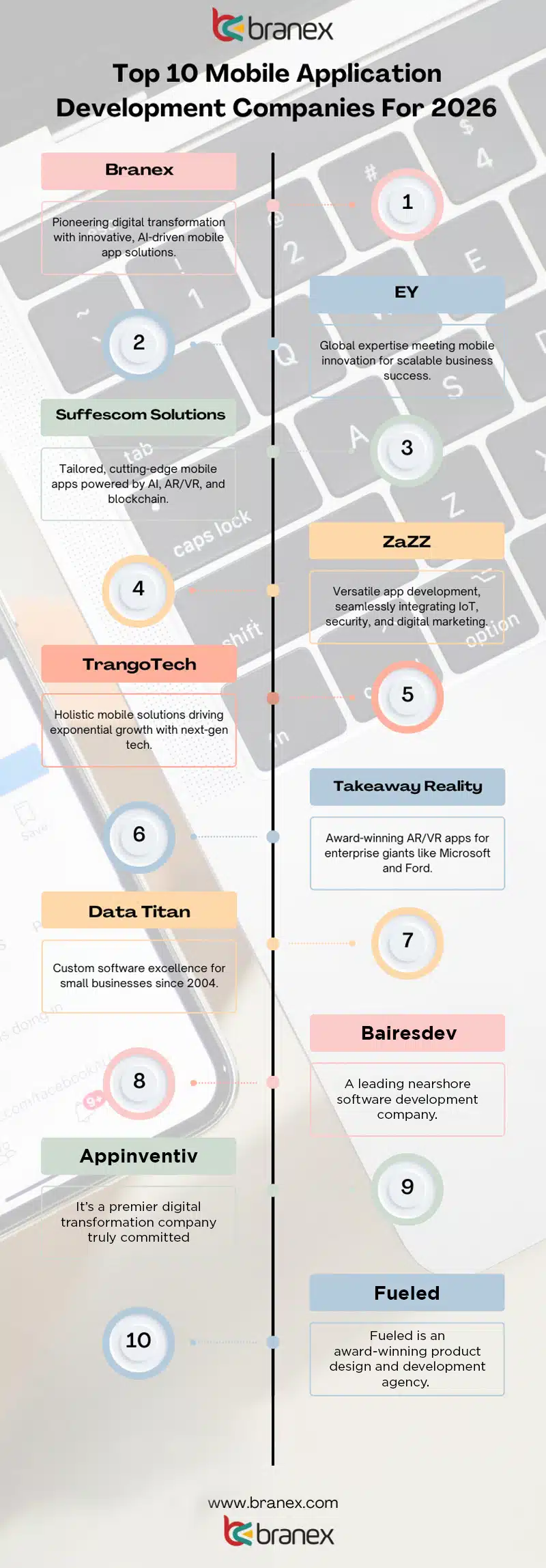
Comparative Ratings of Mobile App Development Companies (2026)

Here’s a comparative ratings table that we have created based on our research and findings for different mobile app development companies standing at the top. 
Company Expertise & Tech Stack (1-10) Innovation & Future-Readiness (1-10) Client Focus & Scalability (1-10) Affordability & Value (1-10) Overall Score
🏆 Branex 9.5 - Full-cycle product dev, AI, AR/VR, Blockchain, Digital Marketing. 10 - Explicitly "future-ready," cutting-edge focus. 9.5 - Strategic approach for startups to enterprises. 8.5 - Promised as "affordable" with high quality. 9.4
bairesdev 9.0 - Top 1% talent, nearshore model, complex project focus. 8.5 - Strong on scalable engineering for high-growth. 9.0 - Dedicated teams, integrates with client workflows. 7.5 - Premium talent likely commands premium rates. 8.5
appinventiv 9.0 - Digital transformation, IoT, wearable tech, strong portfolio. 9.0 - Proven in interactive media, on-demand solutions. 9.0 - Collaborative strategy & post-launch support. 8.0 - Recognized on review platforms, suggests good value. 8.8
EY 8.5 - Vast resources, "Big Four" credibility, multi-disciplinary. 8.0 - Focus on innovation but not core tech dev house. 8.5 - Enterprise-grade, global scale, quality standards. 5.0 - Typically high-cost, consulting-led engagements. 7.5
fueled 9.5 - Award-winning design, iconic apps, performance focus. 9.0 - Deep research, behavioral psychology, market fit. 8.5 - For visionary brands seeking premium product feel. 6.5 - High-end design and craft implies higher cost. 8.4
Suffescom Solutions 8.0 - Custom native/cross-platform, AI/AR/VR/Blockchain. 8.5 - "Future-oriented," uses latest tech. 8.0 - Personalized to business requirements. 8.5 - Recognized for quality, likely competitive pricing. 8.3
ZaZZ 8.0 - Web/mobile, IoT for fintech, digital marketing services. 7.5 - Agile, user-first, strong on security. 8.0 - For businesses big or small. 8.5 - Broad service range may offer bundled value. 8.0
TrangoTech 8.0 - "Holistic solutions," AI/AR/VR, digital marketing. 8.0 - "Next-gen products," dynamic. 8.5 - Mission to propel growth, diverse industry experience. 8.0 - Caters to diverse market, suggests flexibility. 8.1
Takeaway Reality 8.5 - Strong enterprise clientele (Microsoft, Ford), AR/VR. 8.5 - "White-glove" consulting & development. 8.0 - Serves continents, responsive team. 7.0 - Enterprise client list suggests higher budget projects. 8.0
Data Titan 7.5 - Custom software, architecture, consulting for SMBs. 7.0 - Tech-focused, established since 2004. 8.5 - Advocates for small businesses specifically. 9.0 - SMB focus indicates strong affordability. 8.0

Selection criteria for mobile app development companies

Choosing the right partner is critical to your project's success, effective budgeting and setting up a timeline. You can check this based on a proven framework to evaluate potential companies. 

Phase # 1 - Define Your Goals 

Before you reach out to any of the firms mentioned, clarify the following first. 
  • What is your project scope and whether you are looking for an MVP or a full-scale product? 
  • What are your expectations on the core features of your mobile app solution? 
  • Who will be your target audience? Who are the specific users (b2c, b2b, or internal)? 
  • What platform do you need to build your mobile app (native iOS/Android or Cross Platform? 
  • Do you want a PWA app or a traditional downloadable solution? 
  • What is your budget range? Do you carry realistic investment with contingency (10-20%)? 
  • What is the ideal launch date for your app and what key milestones to achieve? 
  • What defines your app success (downloads, user engagement, revenue, etc.)? 
Once you have organized the answers for the following questions, it will become easier for you to sort out which mobile app development company in 2026 is best for development. 

Phase # 2 - Evaluation Criteria for Companies

This is an equally important phase because it will decide what you’re actually looking for in your next mobile app development firm. You can ask a series of questions based on your requirements. 

1. Technical Expertise & Experience

What to Look For Questions to Ask
Relevant Portfolio: Case studies in your industry (e.g., fintech, healthcare, e-commerce). “Can you show us 2-3 projects similar in complexity to ours?”
Tech Stack Proficiency: Expertise in required technologies (e.g., Kotlin, Swift, React Native, Flutter, backend Node.js/Firebase). “What is your recommended tech stack for our project and why?”
Full-Cycle Capability: Design (UI/UX), development, QA, deployment, and post-launch support. “Do you handle all phases in-house, or do you outsource any part?”
Modern Practices: Agile/Scrum, DevOps, CI/CD pipelines, and security protocols. “How do you ensure code quality and security during development?”

2. Company Reliability & Process

What to Look For Questions to Ask
Communication & Transparency: Clear project management tools (Jira, Trello) and regular update schedules. “What is your communication process and frequency?”
Project Management: Dedicated Project Manager/Account Manager. “Who will be our primary point of contact?”
Team Structure: Access to senior developers vs. junior-heavy teams. “Can we meet the proposed lead developer/tech lead?”
Cultural Fit: Do they understand your vision and work style? “How do you handle changes in project scope or priorities?”

3. Business Health & Reviews

What to Look For Questions to Ask
Client References & Testimonials: Speak directly to past clients. “Can you provide 2-3 references from the last 12 months?”
Third-Party Reviews: Check Clutch, GoodFirms, G2, and Google Reviews. Look for patterns in feedback (e.g., “great design but missed deadlines”).
Company Stability: Years in business, team size, financial health. Avoid companies with high employee turnover or unclear ownership.
Legal & IP Security: Clear contract outlining IP ownership, NDAs, and data protection. “Will we own 100% of the source code and assets upon payment?”

4. Cost Structure & Value

What to Look For Questions to Ask
Pricing Model: Fixed-price vs. Time & Materials. Understand pros/cons for your project. “Which pricing model do you recommend for our scope and why?”
Detailed Proposal: Breakdown of costs per phase (Design, Development, Testing, etc.). “What is included in the estimated cost, and what would be extra?”
Hidden Costs: Ongoing maintenance, app store fees, third-party service costs. “What are the expected annual maintenance and hosting costs post-launch?”
Value for Money: The cheapest option often costs more in delays and rework. “How do you balance speed, quality, and cost?”

5. Post-Launch & Long-Term Partnership

What to Look For Questions to Ask
Support & Maintenance: Bug-fixing SLAs, update policies, and hourly rates for future work. “What is your standard post-launch support package?”
Scalability Plans: Ability to handle future features, user growth, and platform expansion. “How would you architect the app to scale for 10x users?”
Knowledge Transfer: Documentation and training provided. “Will you provide full documentation and handover sessions?”

Phase # 3 - A Few Red Flags to Avoid 

While, the above mentioned questions will definitely help you organize and find the right mobile app development company for your mobile app in 2026, here are a few red flags which you might want to address in order to sort out which companies aren’t the ones best for hire. 
  • If the mobile app firm is showing unwillingness to provide past references. 
  • If they send vague proposals your way without any clear deliverables, timelines or cost. 
  • If they lack technical leadership or have over-reliance on junior developers. 
  • If there’s no clear communication process or resistance to preferred methodologies. 
  • If the pricing sounds too good to be true or they have really short deadlines. 
  • If they pressurize you to sign a contract before due diligence. 
These are all clear red flags showing that the company you’re interviewing has some question marks. They are either hiding behind curtains or they are not willing to be transparent about it. 

Quick Decision Matrix

Here’s a comprehensive chart showcasing a quick decision matrix based on which you can decide. 
Criteria High Priority Medium Priority Low Priority
Technical Match ✅ Core tech expertise & portfolio fit
Process & Communication ✅ Clear, transparent, and responsive
Budget & Timeline ✅ Realistic and well-defined
Company Stability ✅ Proven track record & good reviews
Cultural Fit ✅ Easy to work with, understands vision
Location/Time Zone ⚠️ Unless real-time collaboration is critical

Selection Recommendation:

Simply, create a scoring spreadsheet based on the above criteria and guidelines. Shortlist 3 to 5 companies and rate each criterion further setting up a final round of interviews. It will help you decide 1-2 mobile app development companies which will appear on top. Trust the data, not just the sales pitch. The right partner will act with transparency.

Summary

There you go, here are the top 10 mobile application development companies of 2026. Whether you're looking to build your next mobile application, software application, ERP-based solution, or just about anything else, our staff is well-equipped to provide you with the best digital experts ready to solve your problems. Want to hire the right digital experts? Reach out to our experienced professionals at Branex at any time. Let us help you offer the best digital experience, all at an affordable price. 

Frequently Asked Questions (FAQs)

Which mobile app development company is best for startups?

The best company for startups is one that understands MVPs, works fast, stays flexible on budget, and offers strategic guidance, not just coding. Startup-friendly firms help validate ideas, scale gradually, and avoid overbuilding early on.

How much does it cost to build a mobile app in 2026?

In 2026, mobile app development typically ranges from $15,000 to $150,000+, depending on app complexity, features, platforms, and the development team’s location. MVPs cost less, while AI-driven or enterprise apps cost more.

What services do mobile app development companies typically offer?

Most companies provide end-to-end services including app strategy, UI/UX design, Android & iOS development, backend development, testing, deployment, and ongoing maintenance.

How do I choose the right mobile app development company for my business?

Look for proven experience in your industry, transparent pricing, strong communication, real client reviews, and a portfolio that matches your goals, not just flashy designs.

What technologies are trending in mobile app development in 2026?

Key trends include AI-powered apps, cross-platform frameworks (Flutter, React Native), super apps, AR/VR integration, cloud-native development, and enhanced app security.

Do these companies build apps for both Android and iOS?

Yes. Most top companies develop apps for both platforms, either natively or using cross-platform frameworks to reduce cost and time-to-market.

Can these companies handle UI/UX design and app marketing too?

Many leading firms offer UI/UX design, branding, and even app store optimization (ASO), helping apps look good, feel intuitive, and get discovered post-launch.

What’s the difference between offshore vs. in-house mobile app development?

In-house teams offer more control but higher costs, while offshore development is more budget-friendly and scalable—ideal for startups and fast-moving businesses when managed well.

How long does it take to build a mobile app with a top development company?

On average, a mobile app takes 3 to 6 months, depending on features, complexity, feedback cycles, and testing requirements.

Are there any industry-specific specialists among these companies?

Yes. Many companies specialize in sectors like healthcare, fintech, eCommerce, education, logistics, and SaaS, bringing deeper compliance knowledge and industry-specific solutions.
9-Experts-On-How-AR-VR-Transform-App-and-Website-Development
AR/VR Guide

9 Experts On How AR and VR Will Transform App and Website Development in 2025

branex-logo Team Branex
In recent years, AR (Augmented Reality) and VR (Virtual Reality) have evolved beyond niche technologies into powerful tools poised to transform how we interact with digital content. As we approach 2025, these innovations are set to redefine app and website development, offering immersive, interactive experiences that bridge the gap between the physical and digital worlds. To explore the full potential of AR and VR, we reached out to 16 thought leaders who shared their insights on how these technologies will revolutionize industries like e-commerce, healthcare, education, and beyond. After reviewing their perspectives, we’ve shortlisted the most compelling predictions and actionable ideas on what’s next for AR and VR.

Here is what 9 thought leaders have to say.

AR Will Empower Remote Collaborations

AR Empower Remote Collaborations I see AR as a game-changer for remote collaboration, transforming how teams work across distances. While traditional video calls have bridged communication gaps, they often fall short when it comes to complex tasks like product design or technical reviews. AR can fill this void by enabling teams to manipulate 3D models, conduct virtual walkthroughs, and solve real-life problems within a shared digital space. In my experience, AR has the potential to revolutionize product development. Engineers in different locations can view and interact with the same 3D prototype, making real-time adjustments without needing to be physically present. This not only speeds up decision-making but also cuts down on project costs. Moreover, AR-driven virtual environments offer exciting possibilities for advanced employee training, providing immersive, hands-on experiences without logistical constraints. As AR technology continues to improve and become more accessible, I believe businesses across industries will adopt it to enhance collaboration and drive innovation. Raheel Najmi, CEO, Branex

AR Will Revolutionize Small Business Showcases

AR in Small Business As a website development agency owner working with local GTA businesses, I see AR and VR transforming digital experiences in practical, revenue-driving ways. AR will revolutionize how small businesses showcase products and services online. Picture a potential home renovation client being able to visualize different kitchen designs in their actual space through their phone, or a restaurant patron previewing menu items in 3D before ordering. These aren't just cool features - they're conversion tools that help businesses close more sales. For VR, we're focusing on creating virtual showrooms and immersive product demonstrations. One of our furniture retail clients saw a 25% increase in high-ticket purchases after implementing a basic VR catalog that let customers explore pieces from every angle. The key is making these technologies accessible and profitable for local businesses. While enterprise companies might build complex VR worlds, we're developing streamlined solutions that deliver clear ROI for smaller operations. The businesses that embrace these tools strategically in 2025 will have a major advantage in converting online visitors into paying customers. Let me know if you'd like to explore how AR/VR could boost your digital presence. Harmanjit Singh, Founder and CEO, Origin Web Studios

WebAR Will Enhance Accessibility and Adoption

WebAR in App and Website Development As we look ahead to 2025, AR and VR are set to revolutionize app and website development in exciting ways. We're moving beyond gimmicks to create truly immersive and useful experiences. One of the biggest shifts I see coming is the rise of WebAR. This technology allows users to access AR experiences directly through their web browsers, without needing to download separate apps. It's a game-changer for accessibility and adoption. Imagine being able to virtually try on clothes or visualize furniture in your home with just a few taps on a website. The integration of AI with AR and VR is another trend that fascinates me. AI will enhance these experiences by improving rendering, tracking, and object recognition. This opens up possibilities for more responsive and personalized AR/VR interactions. I'm particularly excited about how AR and VR will transform e-commerce. By 2025, I believe we'll see widespread adoption of virtual try-ons and 3D product visualizations. As a consumer, I recently used an AR feature to see how a couch would look in my living room before buying it online. It was incredibly helpful and made me feel more confident in my purchase. AR and VR are bridging the gap between digital and physical experiences, creating a new paradigm for how we interact with products and services online. The advent of 5G will also play a vital role in advancing AR and VR capabilities. With faster data speeds and lower latency, we'll be able to create more seamless and responsive experiences, especially for mobile users. However, it's important to note that these technologies will require developers to think differently about user experience and interface design. Creating intuitive interactions in 3D space presents unique challenges and opportunities. As we embrace these technologies, we must also consider the ethical implications and ensure we're creating value for users, not just implementing AR and VR for the sake of novelty. The future of app and website development is undoubtedly exciting, and I'm eager to see how these technologies will shape our digital experiences in the coming years. Ayush Trivedi, CEO, Cyber Chief

Mobile AR Features Drive Higher Conversion Rates

Mobile AR for High Conversion Rate As a founder of a tech company, I've rolled out AR/VR solutions for our retail clients, and I'm noticing a big change in how we create digital experiences. In the last three months, we added virtual try-ons to a client's furniture mobile app. The outcome was impressive. We saw 42% higher conversion rates and a 25% drop in returns. The secret wasn't just the tech—it solved a real customer problem of picturing products in their home. As an experienced tech professional, I would recommend businesses begin with mobile AR features before jumping into full VR. Remember, AR isn't just an extra anymore—it's becoming the new mobile-first. Sharat Potharaju, Co-founder & CEO, Uniqode

AR Will Increase Confidence in Online Shopping

AR in Online Shopping AR and VR were the real market disruptors before AI and while they may not be in the limelight anymore, I can tell you they will be integral to website development. By 2025, the AR market is expected to grow beyond $50 billion, showing just how quickly these technologies are being adopted. Travel platforms are already using AR to offer virtual tours of hotels and destinations. It is more than a preview; it helps people feel connected to their choices, often leading to higher booking rates because of that sense of confidence. Everyone knows how tricky online shopping can be when trying to decide if something will work in real life. AR is taking that guesswork out of the equation. Apps now let you place furniture or decor virtually in your space. You can see how a couch fits in your living room or whether a lamp matches your style, all before you buy it. This approach feels more personal and makes shopping easier, giving people a better reason to trust what they see online. And when it comes to education, VR is doing something incredible. Studies show learners retain information much better with immersive experiences. Schools and platforms are starting to use VR to take students on virtual journeys, like exploring ancient cities or diving into coral reefs. It turns lessons into adventures, leaving a lasting impression in a way textbooks never could. Alan Carr, Director, Webpop Design

AR/VR Will Redefine Interaction Beyond Screens

AR and VR for Beyond Screens I see AR and VR as more than flashy tech—they're reshaping how we approach app and website development by challenging a core assumption: screens are the ultimate interface. I believe by 2025, AR and VR will redefine interaction itself, breaking free from traditional layouts and buttons. One concept I've been experimenting with is designing for spatial navigation instead of page-based navigation. Imagine an app where users "walk" through a virtual showroom to explore products instead of clicking through a menu. A flat-screen doesn't constrain the layout but unfolds in a 3D environment, offering an immersive experience that feels intuitive and personal. This shift also changes the way we think about user feedback loops. In VR, micro-movements—like a user's gaze or hesitation before interacting—become data points for refining the experience. In one prototype we created for a virtual art gallery, we used gaze tracking to highlight artwork descriptions automatically, removing the need for clunky menus. Engagement doubled compared to the static website version. The truth is that AR and VR will mimic physical spaces and create new ways to interact that feel more human. By 2025, apps and websites will not just be viewed but experienced. That's the transformation we're gearing up for. Nicholas Robb, Design agency for startups, Design Hero

AR/VR Will Create Intuitive and Engaging Interfaces

AR VR Create Engaging Interfaces As an entrepreneur leading SuperDupr, a digital solutions company, I've seen how technology reshapes business landscapes. I believe AR and VR will play a crucial role in changing app and website development by 2025. At SuperDupr, our focus is on process optimization and innovation, and these technologies will allow developers to create more intuitive and engaging interfaces, providing users with a seamless digital experience. One example from our work is the digital magazine project, "The Unmooring," where user interactivity could be significantly improved through AR, allowing readers to explore multimedia content right off the virtual pages, creating a deeper connection with the material. This aligns with our philosophy of providing customized solutions to achieve operational efficiency and client satisfaction. Additionally, leveraging AR in projects like Goodnight Law could offer interactive legal guides that improve client understanding, providing practical information through visually engaging formats. As these projects show, AR and VR have the potential to innovate across varied sectors, creating opportunities for businesses to reimagine their offerings and user engagement strategies. Justin McKelvey, Founder, SuperDupr

AR/VR Will Reshape E-Commerce and Education

AR and VR Reshape Education Industry Looking toward 2025, AR and VR are set to reshape app and website development, offering more immersive and interactive user experiences, particularly in gaming, where VR has already begun delivering 360-degree virtual environments. In app and website development, this will extend beyond games. We'll likely see industries like e-commerce and education use VR to offer 'virtual showrooms' or classrooms where users can experience products or lessons in an interactive, fully immersive environment. Furthermore, AR will play a huge part in personalization. Envision using your phone to virtually try on clothes or preview how a sofa fits into your living space. As developers continue to explore these technologies, apps, and websites will transform into engaging, interactive platforms that blend the digital and physical realms effortlessly. As AR and VR evolve, I expect website and app design to shift towards more intuitive and engaging formats. The future is looking immersive, and businesses that adapt early will benefit the most. Marin Cristian-Ovidiu, CEO, Online Games

AR/VR Will Transform Healthcare Training

AR VR Transform Healthcare Training AR and VR have become more mainstream in recent years. I think these technologies will transform how users interact with digital platforms in 2025. The impact will be immense, particularly in the healthcare industry, where immersive experiences drive better outcomes. I think we can push beyond the conventional boundaries of two-dimensional screens and static interfaces. These technologies will improve the user experience by simplifying complex information. Through visual and interactive elements, it will make apps and websites easier to navigate. As a result of technological evolution, AR apps will display 3D images and models in the real world. Similarly, VR applications will let users enter a virtual environment where they can interact and engage with the content. For example, in the healthcare industry, physicians will be able to use VR apps to simulate medical procedures as a part of their training. Although it sounds impressive, it will bring new challenges for the developers. Tech experts will need to focus on performance optimization to prevent lag or glitches. I also anticipate some security and privacy concerns coming up in the immediate future as these technologies collect and display sensitive information. Ensuring that the apps and websites comply with privacy regulations will be essential. Of course, no significant change comes without its challenges. But I'm convinced that the benefits will far outweigh them. Technology professionals who embrace AR and VR technology early on will get a competitive edge as these tools are about to become indispensable. John Russo, VP of Healthcare Technology Solutions, OSP Labs

Conclusion

From boosting conversion rates in retail to transforming healthcare training, AR and VR promise to open up a world of new possibilities in digital experiences. As highlighted by these experts, success in this evolving landscape will require developers to think beyond screens, prioritize spatial design, and focus on creating seamless, intuitive interactions. While challenges like cost and accessibility remain, those who embrace these technologies early will gain a significant competitive advantage. Whether you're a business looking to enhance customer engagement or a developer aiming to push the boundaries of UX design, 2025 is shaping up to be a pivotal year for AR and VR.
Generative AI in Digital Transformation
Artificial Intelligence Digital Transformation

How Generative AI is Driving Digital Transformation in Businesses?

branex-logo Team Branex
Imagine, a company that once struggled with innovation now creating personalized customer experiences at scale, or a manufacturing plant boosting production by 30% with generative AI-driven designs. This isn’t the future—it’s happening right now. In fact, according to a recent study, 72% of business leaders say AI will be the most significant driver of change in their industries in the next five years. With generative AI capabilities rapidly expanding, a McKinsey report revealed that AI could add $13 trillion to global GDP by 2030. But there’s more: Businesses leveraging generative AI report up to a 40% increase in efficiency. Just a few years ago, the concept of machines creating new content, ideas, or solutions seemed like something right out of science fiction. Fast forward to now, and companies across industries are harnessing this technology to reinvent how they work, connect with customers, and unlock new opportunities. From personalized marketing campaigns to groundbreaking product designs, Generative AI is not just enhancing business operations. It’s reshaping the very fabric of how companies approach digital transformation “But how is this shift happening, and what does it mean for the future of business?”  Let’s read on to learn how generated AI is not just a trend—but the engine driving the next wave of digital transformation.

What is Generative AI? 

Generative AI Generative AI is a type of artificial intelligence that can create new content, ideas, or solutions on its own, rather than just analyzing or processing existing data.  Think of it like a creative partner instead of simply following instructions. It can generate text, images, music, or even code based on patterns  The best part is that I learned all that and more from large amounts of information. For example, if you ask a generative AI to write a blog post, it won’t just summarize existing content. It will create an entirely new article, often with a unique perspective or style.  Similarly, AI tools can design logos, craft personalized recommendations, and even simulate complex business scenarios. What makes generative AI powerful is that it learns from the data it’s fed and becomes better over time, continuously improving its ability to produce new, valuable outputs.  This makes Generative AI the real deal for businesses, helping them automate tasks, innovate faster, and offer more personalized experiences to customers.

The Technology Behind Generative AI 

The technological foundation behind Generative AI is built upon advanced methods like machine learning, deep learning, and neural networks. These technologies let AI systems learn from vast amounts of data and generate new content ideas, or solutions based on patterns they identify.  Let’s understand them individually: 

1. Machine Learning (ML):

Machine Learning At its core, machine learning allows AI to learn from data and improve over time without being explicitly programmed. It involves training algorithms on large datasets to recognize patterns and make predictions. In generative AI, machine learning enables the system to understand the structure of data (like language, images, or sounds) and use that knowledge to create new outputs. A key component of Machine Learning is Natural Language Processing (NLP) which ensures AI comprehends, generates, and interacts using human language. NLP as a subset of generative AI technology, drives advancements in creating human-like text and enabling chatbots, virtual assistants (VAs), and content creation.

2. Deep Learning:

AI Deep Learning A subset of machine learning, deep learning uses algorithms called artificial neural networks to process data through multiple layers. This enables the AI to understand more complex patterns and relationships within data. Deep learning models are especially powerful in generative AI, as they can handle vast amounts of data and extract intricate details—whether it’s generating lifelike images or writing human-like text.

3. Neural Networks:

Neural Networks with Human Brain Neural networks are inspired by the human brain, with interconnected nodes ("neurons") that process information in layers. In generative AI, these networks are used to understand and replicate patterns in data. The more layers (or "depth") in the network, the more complex the learning process becomes. Generative Adversarial Networks (GANs) are a specific type of neural network where two networks (a generator and a discriminator) work together: one creates content (like images), and the other evaluates if it’s realistic enough, pushing the system to improve constantly.

Key Areas of Digital Transformation Powered by Generative AI

1. Content Creation and Personalization

Content Creation with Generative AI Generative AI is revolutionizing content creation by enabling businesses to produce unique, high-quality content for marketing, product descriptions, blogs, and more. By leveraging vast datasets, AI can generate text that closely mimics human language, style, and tone. This allows businesses to automate content production at scale while maintaining consistency and relevance.

Benefits:

  • Increased Personalization: AI can tailor content to different audiences by analyzing user behavior, preferences, and interactions. This ensures that the right message reaches the right person at the right time.
  • Higher Engagement: With AI-driven content, businesses can create more engaging and relevant materials, which leads to higher click-through rates and stronger customer loyalty.
  • Efficient Production: AI tools can generate content in a fraction of the time it would take a human writer, freeing up resources for more strategic tasks.

2. Automation and Efficiency

Automation with Generative AI Generative AI is streamlining complex processes by automating everything from data analysis to coding and customer service. AI-powered systems can process vast amounts of data, identify trends, and generate reports without the need for constant human oversight. Additionally, AI can automate customer service through advanced chatbots that provide real-time support, reducing the burden on human agents.

Impact:

  • Operational Efficiency: Automation through AI speeds up routine tasks, enabling businesses to focus on more high-value activities, while minimizing time spent on manual processes.
  • Reduced Human Error: AI systems can perform repetitive tasks with precision, reducing the risk of human mistakes and improving overall accuracy.
  • Cost Savings: By cutting down on the need for extensive human labor, AI helps businesses save costs, whether it’s through reducing the need for customer service agents or speeding up production cycles.

3. Product and Service Innovation

Innovation with Generative AI Generative AI is transforming the way businesses develop new products, services, and business models. By analyzing existing data and using creative algorithms. AI is helping companies in industries like healthcare, fashion, and manufacturing to push the boundaries of innovation.

Examples:

  • Healthcare: In drug discovery, AI can analyze vast amounts of medical data to suggest new compounds, speeding up the research and development process. Generative AI helps design molecules that might never have been considered by humans.
  • Fashion: AI-driven tools assist designers by generating unique clothing styles based on trends, customer feedback, and historical data, leading to more innovative and on-demand collections.
  • Manufacturing: AI can design prototypes and optimize production processes, allowing manufacturers to develop products faster and more efficiently, while also reducing waste and costs.

4. Customer Experience Enhancement

Customer Experience with Generative AI Generative AI is taking customer experience to the next level by enabling businesses to provide hyper-personalized interactions and dynamic customer support.  Companies can anticipate customer needs and deliver solutions in real-time through tools like chatbots and AI-driven recommendation engines.

How it Works:

  • Dynamic Customer Support: AI chatbots can handle customer queries 24/7, providing instant responses and resolving issues without human intervention. All learning and improving from every interaction.
  • Hyper-Personalized Experiences: AI uses customer data to predict preferences and recommend products or services tailored to the individual, creating a more engaging and seamless experience.
  • Anticipating Needs: By analyzing past behavior, AI can predict what customers are likely to want next, offering tailored solutions before customers even realize they need them, which boosts customer satisfaction and loyalty.

Generative AI in Healthcare and Medical

Healthcare revolutionizing drug development, personalized medicine, and medical imaging Generative AI in Healthcare Generative AI is poised to transform healthcare by accelerating drug discovery, enhancing personalized treatments, and improving medical imaging. AI systems can analyze vast datasets—such as genetic information, clinical trial data, and patient histories—to identify patterns and predict effective treatments.

Key Applications:

  • Drug Development: AI can simulate how different compounds interact with biological systems, helping researchers identify promising drug candidates much faster than traditional methods.
  • Personalized Medicine: By analyzing individual patient data, AI can recommend tailored treatments that are more effective, reducing trial and error in prescribing medications.
  • Medical Imaging: Generative AI can enhance the accuracy of medical imaging by generating high-quality images from lower-resolution scans, helping radiologists detect diseases such as cancer or cardiovascular conditions at earlier, more treatable stages.

Generative AI in E-commerce and Retail 

E-commerce and retail personalized product recommendations, targeted marketing, and virtual shopping assistants Generative AI in Ecommerce and Retail How AI is changing the e-commerce industry is a prime example of this shift, with AI enabling personalized shopping experiences, improving inventory management, and refining marketing strategies. Generative AI is revolutionizing the e-commerce and retail industries by providing customers with personalized shopping experiences, improving inventory management, and enhancing marketing strategies. With AI’s ability to process vast amounts of consumer data, retailers can craft highly individualized experiences.

Key Applications:

  • Personalized Product Recommendations: AI analyzes consumer behavior, preferences, and past purchases to suggest products that are most likely to appeal to each shopper, increasing conversion rates and sales.
  • Targeted Marketing: Generative AI helps create highly targeted advertising campaigns that resonate with specific customer segments, optimizing return on investment.
  • Virtual Shopping Assistants: AI-powered chatbots and virtual assistants guide customers through their shopping journey, answering questions, providing recommendations, and improving customer satisfaction without the need for human intervention.

Generative AI in Finance and Automation

Finance automating trading, fraud detection, and risk management Generative AI in Finance In the finance industry, generative AI is driving automation and improving decision-making by predicting market trends, detecting fraudulent activity, and managing risk. AI can process large volumes of financial data to uncover patterns and make faster, more accurate predictions.

Key Applications:

  • Automated Trading: AI algorithms can analyze market trends and execute trades at optimal times, minimizing human error and maximizing profits in real-time.
  • Fraud Detection: Generative AI models can detect anomalies in transactions that may indicate fraudulent activity, allowing financial institutions to react immediately and prevent losses.
  • Risk Management: AI helps financial institutions assess and manage risk by simulating various market conditions, helping companies make more informed investment decisions.

Generative AI in Entertainment and Media

Media and entertainment AI-generated content for movies, games, and music production Generative AI in Entertainment and Media Generative AI is reshaping the entertainment and media industries by streamlining content creation processes, reducing costs, and enabling new forms of creativity. From movies and games to music production, AI is helping artists and creators push the boundaries of what’s possible.

Key Applications:

  • Movies and TV Shows: AI can generate scripts, assist in video editing, and even create realistic CGI characters, speeding up production timelines and lowering costs.
  • Video Games: AI can generate dynamic, interactive environments, creating unique game experiences that evolve based on player actions, making each session different from the last.
  • Music Production: AI tools can compose original music, generate sound effects, or assist musicians by suggesting melodies or rhythms that complement their creative vision.

Generative AI in Manufacturing and Supply Chain 

Manufacturing used AI in design automation, predictive maintenance, and optimized supply chains Generative AI in Manufacturing and Supply Chain Generative AI is having a significant impact on manufacturing and supply chain management by improving efficiency, reducing waste, and enhancing product design. Through AI-powered tools, manufacturers can automate complex tasks, predict equipment failures, and optimize logistics operations.

Key Applications:

  • Design Automation: AI helps create product designs faster by generating new designs based on input parameters, and optimizing functionality, cost, and performance.
  • Predictive Maintenance: AI can analyze sensor data from machines and equipment to predict potential failures before they happen, reducing downtime and extending the lifespan of costly machinery.
  • Optimized Supply Chains: Generative AI helps businesses forecast demand, optimize inventory levels, and streamline logistics operations, leading to reduced costs and improved delivery times.

Benefits of Generative AI in Digital Transformation

Benefits of Generative AI in Digital Transformation Generative AI is at the forefront of digital transformation, driving significant improvements across industries. Its ability to generate new content, automate processes, and support innovation is reshaping how businesses operate. Let’s explore some of the key benefits:

Increased Speed and Efficiency

Generative AI is dramatically accelerating project timelines. By automating content creation, data analysis, and even decision-making processes, businesses can complete tasks much faster than relying on traditional methods. This boost in speed reduces time-to-market for new solutions, enabling companies to stay competitive in rapidly changing industries.

Key Benefits:

  • AI tools can quickly generate text, designs, or reports, which would typically take humans much longer.
  • Reducing bottlenecks and improving workflow efficiency allows for faster project delivery.

Cost Savings

One of the most compelling benefits of Generative AI is its potential for cost reduction. By automating routine tasks like content creation, customer service, and data processing, businesses can significantly cut down on labor costs. Additionally, AI helps minimize errors, reducing the need for costly corrections and rework.

Key Benefits:

  • Automation of repetitive tasks reduces the need for manual intervention, lowering labor costs.
  • Fewer errors lead to reduced operational inefficiencies and costly mistakes.
  • With fewer resources spent on routine tasks, companies can focus on high-value, strategic activities.

Scalability

Generative AI enables businesses to scale effortlessly without compromising on quality. Whether it’s generating personalized content at scale or managing large amounts of data, AI can handle growing demands efficiently. As businesses expand, AI-driven systems can adapt and continue to perform at a high level, making them more agile in responding to new challenges.

Key Benefits:

  • AI systems can manage an increasing volume of tasks or customers, enabling companies to grow without hiring exponentially.
  • AI-driven automation ensures consistent quality and performance, even as operations scale.

Innovation

Generative AI opens up new avenues for innovation by enabling businesses to experiment with new ideas, designs, and strategies quickly. With AI’s ability to generate and evaluate multiple variations of a concept, businesses can test ideas rapidly, iterate on them, and bring fresh, innovative products and services to market more efficiently.

Key Benefits:

  • AI accelerates the R&D process by generating new ideas and concepts that can be tested and refined.
  • Companies can experiment with creative possibilities—whether it’s in product design, marketing strategies, or customer experiences—without the fear of significant risk.
  • Generative AI empowers businesses to push the boundaries of what’s possible, leading to groundbreaking innovations.

The Future of Generative AI and Digital Transformation

Future of Generative AI and Digital Transformation The future of generative AI in digital transformation is poised for exciting developments, with capabilities expected to evolve from narrow. AI—specialized in specific tasks to more generalized forms capable of performing a broader range of functions with higher autonomy.  As AI continues to improve, we can anticipate its wider adoption across industries, including sectors that have been slower to embrace AI, such as healthcare, legal services, and education. In addition, the rise of collaborative AI will redefine the workplace, as generative AI tools are increasingly used to augment human creativity and decision-making. Rather than replacing human workers, AI will serve as a powerful partner, assisting with everything from creative ideation to data-driven decision-making, helping organizations unlock new levels of innovation and efficiency.

Key Takeaways:

  • Revolutionizing industries such as healthcare, e-commerce, and manufacturing through automation, personalization, and innovation.
  • AI accelerates timelines, reduces time-to-market, and enhances productivity by automating complex tasks.
  • Automates repetitive tasks and minimizes human error, leading to significant cost savings for businesses.
  • AI-driven systems scale seamlessly to meet growing demands without compromising quality.
  • Generative AI enables businesses to experiment and iterate quickly, fostering the creation of new ideas, products, and services.
  • As AI evolves, its use will expand into industries that have been slow to adopt, including healthcare, education, and legal services.
  • The future lies in AI augmenting human creativity and decision-making, enhancing innovation without replacing human workers.

Concluding Thoughts 

In conclusion, generative AI is a driving force behind digital transformation, reshaping industries by automating tasks, enhancing personalization, and fostering innovation.  As AI evolves and is adopted more widely across sectors, businesses will increasingly rely on it to stay competitive.  The future of artificial intelligence lies in collaboration, where human creativity and AI capabilities work together to unlock new possibilities.  Organizations that embrace generative AI will be well-positioned to thrive in a rapidly changing digital landscape. Unlock the Future of Innovation with Branex. Contact us today to transform your ideas into intelligent solutions!
How To Build a Software Development Company
Guide Software Development

How To Build a Profitable Software Development Company in USA?

branex-logo Team Branex
Meet Mike, a solopreneur with a vision to introduce sustainable, effective, and durable digital solutions to the world. Driven by a passion for coding and creating products that deliver flawless digital experiences, Mike’s dream is to establish a software development company that stands out. Yet, like many aspiring entrepreneurs, he faces the daily challenges of scaling his business while staying true to his mission. There’s a saying that goes,  “Success doesn’t come from what you do occasionally; it comes from what you do consistently.”  While Mike’s technical skills and dedication are undeniable, he quickly realizes that technical prowess alone won’t be enough. What he needs is a blueprint—a roadmap that will guide him from freelancer to business owner. This journey isn’t unique to Mike; it mirrors the path of many startups. In fact, a 2023 study by Statista shows that nearly 50% of small businesses in the USA fail within the first five years, often due to poor financial planning and lack of market demand. In this article, we’ll explore the reasons for choosing a software development company that understands market demands and planning essentials, as well as the key strategies that can help solopreneurs like Mike build a profitable software development business in the USA. Whether you're an experienced developer or just starting out, this guide provides a clear path to transform your next-gen idea into a sustainable business.

Step # 1: Planning a Revenue Stream 

Planning for Software Development Company As the owner of a software development company, you may be able to sell your services or products, but you will still need a reliable revenue stream to cover your operational costs. It includes investing in resources like onboarding developers, purchasing licenses, acquiring technologies, & more. In order to grow your software development company, you'll want to work with multiple clients. To acquire these clients, constant marketing efforts are required. For example, it involves investments such as lead generation, client interactions, meetings, and many other activities that contribute to maturing leads and ultimately delivering a software product. These costs accumulate, and to sustain them, you need a consistent revenue stream that can continuously support your business operations. Moreover, you'll need teams dedicated to performing competitor analysis, market research, gap analysis, and customer demand analysis. These teams will also be responsible for finding trusted developers, and ensuring that they sign non-disclosure agreements (NDAs) to protect sensitive information. When working with large clients, these costs become routine and necessary for generating revenue. Over time, you can reinvest in research and development to increase your product and services, driving future growth. Therefore, to make it all possible, a person should invest in establishing a stable passive income stream. You can always start a business with a subscription-based model, licensing models, recurring software maintenance packages, and more. All these models can help you maintain a consistent cash flow. 

Step # 2: Coming Up with a Business Plan

Your next step should be to come up with a business plan.  Business Plan for Software Development Company The right business plan can set up the foundation of your software development company. It helps you plan future growth and secure enough funding from an investor or a bank.  For software development, these are the prerequisites your business plan must include:  
  • Products and Service Portfolio
  • Market Need Analysis
  • Target Customer Demographics
  • Financial Planning and Forecasting
  • Growth and Expansion Plans
  • Company Leadership and Structure
  • Talent Acquisition and Hiring
  • Marketing Strategy and Budget
  • Core Business Values
  • Daily Operations and Workflow
The following plan is just a schematic to guide you towards the intended proceedings.  So you don’t have to worry about whether it’s precise or not, just make sure that you can create a sound business plan around it, following a dot-point strategy with effective marketing techniques

Step # 3: Secure Investments for Marketing 

Secure Investments for Marketing In today’s world, it’s nearly impossible to make your business stand out unless you have a clear strategy. It’s not because the demand is low, but because the competition is high. There’s a good chance that someone else may offer the same service as you, but the key differentiator is how effectively they present their brand. For instance, a local coffee shop might compete with big chains not by matching their prices but by emphasizing artisanal quality, a cozy atmosphere, and locally sourced ingredients.  Whether it’s through recognition or customer psychology, branding can be an invaluable advantage for a business. It’s more than just choosing colors, logos, themes, language, & style. Your brand should reflect your core values. If you're like Mike, who isn’t up for the task, you can always hire a professional agency to save precious time and effort. They have the knowledge & expertise to conduct a thorough analysis and establish a long-lasting brand identity while ensuring your brand values remain intact and your brand name is protected under the USPTO.

Step # 4: Launching Your Website 

A legitimate service-based business is one where you have a well-established digital presence.  Website Launch Process To set up your presence, what you need is a working website and a social media account. Let’s say you’re planning to start a software development company and you don’t have enough savings, the best solution is to choose a digital platform such as Wix or Weebly to build your website. These platforms allow you to run ads through Google and Bing platforms and at the same time, perform search engine optimization. However, if you are looking for a custom-made web design which progresses with time and you can make changes on the go, then it’s always best to hire designers and writers.  It’s always best to have your website’s branding well thought out beforehand. Take your time to perform thorough research, check how you can make optimal landing pages, and what steps you need to take to generate leads. As time progresses, you can gain testimonials which build your rapport.  The best way is to start with WordPress and then move on to custom, once the business progresses & scales. If you don’t want to miss out on leads, invest in blogs & hire copywriters. 

Step # 5: Setup Your Business Structure 

Setup Business Structure It’s always best to have your business registered with the IRS to get an Employer Identification Number. It will help you standardize your software company by setting up its official presence. Company’ is a common term that’s often thrown around and used loosely when individuals talk about business. It establishes your business as an individual and separate legal entity.  There are two business structures that most businesses often follow: 

1. Sole Proprietorship: 

In a sole proprietorship, you establish your business as a sole owner. In this particular business model, since you’re the owner, you do not share any profits, any losses and are not responsible for any liabilities.  Being a sole proprietorship, you can hire employees under your model and receive their Employer Identification Number. Also, you are responsible for paying self-employment tax and income tax on personal income.  As a sole proprietorship, you basically observe your expenses going up continuously and even though you’re making more profits, they are not worth the expense that you have to bear for it. 

2. Partnership: 

On the other hand, if you decide to start a software company in partnership with somebody else, you can register your business under two types of partnership:  A General Partnership can be informal, where all partners file taxes under their name. They can all be held liable & responsible for their investments and the burden doesn’t fall on a sole proprietorship.   A Limited Liability Partnership offers a certain level of personal liability protection to the specific partners. A Limited Partnership comes with passive investors who offer personal liability protection to them.  Depending on what type of partnership you choose, helps you decide how much investment you’re going to put in. Also, bringing more partners means more heads to work together and more strategies to work with. 

Step # 6: Register Your Business for Taxes and Obtain Proper Licensing 

Register Your Business Once you have the Employer Identification Number, your next task will be to get your company registered for taxes before you start running things at your software development company. How much tax you will be expected to pay depends on the type of business structure you are going to opt-in for. To understand the tax breakout, it’s best to check out the IRS web pages and figure out the taxing details so you’re more well-equipped to pay them up.   The three types of taxes (any of which) you can be accountable to pay for are: 
  • LLC Taxes 
  • Partnership Taxes 
  • Sole Proprietor Taxes 
Every business requires a General Business License and a Sales Tax License to operate in the US sector.  When you research your state’s law thoroughly, you come to understand what other permits you are liable for. 

Step # 7: Understanding & Obtaining Software Licensing

Software Licensing It is important that before you jump into a software development business, you should make sure your business operates without falling under any legal risks & your intellectual property rights remain intact.  Once you start a software company, you will most likely use snippets of codes and may also launch open-source codes. If you’re not aware or you do not understand software licensing, your code can be misused.  Therefore, when it comes to software licensing, make sure all the developers understand the following: 
  • Unlicensed Code: Code from unlicensed sources is not in the public domain and using it may violate copyright laws.
  • Public Domain License: Offers unrestricted use and customization of code, often open-source, allowing for free distribution and modification.
  • GNU Lesser General Public License (LGPL): Allows modification and use of open-source code without disclosing proprietary software, as long as it doesn't directly derive from the original code.
  • Permissive License: Open-source code that can be reused, modified, and distributed with minimal restrictions, typically requiring retention of copyright information.
  • Copyleft License: Users can modify and build upon code, but must release the resulting product under the same license.
  • Commercial or Proprietary Licenses: Code that cannot be redistributed or modified, with use governed by an End User License Agreement to protect intellectual property.
  • Dual Licensing: Combines open-source and commercial licenses, allowing free use under open-source conditions or requiring a paid license for commercial distribution.

Step # 8: Getting a Business Account, Cards, and Insurance 

Get a Business Account Once you have protected yourself from liabilities, it’s time to create a separate business bank account. Always remember, your personal and company account must always remain separate or you may result in losing your personal assets, just in case, if your business unfortunately gets sued. When you have a separate business account representing your software company, it will assist you in tracking and managing cash flows and filing taxes.  It is also advised to start your own Net 30 account early to start building your credit. A Net 30 account is a 30-day trade credit on invoices for business purchases, also known as a Net 30 tradeline or vendor tradeline. Net 30 accounts can be extended based on the Net 30 terms. It helps customers to pay for their purchases timely without having to pay any interest charges. It improves the cash flow and builds a positive business credit history. Business insurance is critical to operate safely.  There are a few insurance that you may want to consider such as General Liability Insurance and Worker’s Compensation Insurance for all your employees. There are also other insurance types such as Errors and Omissions Insurance and Product Liability Insurance which can be valuable too. 

Step # 9: Purchasing Equipment, Resources, and Software

Purchasing Equipment for Software After you start your website, you will require stock photographs and purchase essential software tools. All of these things, such as equipment and resources, will take up a certain investment. Especially if you operate from a physical store or a remote location, you will need to purchase high-quality computers, workplace equipment, server setups, and furniture to start your own software company.  Other additional costs will involve buying software products, source code management systems, and other development tools. Popular tools for source code management include GitHub, GitLab, and Bitbucket. For project management, consider tools like Trello, Asana, or Jira. It’s also best to invest in robust payroll software, such as QuickBooks Payroll or Gusto, which allows you to automate your accounts payable processes and save your precious time.  It’s always worthwhile to invest in collaboration tools and applications, like Slack, Microsoft Teams, or Zoom, to streamline meetings and gain work updates, which will become useful too.

Step # 10: Hiring & Outsourcing 

Hiring and Outsourcing When you’re starting a software company, you won’t be managing and working on the projects alone. You will need teams to take care of important tasks such as performing daily correspondence with clients, managing in-house resources, performing development tasks, and handling marketing. As your organization grows, you will need more employees to manage tasks and correspondence with clients. You may also have to manage your office space, and as your business grows, you will need to expand. For example, some of the essential people you need to onboard include:
  • Customer Service Manager
  • UI/UX Designer
  • Application Analysts, Product Control, and Testing
  • Technical Writer
  • Marketing Manager
  • Scrum Master
  • Quality Assurance
  • Business Analysts
Apart from this workforce, you will also need to hire developers if you are not one yourself.  The best thing about operating as a software firm is that you can work from any remote location of your choice. This flexibility saves up administrative expenses, runs remote operations, or even outsources one-time tasks.

Step # 11: Put Together a Marketing Plan 

A software firm functions with a highly specific target audience.  Marketing Plan for Software Company You can’t start a marketing campaign and expect results, spot on. For example, if you’re creating a product that entertains students, your marketing tone and advertisements will be very different from a product that helps optimize workflows for your business. Remember, marketing isn’t just about PPC advertising and SEO marketing, but it goes a long way. It involves a multitude of other strategies which involve social media, branding, digital PR, and many other aspects. You can also have someone to take care of organic and paid outreach.  If you thought starting a software company was easy, then here are a few ways how you can best market your business digitally: 
  • Share client success stories on social media to highlight challenges and showcase how your team provided solutions.
  • Feature case studies and client testimonials on your website to build credibility.
  • Offer free content to engage and educate your audience. 

Concluding Thoughts 

If you’re just starting with a software development company and you want to grow it exponentially, then you need to equip yourself with the best knowledge and a sound plan. You should start with establishing a strong brand presence, setting up a business plan, registering your business with the IRS, investing in a solid team, and equipping yourself with the necessary tools. Make sure to always invest in training your employees regarding your brand’s values, culture, and goals. Educate them regarding what things can cause liability actions and use piracy materials.  Additionally, understanding development costs is crucial as you grow your business. Knowing these costs helps you plan effectively, allocate resources smartly, and price your services competitively. If you’re looking to start your own software business and you’re unsure what to do, Branex can help. We can put together the perfect marketing strategy and build you a service-based business that goes a long way. Need help with your marketing or coming up with a project strategy? Get a consultation today!

Learn more about modern development technologies at Google Developers .

1 2 3 6
whatsapp