Blogs

Add the best talent on the market, an agile skilled management & seamless involvement.

Blog Main Image
UX Experts to Make Web Design
Infographics UI/UX Web Design & Development

15 Tips From UX Experts To Make Outstanding Web Design

branex-logo Team Branex
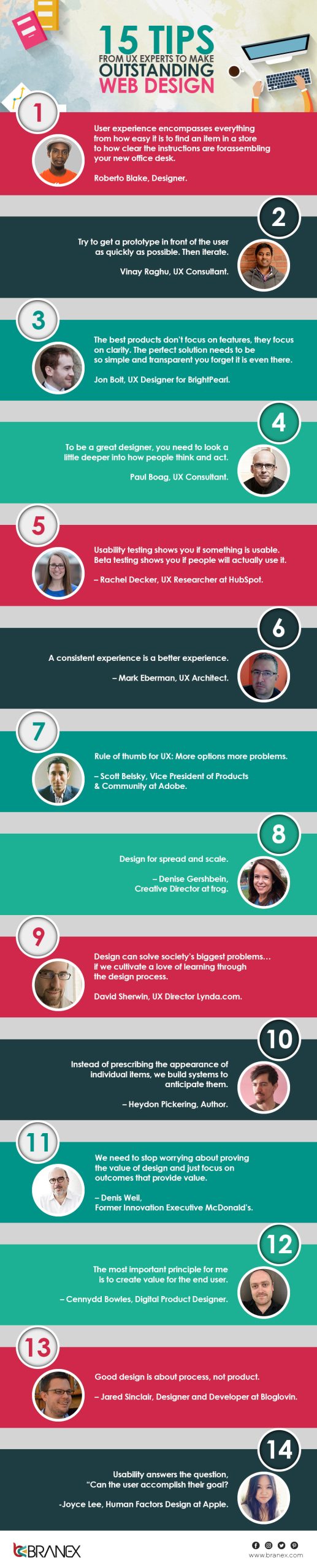
Nothing fascinates a designer more than to see a blank canvas where they can go crazy with their creativity and play around with colors. It also holds true for designing websites from scratch. Unfortunately, most UX or web designers focus on creativity but neglect how it would affect the overall user experience. At the end of the day, the user will use your website. The user experience they have with your website will determine its success or failure. You should ask yourself how users will perceive your website and how they will interact with it. This would help you to deliver an immersive user experience to your website visitors. Is your website easy to navigate and understand for new users? Does it mention what your business is all about and the products and services you offer? Is your website easy on the eyes of new users? All these considerations and much more take you closer to creating truly memorable web experiences. In this infographic, you will get expert advice from the best UX designers, which will assist you in impressing your web audience with a UX design and increasing sales. Here is what the top UX experts have to say about creating wonderful web experiences. Tips From UX Experts To Web Design
Graphic Design Trends Infographic
Infographics Web Design & Development

Top 9 Graphic Design Trends To Follow – Infographic

branex-logo Team Branex
A flat graphic design is like a simple framed picture on your wall - you don't really notice it's there ... until it's gone. Obviously, you don’t want your design to wear out, to drive the visitors away from your website. Instead, you want your design to stand out. And you know what a good web design is like a good film, has a good story, a good director, a good cast, and as a result good audience. So if have followed some of our previous web design blogs you might have realized that we try to offer our readers the best in the market tips. Hey, but if you still have any doubts, feel free to check our previous blogs. The sun is upon us on our heads, which means we are in the middle of the year 2017, Congo to that! But what about the ever-changing trends? Are you following the trends that are currently in the market? If not, no need to worry. We are here to help you out. Our experts at Branex took some time and compiled a wonderful infographic. We are not firing aimlessly on the dartboard instead we have done some work on behalf of you. This is not just some elements on the image. This is a result of the well-researched image that will act as your guideline for the rest of the year. Graphic Design Trends
Typography and Colors in Web Design
Infographics Web Design & Development

Importance of Typography and Colors in Web Design

branex-logo Team Branex
Did you know that web design elements such as typography and colors have a huge psychological impact on users? There is more to web design than design aesthetics and content delivery. According to a study, 62-90% of users will make purchase decisions based on colors, which means that colors are the most important factor for customers. Your website colors and fonts can stir emotions, affect mood and feelings among your website visitors, and create a connection between the customer and the brand. More importantly, they can influence your website traffic, conversion rates, and purchase decisions. Therefore, you should choose colors and fonts carefully because they can make or break your website. Typography helps you convey subconscious messages. Before selecting the right typeface and color for your website, consider several factors, including visibility, demographics, culture, preferences, and much more. Branex pays extra attention to these details and many more to deliver a web design that will impress your visitors. Here is an infographic that can tell you about the importance of typography and color psychology in web design. Typography and Colors in Web Design
Web Design Tools for Entrepreneurs
Business Tips Entrepreneurship Web Design & Development

18 Web Design Tools Every Budding Entrepreneur and SMB Must Utilize

branex-logo Team Branex
The constellation of web design tools is always in a state of flux and growing with each passing moment. Thanks to ever-evolving technology that keeps on enhancing and upgrading, standards keep on changing, and every month new tools are popping up for you to try out that can enhance your capabilities as a designer, or developer or give you insights into the world of designing that help you a lot in crafting the perfect product design if you’re on a solo flight as an entrepreneur. So, whether you’re a front-end designer in a web design agency, a freelancer, a web developer, or an entrepreneur exploring ways to launch your business on the web, you need a variety of tools to help you become more efficient. There are loads of DIY website builders, logo generators, social media image makers, video editors, and much more, but how do you know which one is actually the right choice for your brand? Scroll down and you will find a list of the most 18 useful web design, development, and testing tools for beginners to try out and see how they work for you.

SmartMockups

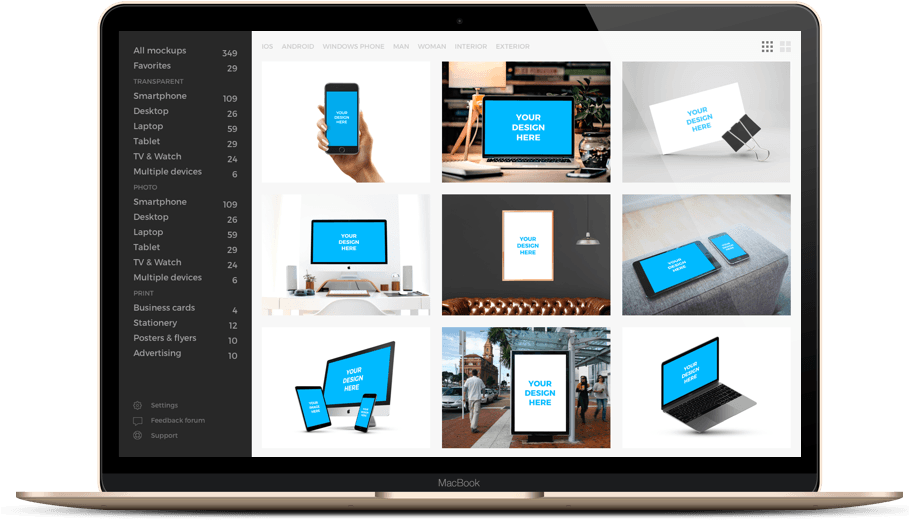
SmartMockups - Web Design Tool There are a lot of images you can use on your website such as images of products, images of satisfied customers, or anything that represents your company culture. To make your life easier, you can use SmartMockups. All you need to simply upload your app’s screenshot and download a mockup. No need to use Photoshop, no hassle at all.

Peek

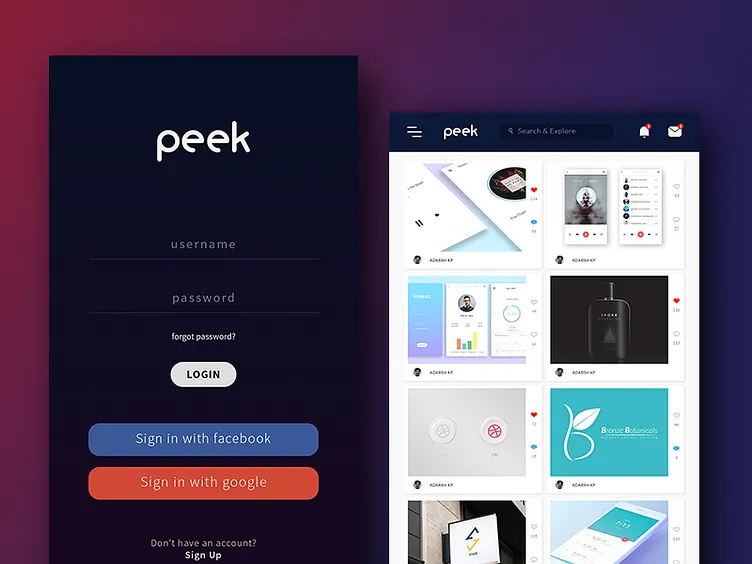
Peek What’s the point of creating a visually appealing website if it has usability issues? Peek is a free tool that provides you with a 5-minute review of your website. It highlights all the glaring UX issues so that you can fix them and make your website functional.

Browser Calories

Browser Calories In this day and age, when all of us are using smartphones for browsing, as a designer, developer, or business owner, you need to keep an eye on page weights. This icon, placed next to the address bar, lets you know the page weight of anything you are looking at.

Cool Text

Cool Text This free tool helps you generate graphics for websites and logos without overburdening you with the design work. You can simply choose the type of image you like most, fill out a form, and your custom-made image is done.

LucidPress

LucidPress If you are looking for an elegant digital or print design for a brochure, flyer, or newsletter, then using LucidPress is a wise choice. It is an easy-to-use tool that has a drag-and-drop capability which makes text, photo, and video layout a lot easier.

Inspectlet

Inspectlet This amazing tool provides a great way to analyze how your visitors engage with your website. You can easily watch how far they scroll, on which section they click, and even on which page they spend their time most. This will help you optimize your website design and content to get maximum user engagement.

Frontify Style Guide

Frontify Style Guide It provides an outstanding solution to all your functional, and visual needs. With Frontify you can easily create professional design guidelines for your brand. No matter if it is a logo, image, color, font, digital and print content, it can manage files as easily as you would expect.

ScreenFlow

ScreenFlow In the realm of video editing, if you are facing difficulty in finding a perfect app that can help you create GIFs, don’t worry, ScreenFlow is here to help you out. With this simple interface, you can animate, edit, and even shoot screens.

Photodex

Photodex You will find this app simply amazing. This tool lets you stitch together images and graphics into a video. It’s free version allows you to use up to 15 images which is perfect for a simple YouTube video.

HTML5 UP

HTML5 UP Believe it or not, templates are lifesavers. If you are a design noob, you will surely find HTML5 UP very useful. It offers well-designed and properly coded templates to help you create your landing pages.

WebFlow

WebFlow This great tool offers a lot of unexpected features like CMS and advanced animations along with an option of HTML exports. The tool has a free plan available.

Pexels

Pexels Stock images can make your website design more appealing and attention-grabbing. Pexels is an amazing tool that allows you to search through a lot of sources of free stock images. You can choose photos of your choice, it has something for everyone.

Visual Website Optimizer

Visual Website Optimizer A/B testing is a must for your website, and Visual Website Optimizer is an amazing tool that offers a simple way to set up A/B tests. Try it out as it is very promising and affordable.

Canva

Canva Canva is a great, free tool for creating simple graphics for blog posts, content marketing, social media marketing, newsletters, and so on.
  1. TypeGenius

TypeGenius Using the right type of font is important for your website. TypeGenius is an amazing tool that suggests perfect font combinations based on your choice.  

Foundation

Foundation This prototyping tool serves as a blueprint for your responsive website. The latest version offers an easy-grid structure that makes styling even more flexible and convenient. It works great with CSS and SASS.

Load Impact

Load Impact In this competitive business world, your website needs to load faster and quickly. Load Impact is a cloud-based service that lets you test how your website, mobile app, or API is performing with a million concurrent users. It makes load testing and website optimization easier to generate traffic load from existing users.

Pingdom

Pingdom It is a service that can easily monitor the uptime, downtime, and performance of your website. All you need to upload a full image in HTML and it will mimic the loading process of your website while incorporating all the elements such as RSS, CSS, images, etc. This way you can check and track the efficiency of your website.

Final Words

This list could be much bigger as there are a lot of great tools and services available and it’s almost impossible to get them all in one blog post. But the above-mentioned tools are the best options to try out for beginners, designers, developers, and small business owners. So, use these handy tools and improve your website quality in terms of design, functionality, and coding.
Costs to Build a Website Design
Web Design & Development

Understanding Costs For Building An Intuitive Website Design

branex-logo Team Branex
Website designing is a tedious process. Sometimes it could take the app owner and the web designers a little time to catch up to the technical shifts that a website design may experience throughout its design process. However, if you answer the following questions prior to embarking on a website design process, chances are that you will spare yourself and the web designer the difficulties that may otherwise arise. Use the Branex website cost calculator after going through this blog post.

What is Your Realistic Budget for the Website Design?

Budget for Website Design The realistic budget for the website design process goes beyond the design and development process. When it comes to building a website, it is not the design and development cost that is involved, but there is a range of other ongoing costs that the owner needs to incur. These costs are web hosting costs, troubleshooting, web security feature inclusion costs, etc. So, if we club these costs under heads, then we will get two major heads. Design and development costs and Ongoing or maintenance costs. If you do not have the kind of financial resources that could allow you to invest a handful of dollars, probably every month, then CMS website development services would be the appropriate solution for your requirements. So, before intending to start your website design process, do make up your mind on how much are you willing to invest in this process.

How to Want the Management of Your Site?

By management, I meant that you want to take control of your website’s work. Because if you do, you will have to hire a full-time designer and developer, or probably contact professional website design and development services. Hiring freelancers could be a pocket-friendly solution for you, but bear in mind that freelancers do not always do what they are told. Since you and the freelancers are not in constant touch, let alone the design process is not informed, they tend to miss out on elements which may require revisions and will consume a considerable amount of time. Even a custom CMS web design doesn’t always go as serene as planned. Here is what you might have to face down the line:
  • Since CMS website designs are the game of plugins, to be precise, you might face some difficulty in the functionality of any plugin that you install. Sometimes, there are technical reasons for it, which the novice business owner/web developer cannot understand, and things get nasty.
  • Your CMS website design may also have a difficult-to-navigate website for your consumer. Easy web navigation holds considerable importance when it comes to the overall success of the website, and if it lacks this usability, attracting traffic and generating leads could become tardy.
So, ask yourself if you require full control of your website coding without knowing how to code exactly. Or is it ok if you hire a professional service for the job?

What Features Are You Intending To See?

Website owners typically require everything on their websites. Starting from brilliant imagery to intuitive design and all sorts of glamor gimmicks in it, which is again not a possibility. Today, website design is not all about creating beauty on the canvas, but the website design process is a technical game whose success also depends on other elements. Elements like search engine friendliness that allow the website to rank faster on search engines, along with quick load time that involves coding techniques, that make the website design leaner so that it loads completely within the set time of a mere 7 seconds by the search engines. So you need to decide on the best things that your website should receive and may have to cut the not-so-required features from it, to make it leaner and more functional. And this is not the full stop here. You can always opt for an upgrade or even include things in it later on.

What About the Hosting and Other Technical Aspects?

Elements such as hosting your website, monitoring, updating your platform (if CMS), and ensuring seamless functions can become a big deal for a novice business owner. Web owners hadn’t experienced enough back then to consider this question before setting up their CMS-based website, and ended up with a lot more technical work to manage than they could bargain for. Managing the technical elements is again a preference that the business owner has to opt for. It’s not as simple as drag and drop and voila. Our sincere advice to business owners who are not tech-savvy, and especially to entrepreneurs, is to settle with a professional web service, which will not only make the entire process easy but also manageable while keeping the overall cost on the floor. You see website design process with a professional service may look elongated at first, however, as you proceed, you will feel that you made the better choice by opting for it. Take my word for it!
Attractive Web Design Elements
Infographics Web Design & Development

8 Attractive Web Design Elements To Convert Visitors Into Customers

branex-logo Team Branex
Design is one of the most crucial elements when it comes to generating leads. To the end user, it is just an arrangement of simple elements, but when you zoom in it becomes quite a meticulous task. As design took an influential role in engaging users, infographics have become the best way to put a significant amount of data in a visual form for the best possible memorization. A good infographic does not just speak words; it says a lot about how the company perceives useful data. So, web designers & developers are focusing on collecting data with stats that can easily be explained in an infographic. A great infographic not only can bring massive traffic to your website but can also generate a prolific amount of leads. We are Branex - a digital marketing agency in the USA, and we came up with a beautiful infographic illustrating the 8 web design elements that can persuade visitors to convert into customers. Web Design Elements
Web Design Mistakes For Young Entrepreneur
Entrepreneurship Web Design & Development

8 Web Design Mistakes To Young Entrepreneur Should Avoid

branex-logo Team Branex
If you are a typical Entrepreneur, you started really small. Like, maybe just you, your room, and your laptop. As a Young entrepreneur, you might be struggling with a couple of things, but most importantly, a good website design. There are only a few web design agencies that know how to design well.

1. Where to Search for the Product?

Research says that you only have 8 seconds to grab the attention of your customer and if in those 8 seconds the customer does not find what he is looking for, God bless you! Hey, but wait, I can help, however. Continue reading! The web is an archive of information. To keep your customers engaged, you need to provide them with a clear, easy-to-use search box. When a visitor searches, he should get something relevant to his search or be directed to something where he can find his solution. As an Entrepreneur, making a website is easy, but the usability part, where the customer can view and search things, is the hardest. Make sure to make it convenient for the customers. Search Box for Entrepreneurs

2. Cluttered Landing Page

Treat every page as a landing page. Moreover, make sure to declutter every single page. Nothing frustrates the customer more than a cluttered page. On every page, just put down the necessary stuff and leave out the ones that are not relevant to your customer. The attention span of a human being is not more than 5 seconds, so make sure you grab that 5-second slot and make good use of it. Moreover, the only way to make good use of those five seconds is to give the customer what is most important to you and the customer. Clutter Landing Page

3. Sour Content

Nothing kills a website design other than dull content. Writing is the easy part; it is the persuasion that is hard. Moreover, if you cannot persuade your customers with great content, you will not get high-volume orders. Research your content. Research your product and share it in a readable manner. Do not write for Google Spider, write so people can read your content and do business with you. Make them feel special with your content, and they will be happy to place an order on your website.

4. Keep it Mobile-only

Apart from being simple, your website needs to be exclusive for mobile too. Keep both the websites, mobile & web separate. The best is to create a mobile app. Hire a custom mobile app development company and spend your energy on other things, but whatever you do, be very strict when it comes to showcasing your content on mobile. On mobile, keep your content short and relevant. Do not clutter with irrelevant material that is of no benefit to your customer. Keep it simple, but keep it persuasive. Mobile Optimized

5. Call-to-Action Button

Most of the websites still play hide-and-seek with their customers with a call-to-action button. I mean, seriously? Keep your call-to-action button in front and make it visible to people. As an Entrepreneur, your goal is to generate leads, and the best way to make leads is to use a bold, visible call-to-action button. Call to Action

6. What To Do Next?

Do not force your customers to think. I repeat, do not let your customers think about what to do next on your website. Design your website in a frictionless, seamless manner. Be very clear on what you want your customers to do. Moreover, the content should be put most simply. Either add a section on ‘how to place an order’ or make the order placement as easy as possible.

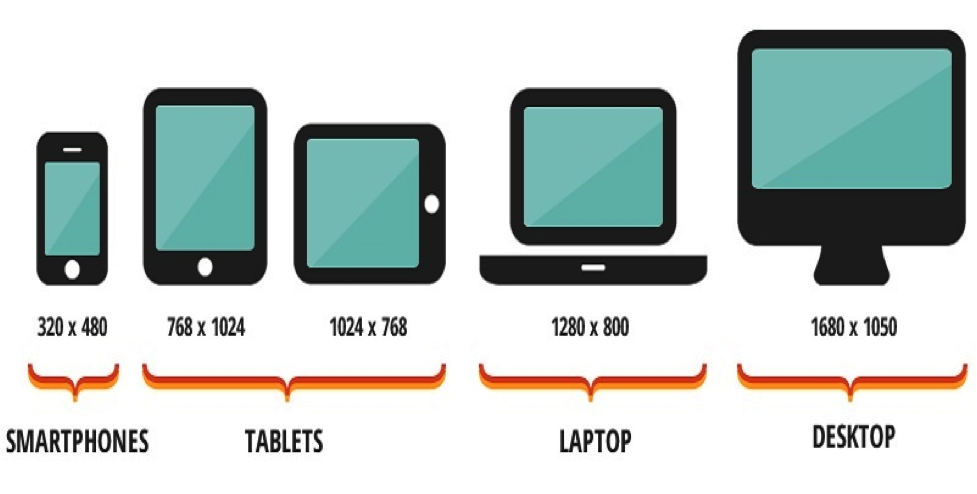
7. Unfavorable Screen Resolution

Be very clear about the screen resolutions you want to use. As per the research, mobile-only resolution is the most preferred way to get your message across. Study the different operating system resolutions and go with what is best for your customer. Think like a customer. What resolution will fit your website well? How will the visitors perceive your content in different sizes? Screen Resolution

8. Inconsistent Interface

Do not change the placement of elements of your website more often. Your customers will build a habit of finding certain things in certain places on your website. Do not make your customers think twice about where the shopping cart is. Make sure to keep the interface constant and engaging to your customers. Rest assured, your customers will love your consistency of design and will look forward to your website right after they land on your website.

To Bottle it Up

By looking at the web design mistakes, you can at least avoid some of the most obvious blunders. At the same time, as an Entrepreneur, do not forget to experiment with different mistakes, as Entrepreneurs have a habit of going the extra mile.
Choosing a Web Design Agency
Business Tips Web Design & Development

10 Must-Know Things Before Choosing a Web Design Agency

branex-logo Team Branex
The Internet has transformed the way we shop, connect, research companies, discover products, understand solutions, and do business with web design agencies. As a result, your business website is more relevant than ever before. It now plays some important roles, including number one salesperson, top education tool, and most valuable brand representation for all interested parties – including customers, buyers, prospects, partners, supporters, advocates, and leads. Given the ever-growing role websites play in the way we do business, a standard online presence is no longer an option. Companies require a capable and experienced web design agency – one comprised of creative digital marketing specialists, talented designers, skilled technicians, content writers, and digital mavens who can ensure that your website successfully captures your core business goals, attracts prospects and partners, and grows your organization. To make sure you partner with the right firm, here are four critical questions to ask potential web design agencies before hiring them:

1. What is the Agency Experience?

Web Design Agency Experience
  • How long has the agency been designing & developing a website?
  • How many clients do they have?
  • How many employees do they have?

2. How Much Should I Pay For the Website?

Prices vary from firm to firm, but a good way is to first check what the market is paying other agencies and then ask yours. You can see a lot of online cheap packages but as I will mention later, these packages come with additional prices, which you will know after your project is nearly 75% completed. To some degree, the saying ‘you get what you pay for holds for web design agencies. However, at a certain point, the price just keeps going up, and the quality of the work does not justify the price.

3. Does the Agency Understand Your Goals?

Your website is simply an extension of your business, and this will highly impact on reaching your business goals. I would highly recommend communicating your business goals to the digital agency yourself. Make sure the agency understands your goals & objectives and is capable of achieving them. For instance, if one of your goals is lead generation, ask the potential agency how will they attract traffic and convert those prospects. Moreover, ask the digital agency to show some case studies they already did. This will give an idea of the efficiency of the firm.

4. Will They Provide Technical Support When Required?

Provide Technical Support Often agencies develop websites and forget their clients. Make sure you do not get into this trap. From the moment the website is up, there will be tons of clients who can contact you anytime, and if there is a technical glitch at that time, you will lose the customer. For this to accomplish you need to make sure you have all the necessary info on which you will-will need technical assistance. Here is a small list of things that you need to get help with your web design agency:
  • Your email setup
  • Your hosting
  • Your domain name
  • How to set up products and delete them?
  • eCommerce setup
Without good technical support, you need an extra developer to fix the remaining problems which you surely don’t want; because this will lead to frustration and most importantly expenses.

5. Do They Have it All in One Place?

Although freelancing is blooming these days because of the economic cost, it is surely not preferred if you develop a website from a dedicated web design agency. Make sure your web design agency is equipped with all the materials that are relevant to your website. That is, from graphic design to web development, from mobile app development to providing technical support. Your website is an investment in your future so you can only afford to make it right the first time. Despite the challenges you face upfront, just make sure you are getting all the services from a single design agency which is capable of handling the task well.

6. Look For Any Hidden Costs

Hidden costs are quite common these days, and digital agencies use them to their psychological advantage. It is important to be aware of any ongoing charges or additional charges that may be applied after the project starts. For example: When going for hosting and domain purchase, look for an SSL certificate which is sometimes not mentioned in the package and agencies add the expense by themselves. Another example of maintenance cost which is also hidden at times.

7. Can the Design Agency Be Your Long-term Partner?

An optimistic design firm is hard to find, but that does not mean it is not there in the market. Look for a firm that is competent yet friendly. How is the agency responding to your random questions? Are they getting irritated, or are they responding rapturously? Does the agency understand the long-term goals and what medium of communication are they using?

8. Can They Meet Your Budget While Being Productive?

If a design agency is providing various services, it will charge a premium cost. However, as a business, you need to keep in check your costs too. Can the agency provide your required service most productively? If yes, then go for the agency.

9. Look For the Finished Projects

A good digital agency puts all of its work online. This work is usually in the form of case studies, and other times it is in the form of customer testimonials. I would rather go for the first one. If the material is not available online ask the firm to provide it to you; go through the material and then be your judge.

10. Can You Update the Content Yourself?

Normally, if it is a WordPress website, which in most cases is, you can easily update the content with not much to no hassle. However, for that too, ask the agency to arrange a training session for your team. A neatly custom-designed website will speak for itself. You do not need much of a hassle with that.

Bottom Line

Selecting your digital agency is not an easy task, it requires careful consideration of many factors. Once, decided you have decided to enter into a commitment for the duration of the project life cycle. Make sure you select a creative digital marketing agency that doesn’t disappoint you in the future.
Web Design Trends for Entrepreneurs
Entrepreneurship Web Design & Development

Web Design Trends For Entrepreneurs Need To Watch Out

branex-logo Team Branex
You all know who Neil Armstrong is, but do you know who Buzz Aldrin is? I bet most people do not know him. So, let me tell you he was the second man to step on the moon, and the best part he was with Neil Armstrong. Although Buzz Aldrin’s effort was meritorious, most people do not know about him because he was a follower. Yes, that is the thing about supporters, people rarely remember them. As an Entrepreneur, one of the most important habits you need to learn is how to follow web design trends. Because in the year 2017, those Entrepreneurs who

1. Mobile-Friendly Websites

So you might have heard it a lot, the year 2016 was the year of the mobile-first internet site. Well, the good news is that 2017 I the year of mobile-only websites. Am I radical? In 2015 mobile traffic accounted for 58%, in the year 2016 this just extended to 60%. So, still, do you think mobile-first websites are just a choice? Long gone are the times when web designing was limited to desktop users, and then came the adoption of tablets and smartphones users. As an Entrepreneur, you are expected to come up with a website that just does not look beautiful on mobile; it needs to have frictionless, seamless browsing. The mobile site is the new gold standard of web design. Right from small web design agencies in New York to any large web design company, the mobile-only site is the new trend that will lead from the top in the year 2017. Mobile App Website

2. Bye Bye App Store And Say Hello To Android Instant Apps

How many of you delete apps just to install new apps? I bet you are among the majority who make space to install new apps. Not anymore! Presenting Google Instant Apps, no installation required, no memory required. Just run apps directly from Google. I know, I know you are thinking, how it is relevant to web design? Two reasons. First, developers in 2016 focused on mobile apps; now they need to develop an app that looks good with relevance to web experiences. Secondly, more and more designers are already into designing apps that give a seamless web experience. Android App Store

3. Welcome Skeleton Screen, Good Luck with Loading

Skeleton screen is the new trend in web design. If you have not heard of it, this is your real chance to know it. The skeleton screen is not about the UI design; it is about how a page loads on the smartphone. Skeleton Screen with Loading Skeleton loading screens make sure to give the user an ultimate seamless experience. Without blinking the eyes, your user needs to get a glance at what you are offering. Fast loading just not only creates a better user experience but also develops your brand identity as a technically strong brand. Skeleton screens allow users to anticipate the loading experience. The moment of happiness of loading a beautiful design can never be measured in numbers. Give your users the best first impression, and they might give a good word for you.

4. Branding Logos with Minimalism

A sculpture design technique was invented in the 1950s. The basic ideology was to make statues as simple as possible. The art of Minimalism trend created so much buzz in the year 2016. Corporations redesigned their logos with meticulous looks. Among other reasons, it can easily be explained that the whole web is about to envelop itself into a mobile app. Logos just don’t need to look good on the desktop. Furthermore, they need to look simple on smartphones too. Branding Logo with Minimalism

5. Bold Colors and Typography

How does carrying an iPhone make you feel?  I know you cannot explain what feels different, but you feel pretty amazing. In reality, good design has a lot to do with bold colors and excellent typography. Although some websites are already adopting it, clean design with bright colors and beautiful typography will be a common denominator in the year 2017. Check the design by ToyFight, and you will get an idea of how beautiful the design speaks for itself. Colors and Typography White space does not have to be empty anymore. Element placement can lead to customer engagement, and once the customer gets engaged, it will be easy for them to place an order on your website.

6. Dancing CTA Buttons

Yes, the animation is not over yet. If you want the attention of customers, get them something classy to click through. Create animated call-to-action buttons that will force customers to place an order instantly. The best form of animation is animation within the button. Some movement captures the attention of the customer, and they will stick to it for long. CTA Button

The Bottom Line

A simple website will land you more business than one that is stuffed with pages and information. From this point, onwards graphic interfaces will not be everything Entrepreneurs need to focus on. As part of your journey, it will be your job to keep track of all the changing trends and what your competition is working on. These trends when ignored can make save your startup from a drastic disaster. So now, it is your turn. Are you, as an Entrepreneur, ready to welcome the trends of the year 2017? Do you think that these trends are enough to keep your startup going? If you have some trends, feel free to share them with us.
UI Design Trends For Websites
UI/UX Web Design & Development

5 Must-Follow UI Design Trends For Websites

branex-logo Team Branex
Design trends are happening at an exponential rate, and it is important to keep up with that speed. Even if you are not one to follow the trends, as a designer, it is necessary to stay up-to-date with the latest trends in the market. In the last couple of years, there has been an increase in new ideas and UI design trends, with all the big browsers giving support to HTML5 and CSS standards, along with the Javascript engine. UI web design trends usually don’t last that long, and each year new trends are introduced. There is a necessity to stay in touch with all the happenings in the design industry to stay ahead of your competition. To help you do that here are some UI design trends which you need to follow for the year 2017

1. Responsive Web Design is Necessity for Your Business

Although responsive web design is not new, experts predict that both small and big businesses will focus on making their online responsive web presence. This change is for two main reasons, firstly cost-effectiveness of building a single site that is capable of both delivering content and device usability of that content. Secondly, Google updated its ranking algorithm for the need to have responsive websites. Responsive UI Design

2. Businesses Focusing on Mobile-first Websites

As the name implies, mobile-first UI design is solely focused on mobile devices first and then on any other larger screen devices. Just like responsive UI design, this is not a new thing. However, mobile devices have become the primary tool used for browsing the internet. With a small screen comes the art of rearranging the design to fit the needs of any handheld device. A great example is of Etsy website. Open Etsy both on the desktop and on a mobile phone, and you will get to know the difference. The site is beautifully optimized for mobile devices. Etsy Designs for Mobile

3. Grid-based UI Designs

One of the hottest UI design trends that arose from material design guidelines is the use of grid-based UI. Web Design agencies are charging quite a high price to put your ideas in a grid Grid-based UI Designs format. With the attention span of users decreasing day by day, the grid is a marvelous way out. All your data can be manageable and searchable in the grid format. Tech giants such as Facebook, Google, Twitter, and even Pinterest have popularized their content in a grid format. Below is a brilliant example of how data can be efficiently organized in a grid without losing essential elements from the design.

4. Parallax Scrolling in Demand

Once upon scrolling was used to browse specific elements of your website, now scrolling is used by website designers as a creative way of displaying and sifting through the content. Parallax scrolling is a technique which gives a 3d look, with background and foreground moving at different speeds. When used well, Parallax scrolling creates a mind-blowing variety to deliver content over the internet. However, most websites overuse this effect and in turn, make it worse for design usability. Parallax Scrolling Designs

5. Bold Colors and Big Fonts

For the past few years, we have seen over-saturated rich-colored websites with vibrant hues and gradients. This change is due to advancements in screen technologies by which bold colors and big fonts look pretty awesome in almost every screen size. The best example is the redesigning of the Instagram logo, which was once flat, and now it is a lot more vibrant and colorful. It is safe to assume that more brands will move towards testing different color and font combinations to make their sites stand out from the crowd. Colors and Fonts in Web Design

Wrapping it Up

Whilst we think everything on this list is pretty great, don’t try and fit every single one of these trends into your new website. Web Design companies are using these trends and making some good money out of it. Study these trends yourself and make them work for your brand too.
1 3 4 5 6
whatsapp