Blogs

Add the best talent on the market, an agile skilled management & seamless involvement.

Blog Main Image
07 Facebook
Mobile App Development

Global Talent, Local Impact – How Offshore Outsourcing is Benefitting for Mobile Development?

branex-logo Team Branex
Mobile apps aren’t just products, they’re the heartbeat of modern life. We’ve long viewed offshore development as the engine room of the global economy: a way to cut costs, move 40% faster, and fill the talent gaps of Silicon Valley. And we have always believed the world’s most sophisticated mobile ecosystems are designed in the West only to be exported in the East. However, this notion has not entirely been preached true. When U.S. markets were perfecting single-purpose apps, developers in Asia and Latin America were pioneering “Super Apps,” the digital Swiss Army knives that handle everything. They have spent the last decade solving problems of scale, connectivity and hardware constraints that Western developers are only just beginning to experience. Offshore is not only limited to finding someone to build your idea, it’s bringing the world’s best minds straight into your team to solve the challenges of the next decade. They are importing the future of UX and architecture from the very markets that were once considered "secondary."  

The Evolution of Offshore Development

To better understand where mobile innovation is taking us, let’s have a look at where it all started. Offshore development was one simple cost-saving tactic which many countries considered as a fundamental global product pillar. However, it has now undergone a radical transformation. 

1. The Era of Execution (1990s – 2005)

In the early days, offshoring was purely transactional Western companies sent rote, repetitive tasks like back-office data entry and simple maintenance to teams in India or Eastern Europe. The goal was arbitrage, it was a dream of doing the same work for 70% less.  In this era, the offshore team was the "hand," but the "head" stayed firmly in the West.

2. The Era of Integration (2006 – 2020)

As cloud collaboration tools matured, the relationship shifted to Managed Services Companies began trusting offshore partners with entire lifecycles.  Whether it was QA testing or cross-platform mobile builds, we saw the rise of the Dedicated Development Center (DDC), where offshore talent became an extension of the local team, working in Agile sprints.  This era proved that offshore teams could deliver quality, not just quantity.

3. The Era of Innovation (2021 – 2025+)

Today, we have entered the age of Strategic Partnerships With the global IT outsourcing market projected to hit $151.9 billion in 2025, the focus has changed from "How much can we save?" to "How much can we learn?"
  • Domain Leadership: Offshore hubs in Latin America and Southeast Asia are now leading the world in Fintech and Super App architecture. They are solving problems of scale and offline connectivity. 
  • The AI Surge: In 2025, over 30% of global IT outsourcing is driven by specialized needs in AI & ML, skills that offshore hubs have aggressively refined often outpacing the local market. 

 Why Mobile Development Thrives Offshore?

The shift towards offshore development isn’t just a trend, it is a structural response to the growing mobile ecosystem.  Here’s why some of the most ambitious apps are now designed across borders: 

Niche Mastery at Scale 

While local talent pools often see a "war for generalists," offshore hubs have become centers of excellence for specialized mobile disciplines. We see hubs in Eastern Europe and India have become the global "R&D labs" for frameworks like Flutter and React Native.  They let businesses target iOS and Android simultaneously without doubling the budget.  And with the introduction of Edge AI (processing data on-device), offshore teams in regions like Vietnam and Poland are integrating lightweight machine learning models into mobile apps to add a layer of personalization.  Here’s a breakdown how some of the primary offshore hubs are utilizing key technologies to create business impact in specialized mobile niche. 
Specialized Mobile Niche Primary Offshore Hubs Core Strength Key Technologies Business Impact
Cross-Platform Engineering Eastern Europe, India Framework-first architecture thinking Flutter, React Native, Kotlin Multiplatform One codebase, faster launches, lower burn
AI-Native Mobile Apps Vietnam, Poland On-device intelligence & personalization Edge AI, TensorFlow Lite, Core ML Real-time UX without cloud latency
Mobile Fintech Security Ukraine, Estonia Secure-by-design mobile systems Biometric auth, encryption, PSD2 APIs Trust, compliance, reduced fraud
Scalable App Architecture India, Romania Long-term performance planning Clean Architecture, MVVM, Microservices Apps that don’t collapse at scale
Super App Development Southeast Asia (Indonesia, Vietnam) Multi-service mobile ecosystems Modular SDKs, in-app wallets Higher LTV, ecosystem lock-in
Mobile Health & Wearables Poland, Czech Republic Sensor-driven, regulated builds Bluetooth LE, HealthKit, FHIR Data accuracy + compliance
AR-Driven Mobile Experiences Ukraine, Serbia Real-time rendering optimization ARKit, ARCore, Unity Differentiated, immersive UX
Mobile DevOps & CI/CD India, Latvia Automation-first delivery pipelines Fastlane, Bitrise, GitHub Actions Faster releases, fewer rollbacks
Performance Optimization Belarus, Lithuania Deep system-level tuning Memory profiling, CPU/GPU tuning Lower churn, better app ratings
AI-Powered QA & Testing India, Philippines Predictive testing & coverage Automated UI tests, ML-based QA Fewer bugs, shorter test cycles

The "Sun Never Sets" Development Cycle

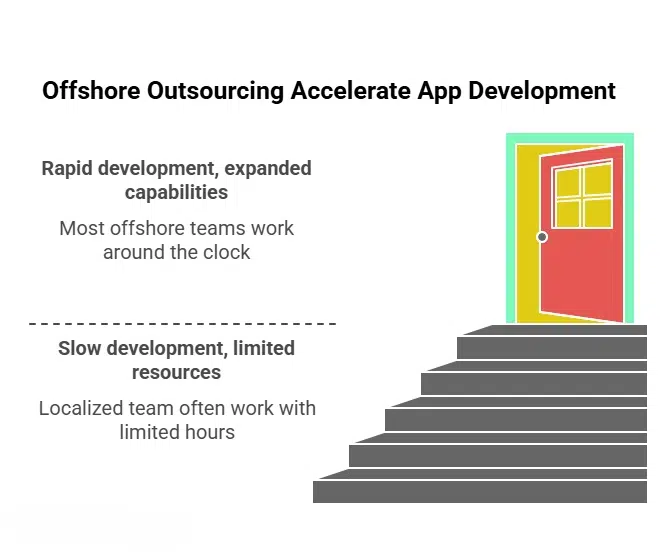
If we are talking about the app economy, the most valuable currency is Time-to-Market.  Offshore development creates a 24-hour production loop which a localized team simply cannot match.  While a New York-based product manager sleeps, a team in Manila or Bangalore is performing QA, fixing bugs discovered during the day, and pushing code. Offshore Outsourcing mainly leverage time-zone offsets, letting companies to effectively compress a six-month roadmap into four months.  It allows them to capture more markets before the competitor can. 

The "Quality-Value" Paradox

The old narrative claims you had to choose between, “cheap” and “good.”  If they went cheap, they hired a low-cost dev shop to slap together a basic iOS app. It worked… until users hit crashes during peak hours, maps lagged, and adding features meant rewriting half the codebase. So technically, you hired a team who was cheap but didn’t deliver as per expectations.  The new reality is that offshore hubs often provide higher quality because of their talent density.  In Silicon Valley, developer tenures are notoriously short. In emerging tech hubs, developers often stay with projects longer, leading to better institutional knowledge and cleaner long-term codebases.  Simultaneously, developers in "mobile-first" economies (like Latin America) have a native understanding of low-bandwidth optimization and intuitive UI, telling apps are high-performing even in sub-optimal conditions. It tells us the advantage has quietly moved. Quality in mobile development isn’t just limited to individual brilliance anymore; it’s about systems, context, and continuity. It’s banked on distributed centers of excellence quietly outperforming legacy tech capitals.

Case Study: How WhatsApp Scaled to 450M Users with 50 People? 

When WhatsApp was acquired by Facebook for $19 billion in 2014, the tech world was stunned by one metric: the company had only 55 employees to support nearly half a billion users. In its early days, founders Jan Koum and Brian Acton didn't have the capital to compete for high-priced engineers in Mountain View. Instead, they turned to a team of developers in Russia to build the core functionality of the app. What the founder did was he kept "business" (customer support and operations) in the U.S. and sent the "technical heavy lifting" offshore.  This offshore team was responsible for the app’s legendary reliability. They utilized Erlang, a specialized programming language known for handling massive concurrency, which allowed WhatsApp to scale to millions of messages per second with a skeleton crew.  At the time of acquisition, WhatsApp had a ratio of 1 developer for every 10 million users, an industry record. When competitors were bogged down by massive overhead and local hiring cycles, the offshore-centric model gave the company an edge to dominate the global messaging market before anyone else. They launched a world-class product on a startup budget, and the founders achieved one of the largest tech acquisitions in history.  The WhatsApp story is the "North Star" for modern mobile development because it proves that offshore isn't just for maintenance. It’s for building the core, high-performance architecture that defines a billion-dollar company.

Case Study: How Expensify Automated Fintech with a Strategic Global Team

Expensify is the #1 expense reporting solution in the U.S., processing billions of dollars for over 60,000 companies. But the core function of the app, the ability to scan a receipt and have it instantly reconciled with a bank account, requires a massive, complex back-end which must work 24/7 across thousands of different global banking institutions. When Expensify needed to scale, they faced a choice: hire a massive, expensive team in San Francisco to maintain the "scrapers" (tools that pull data from bank websites) and "parsers" (tools that read receipt data), and ultimately find a specialized partner for deployment.  They chose a strategic offshore partnership to build and manage their Core Back-End Systems. Because every bank has a different website architecture. If a bank changes its login page, the Expensify app breaks. It requires a dedicated & specialized team to monitor, update & secure integrations.  Similar to WhatsApp, Expensify kept its core "Vision and Strategy" in-house but moved the high-complexity and high-maintenance technical engineering to an integrated offshore team. A team of just 14 dedicated offshore developers was able to manage the entire back-end for millions of users, allowing Expensify to remain a lean, high-margin company. 

The Major Benefits of Investing in Offshore Outsourcing for Mobile Development 

Significant Cost Optimization  

Cost remains a major advantage when it comes to outsourcing mobile app development. When you outsource to regions which have a lower cost of living (such as South Asia, Eastern Europe or Southeast Asia), businesses can often reduce development cost down to 40% and even up to 70%. It saves you office space, hardware cost, software licenses, and employee benefits. It also saves you health insurance coverage cost and 401K, an employer-sponsored retirement savings plan in the U.S.  Similarly, a senior developer in North America may cost $150/hour while an equally skilled developer in an offshore hub might only cost around $30 to $50/hour. You can only pay for the hours worked on a project which ultimately saves you cost on “idle time.” As a result, you don’t have to pay any full-time in-house salary. 

Access to a Global Talent Reservoir  

When you’re hiring people in-house, it often limits you to a 50-mile radius. Offshoring removes geographic barriers, letting you tap into specialized expertise that might be scarce or too expensive at home. For example, if you need specific experts in Ai, blockchain or emerging frameworks like Flutter or React Native, offshore hubs often have deep & pre-vetted pools of these incredible specialists. Many offshore firms are ISO-certified and follow strict global compliance standards such as GDPR or HIPAA, which ensures the quality of the final product meeting international benchmarks. 

“Follow-the-Sun” Productivity

One of the most underrated benefits is the 24/7 development cycle created by time zone differences. While your local team sleeps, the offshore team continuously works round-the-clock. For instance, a U.S. based product team can hand off feature requirements at the end of their workday to an offshore team & by the time they log back on their system the next morning, the offshore team  has already implemented the features, fixed bugs, and shared updates accordingly. This way, you can save up an entire day of progress, often reducing the app launch from months to just weeks, with a successful release. 

Operational Scalability and Flexibility 

Mobile app needs can change over time.  For instance, you need 10 developers to develop the app, only 2 to work on maintenance tasks later on. With rapid scaling, offshore partners can ramp up a team in days, whereas hiring internally can take up to months. For example, if a startup suddenly needs five mobile developers to meet an investor deadline, an offshore partner can assemble and deploy a ready team within a week, while in-house hiring would require weeks of interviews, negotiations, and onboarding before any real work begins. Similarly, if you need to switch from a native iOS app to a cross-platform solution mid-project, offshore agencies often have different internal resources to swap team members without hiring crisis. For example, a product team pivoting to React Native after early user feedback can immediately replace iOS-only engineers with cross-platform specialists, keeping development moving instead of pausing. 

Focus on Core Business Strategy 

When you offload the technical “heavy lifting” to an external partner, your leadership team can stay focused on what actually grows the company. You can spend your energy on marketing, user acquisition, and investor relations. For example, instead of sitting in daily standups or debugging release issues, founders can run growth experiments, close partnerships and prep investor decks while the offshore team builds, tests and deploys. Offshore teams let you focus on the “why” and “what” of the app while the offshore team handles the “how.” For instance, product leaders can spend time validating features with users and refining the roadmap, while the external team makes decisions for architecture, code & infrastructure. 

Cost Comparison Between In-House and Offshore Team 

This table will show the exact cost estimate and the financial advantage offshore team provides; 
Attribute In-House Team Offshore Team Impact / Notes
Hourly Rate / Salary $100–$150/hr (senior dev in US) $30–$50/hr (experienced offshore dev) Direct savings of 60–70% per developer.
Recruitment Costs $5,000–$10,000 per hire Minimal (included in service fee) Offshore partners maintain ready-to-go talent pools.
Onboarding & Training 2–4 weeks Immediate (internal knowledge available) Reduces downtime and accelerates project start.
Employee Benefits Health insurance, 401K, PTO, other perks (~20–30%) Usually included in service fees Major savings on overhead costs.
Hardware & Software Laptops, monitors, dev tools, licenses Provided by offshore provider No capital expenditure for equipment or software.
Office Space Dedicated workspace, utilities N/A (remote / provider-managed) Saves on rent, electricity, and facility costs.
Project Management Overhead PM + Scrum Master salary + internal reporting Often included by offshore provider Reduces overhead of managing individual developers.
Scalability Hiring additional staff can take months Can ramp up in days Flexible response to sudden workload spikes.
Quality & Retention Shorter tenures, risk of turnover Higher retention in mature offshore hubs Ensures long-term institutional knowledge and cleaner codebase.
Time-to-Market Impact Limited to local working hours, slower iterations 24/7 development cycle via time-zone advantage Speeds up launch, reducing overall product development lifecycle.

Challenges You Experience with Offshore Mobile App Development

Communication Gaps 

Timezone differences can often delay feedback. For example, a developer in Manila finishes a feature at the end of their day, but the U.S. product manager doesn’t review it until 12 hours later, slowing down feedback cycles. Cultural or language barriers may cause misalignment of requirements or design nuances. For instance, a UI element labeled “Submit” may be misunderstood in translation, or context loss. However, this can actually be fixed with clarification and rework. 

Coordination Overhead 

When you’re managing multiple teams across geographics, it requires a strong project management team to overview everything. Companies need separate project managers to run daily standups with teams located in California, India, and Poland that require multiple sessions to accommodate time zones. It might make standups, sprint planning and hand-offs a bit heavier than working with a local team. However, a simple fix by the offshore QA team might need extra documentation for onshore developers.

Hidden Costs 

There are many hidden costs such as travel allowances, onboarding costs or workshop costs which can all add up. For example, a U.S. company may need to fly to Vietnam for a two-week alignment workshop, costing thousands in flights and accommodations. When you integrate offshore processes with onshore systems you often require extra tools or middleware. Just adding middleware to sync code repositories or project management tools between teams can increase software licensing costs. 

Quality Inconsistencies 

Not all offshore talent is equal, some may require additional training to meet your global standards. Certain offshore engineers require effective training on your specific tech stack or meeting code standards. Code review cycles, on the other hand, may require stricter standards to maintain consistent quality. Because when you’re working with offshore teams, they can often leave subtle bugs unidentified in payment flows or security features which will require additional cycles by an in-house tester. 

Security & IP Concerns 

Sensitive data may require extra encryption or legal protections. Therefore, handling healthcare or financial data with offshore teams may require HIPAA or GDPR compliant servers and encryption protocols. This leads to securing effective IP ownership, NDA enforcement, and regulatory compliance. For example, a U.S. startup sharing proprietary algorithms with an offshore partner needs clear NDAs and legal frameworks to prevent ownership disputes.

Concluding Thoughts 

Offshore outsourcing is no longer a cost-saving tactic, it has turned into a strategic advantage. Offshore outsourcing leads to global talent acquisition, time-zone efficiency and accessing a specialized team of expertise where companies can scale faster, innovate smarter and focus on what drives growth.  The future of mobile development is borderless, and the smartest teams are building it together.   Don’t let geography limit your ambition.  Tap into global talent with Branex’s offshore and staff augmentation solutions Build Your Team Now.
Mobile app Development
Mobile App Development

Mobile App Development – Essential Steps to Building a Mobile App

branex-logo Team Branex

As of December 2025, the Google Play Store had about 2.26 million apps

Believe it or not, the average user interacts with 10 apps a day and around 30 a month. A typical smartphone has nearly 80 apps installed, but most of them just sit there, unused. Creating a mobile app isn’t just about writing code. It’s a high-stakes gamble in a cutthroat digital world.  Nearly 1 in 4 users abandons a newly downloaded app after just one use, and within 30 days, almost half of all Android apps get uninstalled. If your app doesn’t deliver value fast, it’s probably headed for the graveyard. When brands build apps with purpose, strategy, and real user empathy, they are not just coding. They are creating something people actually want to keep on their phones. If you’re a founder curious about making that happen, let’s walk you through the full journey of building a mobile app that actually sticks.

Mobile App Market Growth (2025-2033) 

The mobile app market is massive and evolving fast. It’s not just getting bigger, it’s transforming.  Most of the growth is coming from e-commerce, banking, and gaming. Here’s a quick roundup from some of the well recognized internet sources: 
Metric Statistic Source
Global Market Size (2025 Est.) $264.96 Billion (App Development Market) Mordor Intelligence
Projected Market Size (2032) $777.4 Billion (Mobile Application Market) Allied Market Research
Compound Annual Growth Rate (CAGR) 14.4% (2023-2032) Allied Market Research
Total App Downloads (2024) 136 Billion (Note: A slight decrease, -1% YoY) Sensor Tower
Monetization Insight 98% of mobile app revenue comes from free apps utilizing in-app purchases, subscriptions, and advertising. Buildfire, Netguru
Top Revenue Categories Gaming ($196.1 Billion) and Social Networking ($153.4 Billion) together make up over two-thirds of the total worldwide app market. MobiLoud (2024)
Fastest Growing App Subgenre AI Chatbot Apps saw a 112% year-over-year growth (2024). Sensor Tower
Leading Growth Region Asia-Pacific is expected to exhibit the fastest CAGR (around 18-19.71%) and is the largest market by revenue share. Allied Market Research, SNS Insider

Different Approaches to Mobile App Development

There are basically four main ways to build a mobile app:

Native App Development

Native apps are built for a single platform like iOS or Android using platform-specific languages and frameworks. Native app development ensures high performance, fast speed, strong security, and full hardware integration, making apps reliable, scalable, and user-friendly.

Hybrid App Development

Hybrid apps use a single codebase to work on multiple platforms, like iOS and Android. They combine web technologies such as HTML, CSS, and JavaScript with a native “shell” so the app can run across devices.

Also Read: The Three App Types Explained: Native, Hybrid & Web Apps

Cross-Platform App Development

Cross-platform apps also run on multiple operating systems, using frameworks like Flutter or React Native. Unlike hybrid apps, they don’t rely on a web-based shell, which makes development simpler. However, performance can sometimes be a bit slower compared to fully native apps.

Progressive Web App (PWA) Development

PWAs are web apps that feel like native apps on any device or operating system. They’re built with HTML, CSS, and JavaScript and give users an app-like experience without needing to download anything from an app store.

The 8 Essential Steps to Building a Winning Mobile App Experience 

Find Your Purpose 

The best mobile app ideas are the ones that actually solve a real problem for your users. Apps that offer solutions nobody else has managed to deliver often make the biggest impact on the Apple Store and Google Play Store. Think back to a time before Google Maps. Remember how painful navigation used to be? Everything changed once Google Maps launched, and now every GPS-powered device relies on it to get around. When you’re building a mobile app, start by thinking about its purpose. Ask yourself:
  • What problem or need does my app solve?
  • Does it actually make life easier for people?
  • Who is my target audience and what do they expect?
  • What’s the end goal for this app? Are you trying to build a community, provide a service, drive revenue, or something else?
  • Why would someone choose this app over websites, competitors, or even pen and paper?
Focusing on these questions will help you create an app that’s truly useful and meaningful.

Study the Competition 

Honestly, pretty much every problem you can think of already has some app trying to solve it. So before you get hyped about what you hope will be the next big hit on the Google Play or App Store, take a little time to see what’s already out there. Scrolling through and checking out apps one by one will give you a clear picture of what makes them stand out. You can also ask yourself some key questions about the competition:
  • Will my app actually solve the problem the way I imagine, or could I do it better?
  • How do they price their app? Should I go freemium or full-on premium?
  • Does my app look and feel better than what’s already out there?
  • Are there any UI/UX issues my app could avoid?
  • Who are these apps aimed at, and is that the same audience I’m going after?
Answering these will give you a solid sense of the market and whether your app will stand out or just blend in with all the others.

Choose Your OS 

Before diving deeper into building your app, it’s important to figure out which platforms you want it to run on. Different types of apps call for different development approaches. For example, a native app is built specifically for one operating system, while a hybrid app can run on multiple platforms. Let’s break it down: the two big players are Google’s Android and Apple’s iOS. Each has its own coding language, most Android apps use Kotlin or Java, while iOS apps are usually built with Swift or Objective-C. The main tools developers use are Android Studio for Android and Xcode for iOS. These tools let you build the app and connect it with the device’s features, like the camera or GPS. Choosing which platform to focus on early will save you a ton of time and money. You can either build separate apps for each platform or go with a hybrid solution to cover both. Ultimately, your decision comes down to your budget and what makes the most sense for your app.

Decide on Features & Functionality 

So here’s what you need to do next!  You need to think about the features and functionality of your mobile app
  • Think about the functionality your mobile app has? 
  • What will the screens be like? 
  • How will you design the user journey and interface? 
We have put together simple schematics to help you space out and design the feature set. 

Also Read: How Branex Develops Your Custom Enterprise Mobile App Development?

Category Focus Key Questions How to Handle It
Core Functionality App’s main purpose Does this actually solve the user’s problem? Is it essential for the app’s goal? Start with the MVP—get the must-haves in first. Don’t overstuff with extras.
User Experience (UX) Overall usability & satisfaction Is the app easy to use? Do flows feel natural and friction-free? Test with real users. Focus on speed, smooth performance, reliability, and keeping steps to a minimum.
Performance & Reliability Speed & consistency Does the app load quickly? Does it run without crashing? Optimize load times, fix bugs, and handle errors gracefully.
Accessibility Everyone can use it Can all users, including those with disabilities, navigate it easily? Add readable fonts, strong color contrast, voice-over support, and touch-friendly elements.
User Interface (UI) Visual design & layout Is the app easy on the eyes and simple to navigate? Keep layouts clean, spacing consistent, icons/buttons clear, menus intuitive.
Interaction Design Gestures & taps Are taps and swipes predictable? Stick to standard gestures (tap, swipe, long press) and give feedback via animations or highlights.
Branding & Aesthetics Look & feel Does the app reflect your brand and feel cohesive? Use consistent colors, fonts, and design elements that match your brand identity.
Feature Prioritization Must-have vs nice-to-have Which features are critical, which are optional? Focus on core features first; add extras gradually based on user feedback.
Technical Feasibility Development & maintenance Can this be built efficiently? Will it scale? Keep backend complexity in check, know platform limits, and plan for future updates.
User Feedback Iteration & improvement What do real users like or struggle with? Run usability tests, collect reviews, track analytics, and refine features continuously.

Come Up with a Development Plan 

No mobile app really comes together without a solid development plan behind it. Before you start building, you need to make a few key decisions. You have to choose which programming language you want to use and what development approach fits your goals.  The right tech stack is not about picking whatever is most popular. It depends on what you want your app to do, your budget, and the team you plan to bring on. There is no single best technology for every situation. The best choice is the one that actually supports your project needs. At Branex, we do not just pick a random tech stack and move forward. We take the time to figure out what fits your project so you are set up for long-term success. You have plenty of options when it comes to languages like Java, JavaScript, Python, Ruby on Rails, and more. You can also choose from different development methodologies like Scrum, Agile, DevOps, Lean, Prototyping, XP, or RAD before you begin your project. A few other things to take care of include a timeline with specified milestones. It also further includes stakeholders information as well as the initial marketing ideas.  Summing it all up will give you a proven development plan. 

Build Your First Prototype 

Once you have a clear plan in place, the next step is to build an initial version of your app, also known as a prototype. This part is honestly pretty exciting because now you have something real to show to reviewers, investors, and even manufacturers.  Here is the moment when people look at it and say, “Okay, this actually feels like an app.” A solid prototype works like a blueprint for everyone involved. It helps stakeholders understand the flow, the features, and the overall direction.  Simply said, it sets the foundation the rest of the app will build on, almost like laying down the first link in a chain the final product will follow.

Test Your App 

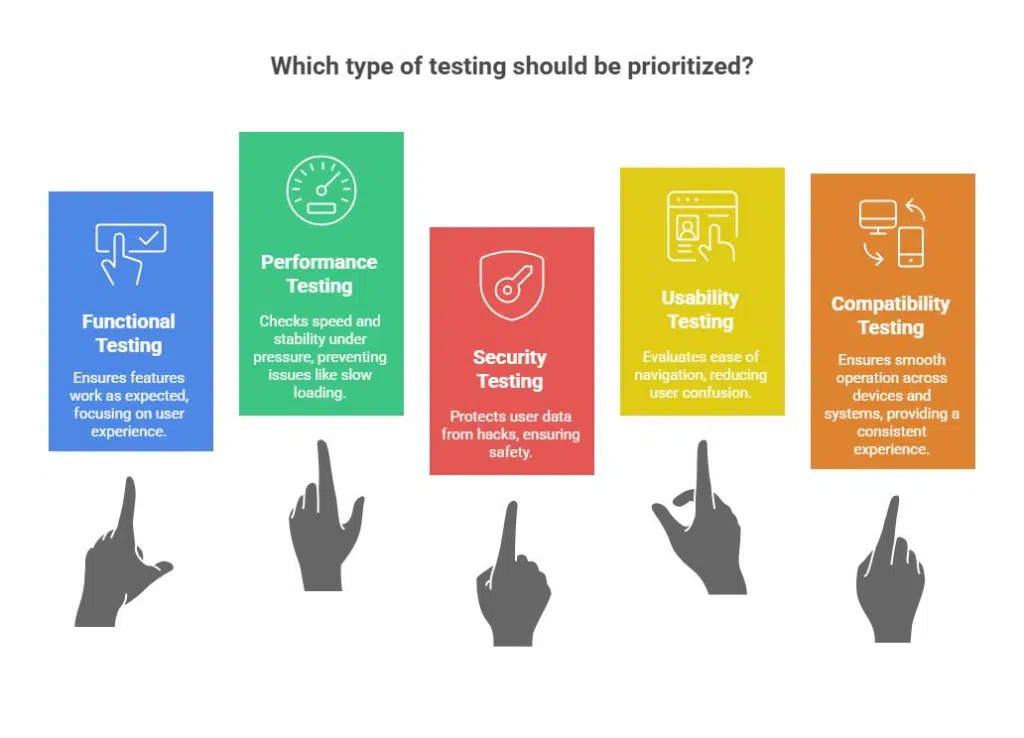
A mobile app is not truly ready until it makes it through all the testing phases. Mobile app testing usually focuses on five main areas: functional testing, performance testing, security testing, usability testing, and compatibility testing. These tests can be done through manual testing, automated testing, and beta testing across different devices, networks, and operating system versions. All of this helps make sure the app is high quality, reliable, and easy for people to use. Quality assurance plays a big role because it confirms the product meets the standards set by everyone involved. Stakeholders include employers, clients, and actual users who give feedback. Having a mobile app properly QA tested can save you time, money, and boost your brand’s reputation. Technical testing alone won’t cut it. Your customer’s feedback is super valuable but you need more info to honestly build an app that’s satisfactory. You can try it out by sending them simple survey asking: 
  • What did you enjoy about the app? 
  • What did you not like about the app? 
  • Did you find any issues while using the app? 
  • How was the overall vibe? 
  • If you want to change one thing, what would it be? 
Such feedback will help you understand what works and what needs to be improved before launch. 

Launch & Promote 

Everything is set!  Finally, it’s time to launch your mobile app.  You can take this time to study the requirements and instructions for publishing Google Play Store and Apple App Store. Once, your app is available at these locations, take a moment to savor your accomplishment. Now, you can start with the marketing process for exposure.  There are different ways how you can best promote your app, including but not limited to: 
  • Creating a website which discusses the app and its benefits. 
  • As a bonus, launch a video and push it through YouTube shorts or TikTok. 
  • Create an account on all major social media website fronts & broadcast messages. 
  • Introduce your mobile app to influencers who can spread the word in circles. 
  • Use every opportunity to request reviews & be sure to respond to both positive & negative. 

Concluding Thoughts 

Once you have successfully designed, launched and promoted your mobile app, it’s now time to have adequate support running at the backend to support users.  Make sure that once your app is live, if users are sending some kind of queries, your team is ready to report to all user requests.  If you're unable to do it right away, send a decent note letting them know you’ve received their request and you’re working on the problem.  Times as such have a mobile app maintenance team can be of significant assistance.  Learn why having a mobile app maintenance is crucial for your mobile app development strategy.  Also Read: Why Mobile App Maintenance Is Crucial For Your Mobile Strategy At Branex, we don't just build apps, we design experiences that turn memorable.  Ready to take your next big app idea and turn it into something people actually use and love?  Get in touch with us today and start building your next hit app.

FAQs

1. How long does it take to develop a mobile app?

The timeline depends on the app’s complexity, features, and platforms. Most apps take 3–9 months, including planning, design, development, testing, and launch.

2. What’s the average cost of building a mobile app?

Mobile app development typically ranges from $20,000 to $150,000+, depending on the tech stack, features, design complexity, and whether you’re building for iOS, Android, or both.

3. Do I need a maintenance plan after launching my app?

Yes. Once your app goes live, it requires regular updates, bug fixes, security patches, and performance improvements. A maintenance plan ensures stability, user retention, and compliance with new OS updates.

4. What’s the difference between native, hybrid, and cross-platform apps?

Native apps: Built specifically for iOS or Android; best performance. Hybrid apps: One codebase for both platforms; faster to build. Cross-platform apps: Built with frameworks like Flutter or React Native; balance of speed, cost, and performance.
google-2
Mobile App Development

Why Mobile App Maintenance Is Crucial For Your Mobile Strategy?

branex-logo Team Branex
Imagine spending months building the perfect mobile app. You launch it, and downloads start pouring in. But then something unexpected happens. Your app starts losing users. Reviews show minor glitches that are ruining the experience. You check it out…and it’s true. Surprising as it sounds, you’re not alone. Data shows that almost 25% of apps get abandoned because of poor user experiences. We live in a fast-paced digital world full of competition. What’s new at the start of the year can feel outdated by the end. In this environment, users expect apps to just work, flawlessly. That’s why businesses bring in app maintenance teams. Their job is to keep apps updated and running smoothly. Mobile app maintenance isn’t just about fixing bugs. It’s about keeping users engaged, giving them a great experience, and building a strong brand reputation. Today, we’re going to talk about how to create a solid app maintenance strategy and explore the different types of app maintenance. So, buckle up and let’s dive in.

What is Mobile App Maintenance? 

Mobile app maintenance is a continuous process. It involves monitoring, updating, and optimizing a mobile application after it has been launched.   This maintenance service is compulsory because it will ensure your mobile app functions correctly and delivers as expected by users.  A maintenance team ensures the app remains stable and up-to-date with the latest technologies and fully compliant with all OS versions.  The process entails fixing bugs, improving performance, updating features, ensuring security compliance, and adapting to new devices and operating system versions.  Mobile app maintenance is a proactive strategy to increase the lifecycle of any mobile app.  The end goal is to protect your business investment. 

The Different Types of Mobile App Maintenance

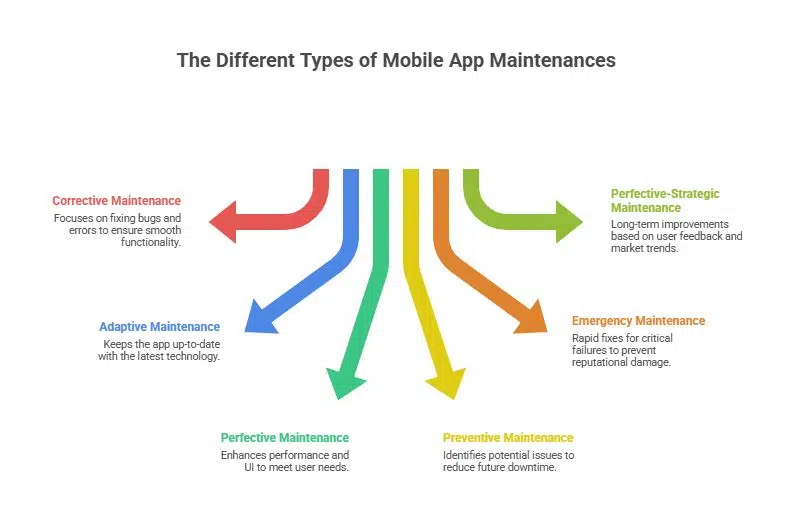
Technically speaking, there are six types of mobile app maintenance available and they are as follows: Corrective Maintenance - This type of maintenance focuses on fixing bugs, errors, and defects which impact the app's functionality, directly or indirectly. The purpose of this maintenance is to ensure the app works smoothly and delivers a consistent end-user experience. Adaptive Maintenance - This maintenance ensures your mobile app remains up-to-date on the latest software and operating system to deliver seamlessly across multiple devices & with third-party integrations. The objective is to keep apps consistent with technology advancement. Perfective Maintenance - Perfective maintenance enhances mobile app's performance by adding new features or through improvement in user interface (UI). The goal is to continuously improve the app to meet changing user needs & expectations accordingly. Preventive Maintenance - This is a proactive maintenance measure where teams identify potential issues before they become a major problem. In this type of app maintenance, the goal is to reduce the future downtime and minimize costly emergency fixes before they take place. Emergency Maintenance - As the name suggests, these are rapid fixes for critical failures or security breaches which can cause hindrance within app's overall functionality. The goal is to restore the app's normal functioning as quickly as possible to prevent reputational damage. Perfective-Strategic Maintenance (sometimes considered a subset of perfective) - is a maintenance method where long-term improvements are suggested based on user feedback. Data is collected through analytics & from market trends to forecast how to achieve competitive advantage. 

Why Mobile App Maintenance is Crucial for Your Mobile Strategy

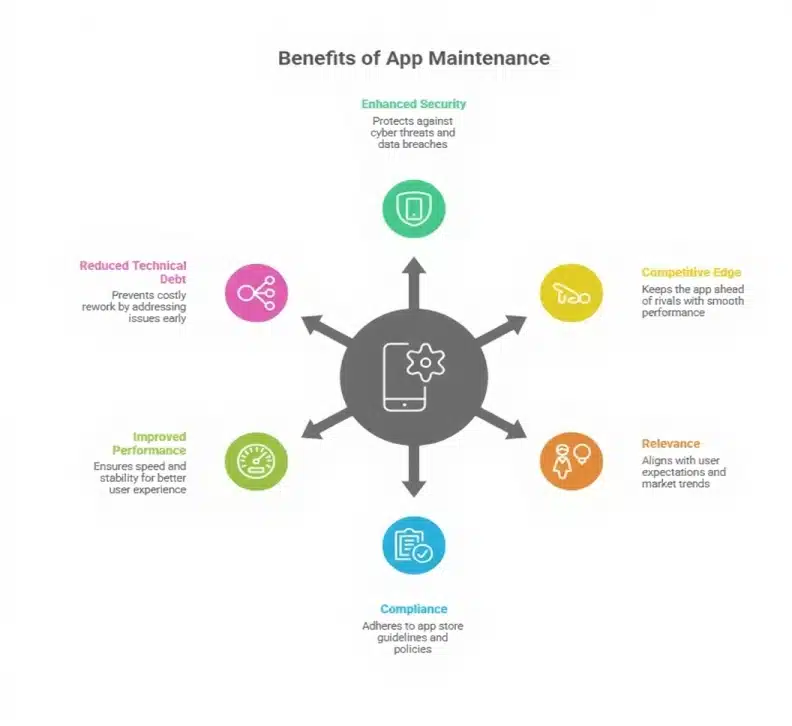
Mobile app maintenance is highly crucial if you want your mobile app to truly turn successful. This is because app maintenance is the backbone of a sustainable mobile strategy, one that keeps your costs under control, your security tight, your users happy, and your app competitive. 

You Don’t Want Your App Budget to Bleed Out!

When you own a mobile app, you’re always keeping an eye on where your money goes. An app only has value if it saves you money, not drains it. You see, every time your app goes down, whether it’s a server issue or an application glitch, you lose revenue. Since you’ve already invested heavily in building it, you need a solid team to maintain it.  Having a maintenance team constantly updating, fine-tuning, and applying best practices keeps your app running smoothly with minimal downtime. This proactive approach catches bugs early, prevents users from leaving, and ultimately saves you the money you’d otherwise spend on fixing problems, rebuilding your reputation, or bringing users back.

It Ensures Maximum App Security

Cybercrime is on the rise, and malicious actors are always hunting for entry points. Even when your mobile app follows great security practices, breaches can still occur. That’s why every reliable mobile app development team includes a maintenance unit dedicated to ensuring the app adheres to top-tier security protocols. App maintenance teams implement updated encryption standards, add advanced security features, and ensure every protection measure remains intact. Users are cautious about sharing private information — but with a strong maintenance process behind the scenes, the risk of data leaks becomes minimal.

It Ensures You Remain Competitive

The market is fiercely competitive, and your rivals are always ready to capitalize on any glitch or loophole in your app. To maintain an edge, your app needs preventive and adaptive maintenance routines that keep functionality smooth and performance steady. As new features and technologies continue to enter the market, your responsibility as an app owner is to deliver an app that’s more reliable and error-free than your competitors’. Maintenance helps you achieve exactly that.

It Keeps You Relevant to Your Business

Staying relevant in your audience’s eyes is everything. Customer interests evolve quickly, and users expect their favorite apps to grow with them. This is where consistent maintenance becomes essential. Your maintenance team keeps an eye on emerging trends and ensures your app stays aligned with user expectations and business goals. Regular updates help your app remain fresh, intuitive, and connected to the needs of your consumer base.

It Keeps Your App Compliant with App Store Rules

Apple and Google frequently update their guidelines, regulations, and policies. Falling behind even slightly can put your app at risk. When you have a mobile app maintenance team working behind the scenes, active maintenance will ensure your app meets new requirements before they become a problem. Since both app stores are strict about quality and user experience, staying compliant helps secure long-term success, high performance, and a positive brand reputation.

It Improves App Performance and Speed

If your app is appropriately designed and well-built by a professional mobile app developer, it will degrade over time. However, with the passage of time, device models become more diverse, and there are many third-party API changes that can harm user experience. However, when you opt-in for mobile app maintenance, it helps you with a variety of essential tasks, such as cleaning up old code, optimizing the app for performance, reducing load times, & evenly minimizing crashes. As a result, you get a faster app with higher retention, less user bounce, and an app that barely lags.

It Reduces Technical Debt

Every mobile app experiences technical difficulties. Technical debt can often arise from the use of outdated libraries, deprecated functions, or code that was written in a rush. When you have an app maintenance team in place, it clears up your technical debt piles, which may eventually lead to expensive fixes later on. They also perform time-consuming updates on your mobile app and remove any blocks that may become a hindrance to new feature development & launch.  Regular maintenance, on the other hand, also helps trim the technical debt early, saving your development team from catastrophic rework later. 

A Quick Overview of the Essential Maintenance Task 

Maintenance Task What It Means Why It Matters
Bug Fixes Identifying and resolving crashes, glitches, and performance issues. Keeps the app stable and prevents users from dipping.
API Updates Updating third-party APIs, internal APIs, and deprecated endpoints. Ensures features keep working smoothly as external services evolve.
OS Compatibility Optimizing the app for the latest iOS/Android versions. Avoids breakage after OS updates and keeps the UX smooth.
Security Patching Applying new security protocols, fixing vulnerabilities, and improving encryption. Protects user data and shields your app from breaches.
UX Improvement Tweaking navigation, visuals, interactions, and overall usability. Makes the app feel fresher, faster, and more user-friendly.
Database Cleanup Removing redundant data, optimizing queries, and improving storage efficiency. Boosts performance and cuts down on loading delays.
Third-Party SDK Audits Checking integrated SDKs for updates, vulnerabilities, or performance issues. Avoids hidden security risks and keeps third-party features reliable.

How Often Should You Update Your Mobile App? 

Since your app users are expecting the best app experience, you need to make sure the app remains consistently up-to-date. An update is critical right after launching as this will ensure your audience remains content almost all the time while engaging with the mobile app.  Here’s a few ways how mobile apps can be updated:  Regular Updates - If you want to update new features and enhancements, you can schedule a new mobile app maintenance plan.  Bug Fixes & New Features - There’s always certain issues that customers encounter, and it is wise to patch them up as soon as possible.  As Per Requirement - When stakeholders demand a new release and when it has become necessary.  These roll outs often happen around every 2 to 3 weeks. Most of the time, these roll outs happen without the customers experiencing any app setbacks or delays in mobile experience. Here’s a tabular representation of what type of maintenance is required at what frequencies.  
Task Primary Focus Suggested Frequency Impact on App Performance Impact on User Experience Risk if Ignored
Bug Fixes Stability & crash prevention Weekly / As issues arise ⭐⭐⭐⭐⭐ ⭐⭐⭐⭐ Frequent crashes, user churn
API Updates Smooth functionality with external services Monthly ⭐⭐⭐⭐ ⭐⭐⭐ Broken features, data issues
OS Compatibility Supporting new iOS/Android versions Every OS release ⭐⭐⭐⭐⭐ ⭐⭐⭐⭐⭐ Major breakage after OS updates
Security Patching Data protection & vulnerability fixes Monthly / Critical patches ASAP ⭐⭐⭐⭐⭐ ⭐⭐⭐⭐ Breaches, data leaks, compliance violations
UX Improvements Navigation, design, and overall usability Quarterly ⭐⭐⭐ ⭐⭐⭐⭐⭐ Poor usability, low retention
Database Cleanup App speed & backend performance Monthly / Quarterly ⭐⭐⭐⭐ ⭐⭐ Slowdowns, storage bloat, crashes
Third-Party SDK Audits Ensuring SDKs are safe & updated Monthly / Per SDK update ⭐⭐⭐ ⭐⭐⭐ Security risks, broken integrations

How Much Does Maintaining an App Usually Cost?

App owners expect to spend around $2,000 to $2,500 every month to make sure the app is running optimally.  The idea is to invest roughly 20% of the total cost which was utilized in the application’s initial development.  For example, if your app costs around $200,000, the cost of app maintenance should be around $40,000 annually.  In case, if the app development supported both Android and iOS, this price can slightly go on the upper end.  However, the overall cost can vary depending on the updates you wish to launch. So once, you create your mobile app and send it out live in the market, you should ensure that it sustains.  Many app maintenance expenses may amount to 40% of the initial development during the first year and can eventually drop anywhere between 15 to 25% within the subsequent years.  The app maintenance cost depends on the service agreement you have with the mobile app development company Every company has its own terms for providing after-services.  Therefore, choose the app development partner wisely. 

How App Maintenance Prepares You for What’s Next

Winning on mobile isn’t about reading the future.  It’s about making sure your app can pivot the moment the landscape shifts. Regular maintenance keeps your backend fresh, your tech stack agile, and your app ready for whatever drops next.

AI Integration

Regular maintenance keeps your data pipelines, APIs, and backend systems clean and optimized. This is exactly what you need for AI features like recommendations, chatbots, or automation. Without proper upkeep, AI is hard to implement and even harder to scale.

New OS Releases

iOS and Android update every year. Apps that aren’t maintained quickly run into compatibility issues. Regular maintenance ensures your libraries are updated, features stay compliant, and your codebase is clean. This makes adapting to new OS versions smooth instead of chaotic.

Wearables

Smartwatches and other wearables rely on lightweight, optimized apps. Maintenance trims code, updates APIs, and keeps background processes efficient. This makes it easier to extend your app to devices like Apple Watch, Wear OS, and fitness trackers.

Voice and Gesture Controls

Voice commands, gesture navigation, and hands-free interactions only work on apps with modern frameworks and clean UI logic. Maintenance keeps your app ready to support these emerging input methods.

Privacy Regulations

Data laws like GDPR, CCPA, and whatever comes next evolve quickly. Maintenance ensures your app stays compliant by updating permissions, improving data handling, and adding new regulations into your system before they become a risk.

Concluding Thoughts

Keeping a mobile app alive isn’t just about releasing updates. It’s about protecting your investment, staying competitive, and delivering an experience users want to keep coming back to. A well-maintained app doesn’t just work. It grows with your users, adapts to new devices, and keeps your brand looking sharp.  From catching bugs early to rolling out new features and staying compliant with OS standards, maintenance is what turns an app from “nice to have” into “industry-grade.” If you’re serious about scaling your mobile strategy, think long-term. Build the app and build the system that keeps it running. Maintenance isn’t an add-on. It is the backbone of everything your app can become. Your app deserves better than “launch it and hope for the best.” Looking for a mobile app maintenance partner who thinks ahead, not just fixes things when they break? Entrust your app development and maintenance to Branex.

FAQ

Do I really need continuous mobile app maintenance?

Yes. Mobile apps need ongoing updates, bug fixes, and security patches to stay functional, secure, and user-friendly. Without maintenance, apps quickly become slow, outdated, and lose users.

Can I outsource mobile app maintenance instead of hiring a team?

Absolutely. Outsourcing is cost-effective and gives you access to experts who handle updates, security, performance, and OS compatibility — without the overhead of an in-house team.

How much does mobile app maintenance cost?

Costs vary, but most businesses spend 15–25% of the initial development cost annually. On average, that comes to $2,000–$2,500 per month, depending on app complexity and update frequency.

How often should I update my mobile app?

Most apps are updated every 2–3 weeks, or sooner if critical bug fixes, security patches, or OS updates are required. Regular updates keep your app smooth, secure, and competitive.

 
ab9e51ae-cada-11f0-919b-0242ac120004
Mobile App Development

How AI Is Redefining the Design Experience?

branex-logo Team Branex
I hate to break it but… AI in design has completely rewritten the rules. For years, we romanticized the grind: late-night iterations, pixel-perfect tweaking, moodboards taped across walls like crime-scene evidence. But that era is fading fast, not because designers got tired… but because AI design tools showed up and basically asked, “Why are you still doing all this manually?” The shift wasn’t gradual, it hit like a jolt. "A recent industry survey found that 65% of design teams adopted at least one AI tool in the last 18 months." One moment we were dragging rectangles on a canvas, and the next, AI-powered design could generate ten layout variations before our coffee even cooled. Brands, agencies, and creators adopted it faster than expected because they finally saw the bigger picture: Artificial intelligence in creative workflows doesn’t replace the creative process - it clears out the parts everyone secretly hated. What’s even more interesting is how quickly the mindset changed. Designers who once treated software like a toolbox are now treating AI for designers as a genuine creative partner - one that sparks ideas, tests directions, and expands your imagination. This is no longer just “using a tool.” This is design automation with AI, where your workflow feels more like a conversation than a chore. And honestly, this is just the start. The teams leaning into AI-driven user experience early on? They’re already redefining what modern creativity looks like, and the rest of the industry is trying to catch up.

The Big Questions Everyone Keeps Asking

Can AI replace designers?

AI's Role Designer’s Role
Generate options Define context/strategy
Execute instructions Understand emotion/culture
Automate tasks Provide the “Why”
Optimize speed Ensure authenticity
Not exactly. AI-generated design models can create images, layouts, and ideas fast, but it doesn’t understand context, emotion, culture, or the “why” behind a design.  On the contrary, a designer knows the brand, the audience, and the message.  AI just follows instructions.  So it’s like AI-assisted creativity can help cook, but it can’t run the kitchen.

How to use AI for design?

You use AI the same way you’d use a super-smart assistant.

It can collect ideas, suggest styles, create drafts, fix layouts, and generate quick versions of your design using AI prototyping tools and AI brainstorming tools. Instead of doing all by yourself, you let AI handle the mundane tasks so you can focus on important tasks.  You can put your focus on designing a solution that looks good & feels right. 

Does AI improve creativity?

The short answer is yes.  It removes the “stuck” moments.  If you’re out of ideas, AI can give you starting points.  If you have an idea but don’t know how to execute it or visualize it, AI can show you options. It won’t replace your creativity, it’s just going to give you more directions to explore.  Ai gives you ideas specially when you need a fresher outlook and when your mind goes blank. 

Is AI good for design teams?

Definitely. It makes teams work faster.  Instead of spending hours resizing images, fixing small mistakes, or making endless variations, AI takes care of all that. Teams get more time to focus on strategy, storytelling, and the actual craft.

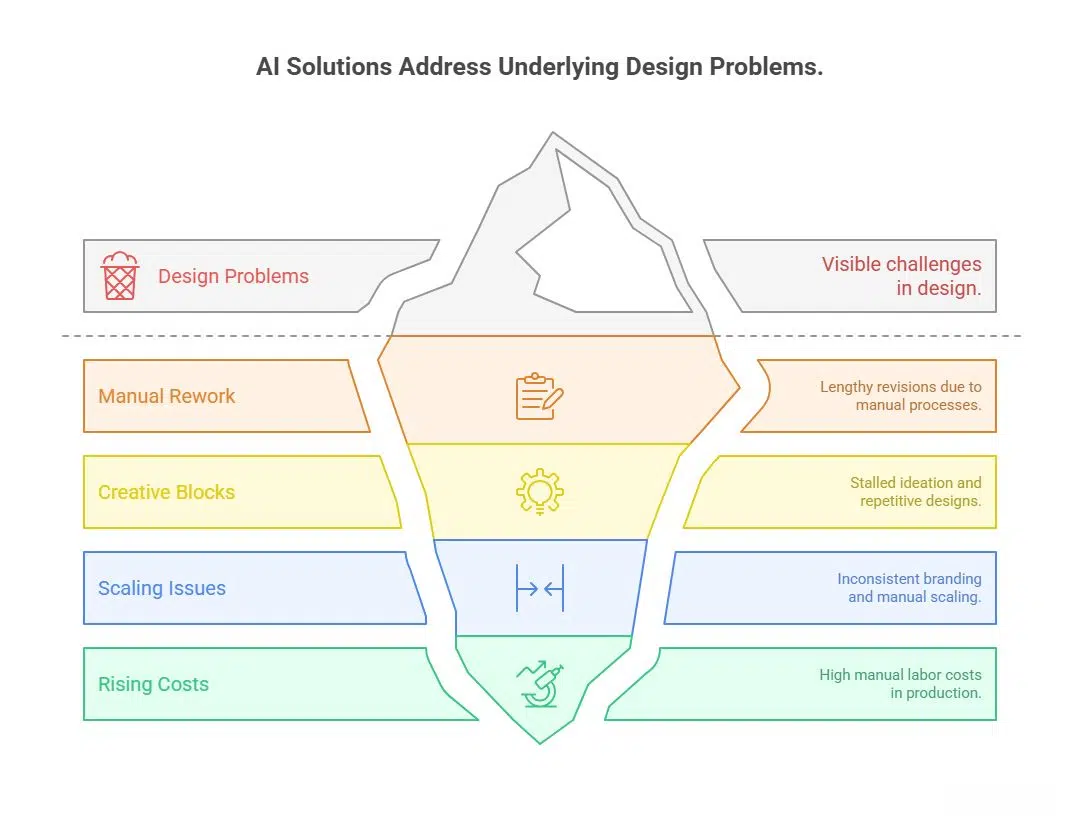
What Real Design Problems Do AI Help Overcome? 

Endless Revisions & Slow Turnarounds

Did You Know: "Teams using AI for early-stage concepting report a 40-60% reduction in late-stage revision cycles." So here’s the thing about AI, it speeds up early-stage concepting. Your design team with AI can start stronger and get more aligned options. They don’t have to struggle with manual rework since automated versioning helps them explore multiple directions quickly. With AI, they have a faster feedback loop which means issues can be spotted earlier ultimately reducing the late-stage revisions. Now, teams aren’t depending on “fixing” and “refining” but are more agile in saving precious time dramatically. This is good for both prospects and customers as they don’t have to often go to and fro for minor improvements. 

Creative Blocks & Uninspired Concepts

AI gives multiple instant visual variations, better references and amazing styles which refresh the creative process. Designers are better equipped with unconventional ideas without them having to spend hours building themes from scratch. For prospects and customers, it means ideation becomes a whole lot faster, and much more dynamic. It helps teams break out of repetitive patterns and access broader creative possibilities leading to more innovative final outputs in the long run.  Scaling Content Without Losing Quality With AI, prospects and customers can automate layout development and create more templates. This ensures consistency is well met across large content volumes. AI-driven brand rules maintain color, typography and tone without requiring much human oversight. With bulk asset generation & easy customization of designs, teams can quickly replicate ideas into different platforms which offer resounding experience for different audiences. On the contrary, with AI-powered A/B testing, prospects can run continuous experiments without having to worry about diluting their brand standards. 

Rising Production Costs

Did You Know: "By automating bulk asset generation, organizations have seen a 25% decrease in overall production hours, eliminating the need for temporary external support." AI ultimately cuts down on manual labor or repetitive tasks saving the overall production hours. It means establishing faster workflows with fewer biblical cycles. Gradually, teams are more adapted to deliver quickly & within set timelines with solutions which are much more interactive and better. With automated asset creation, AI eventually eliminates the need for hiring more external support. Design teams are enabled to work more productively turning AI into efficient cost-control mechanisms.  What Most People Don’t Realize About AI in Design

It’s Not Just About Generating Visuals

Ai is transformative and not just in the books. It’s actually reshaping the upstream parts of design, everything before even a single pixel gets placed. With the help of AI, design teams can analyze a lot of things like user behavior, conduct research and understand patterns faster compared to manual methods. UX flows can now be auto-mapped based on predictive algorithms which gradually reduce guesswork. Artificial Intelligence further ensures design meets standards without following lengthy audits. For designers, it means testing becomes relatively more accurate with AI flagging friction points early in the process.  

AI Makes Design More User-Centric

People want designs they can relate to and AI can make it happen. With predictive behavior models, design teams find themselves better equipped to anticipate what users are looking for. A more personalized journey can be crafted in design psychology without requiring any heavy manual segmentation. In fact, the end result comes off as a design approach that moves from “one layout fits all” approach to every user gets exactly what they are looking for. 

AI Is Improving Design Governance

As mentioned above, brand consistency becomes easier to maintain with AI. Designers can apply correct styles, add the right colors and set the best tones. They can automate design guidelines and ensure outputs are well aligned communicating the brand’s identity evenly across large teams. On the contrary, AI reduces human errors by detecting inconsistencies which designers might easily miss, especially while working on tight deadlines. For prospects, it means cleaner & more reliable outputs. 

What the Industry Is Talking About Right Now

Automation vs. Authenticity

There’s a big conversation happening right now in design circles especially on LinkedIn posts and X threads. People are discussing where automation ends and human touch begins. Everyone agrees AI can speed things up, but some worry it might make designs feel “too perfect” or generic. AI isn’t about replacing authenticity, it’s more about getting the boring stuff out of the way so designers can focus on the part that actually matters: emotion, storytelling, and originality.

Ethical AI + Copyright

Now, this one’s tricky. As AI becomes part of the creative process, questions about ownership and copyright are unavoidable. Who will actually own AI-generated images? And are we okay with AI learning the ropes from existing work without explicit permission? For designers and brands, they are vocalizing more transparency to secure their data and it’s a conversation that’s only going to get louder as AI moves from novelty to standard practice. 

The Rise of AI-Native Design Tools

We are seeing the emergency of tools like Figma AI, Adobe Firefly, Canva Magic Studio, Runway. And all of these platforms aren’t just add-ons anymore, they are built alongside you. Do you need a layout suggestion, a color palette or a fully generated concept? These tools do all of it instantly. It makes experimentation better, faster and opens newer doors to creative direction, one that designers desperately require. AI gives them avenues that they might never explore all on their own. 

Real-Time Personalization as the Next Big Battleground

Everyone’s racing toward smarter, adaptive design. We are talking about interfaces that change based on user behavior, apps that adjust themselves on the fly, websites that evolve for every visitor. The companies that get this right will win attention, and AI is the engine making it possible.  It’s not science fiction anymore; “design that evolves on its own” is becoming the new standard, and those who ignore it risk falling behind. 

How AI Is Reshaping Creative Workflows

In Brainstorming & Ideation

The real benefit of having AI is that it instantly generates moodboards, style references and visual variations. As a designer, you can test multiple creative directions in a matter of minutes instead of hours. As a prospect, you can provide better clarity to your design teams and take them a step forward. It somehow removes the blank-page problem allowing teams to get ideas that flow faster. 

In Prototyping & UX Design

AI further helps designers to map user flows and predict how people are more likely to interact with the design. With predictive journey mapping, teams can see potential friction points before sending anything live. At the same time, prospects can identify red flags and explain to designers to better refine the experience early which gradually reduces the costly revisions which people experience later. 

In Design Production

Prospects and designers can also use AI to generate assets, optimize layouts and automatically resize or format content for different platforms. It can reduce the repetitive tasks which can take hours and are somewhat complicated. These tasks can easily be completed in a matter of minutes. As a result, prospect & designer can better focus on refining the creative decision process rather than staying stuck in execution. 

In Testing & Optimization

Ai offers heatmaps, usability predictions and automated A/B content testing which all contributes to better assessment on what works and what doesn’t.  With data-driven insights and making final adjustments to graphical outputs, it ensures the final design performs just the way prospects have envisioned it. 

The Future - What Comes Next

AI Trend Core Function Expected Designer/User Experience Real-World Concept
Hyper-Personalized Designs Dynamic 1:1 Content Delivery The interface adapts in real-time to your mood, location, and past behavior. Netflix (unique homepage layout for every user), Spotify (algorithm-driven playlists/UI).
Voice-Driven/Multimodal Creation Natural Language/Sketch Input You literally tell the AI what you want ("Make a brochure, modern style, using this sketch"). Adobe Firefly (Text-to-Image), Runway (Text-to-Video), Uizard (Sketch-to-Prototype).
Self-Optimized Interfaces Autonomous UX Refinement The app learns from collective usage data and automatically updates its navigation or button placement to reduce friction. Google/Amazon (A/B testing that runs and optimizes itself), A.I. Network Management (self-healing telecom networks).
Expanded Imagination AI as a Creative Catalyst Breaks creative blocks by generating entirely unconventional design styles or concepts you wouldn't explore manually. Midjourney/DALL-E (unconventional, high-art concept generation).

Hyper-Personalized Designs Will be Designed in a Matter of Seconds 

The future of design will not be a “one-size-fits-all” approach. With artificial intelligence in play, designers & prospects will be more enabled to perform dynamic branding and create content which resonates correctly with the target market. It will deliver experiences personalized to meet their specific behavior & preferences. And all of this will be happening in real-time. Imagine everything, from websites, apps, to campaigns and everything in between custom-built to provide a streamlined experience. 

Moving Out-of-the-Box with Voice-Driven and Multimodal Creation 

Designs will not be any longer limited to just screens and clicks. You can use natural language, sketches and even gestures as inputs for AI. It will be like literally telling the AI model how to design your next graphics. You can describe what you want in the form of a prompt or simply explain it through voice and before you know it, your AI model will make a working concept close to how humans would. 

AI Will Offer Self-Optimized Interfaces 

AI will provide you with a system that will learn from user behavior and continuously update itself. It will be fully capable of predicting the requirements of the end-customer, reducing friction & refining the experience without any manual intervention whatsoever. The objective of such an interface won’t be limited to simply evolving solutions organically but having users interact more efficiently. 

The Final Takeaway 

AI isn't just there to replace designers, it's here to amplify what makes them human. Teams should embrace AI more as a creative partner, a tool that speeds up repetitive tasks, creates a way for new ideas and enables teams to deliver more personalized and user-focused experiences.  At the same time, designers can unlearn the very notion that creativity must be a painstaking process and purely manual. They can move from old workflows that limit potential to more strategy oriented, story-driven and innovative approaches leading them into a new era of design.  For organizations ready to explore how AI can upscale their creative process, Branex partners with teams to integrate intelligent solutions that transform ideas into impactful, user-centered experiences.

FAQs 

Q1: Why is it reliable to hire Mobile App Development Services from Branex? Branex has a dedicated mobile app development team that provides full-stack expertise, UI/UX design, QA, and post-launch support. Unlike freelancers, there’s no single point of dependency, ensuring smooth project delivery and the best Custom App Development experience. Q2: Freelance developer vs. Branex team which is better for post-launch support? Branex offers 360° app support solutions including maintenance, updates, bug fixes, and performance optimization. Freelancers often handle multiple clients and may not provide consistent support. A dedicated team is ideal for Retail & Fashion App Solutions. Q3: What factors affect the cost of app development? Costs at Branex depend on app complexity (features, integrations), platforms (iOS, Android, web), third-party integrations (payment gateways, analytics), backend infrastructure, security measures, and custom design requirements. Budget-friendly eCommerce App Development and high-end apps require different strategies. Q4: What skills should an app developer have? Branex developers are skilled in: Native & cross-platform programming (Swift, Kotlin, Flutter, React Native) Backend development (Node.js, Django, Laravel) UI/UX Design for Mobile Apps expertise Security & compliance knowledge Strong problem-solving and communication skills Q5: Does Branex offer app builder templates? Branex can provide ready-made templates for MVP (Minimum Viable Product) apps. However, for complex apps, Custom App Development with advanced features and integrations is recommended. Q6: Can I work with Branex if I am based abroad? Absolutely! Branex works with international clients remotely. With clear communication and requirement specifications, you can collaborate with their global team for seamless development and timely delivery. Whether it’s Fashion App Development or Mobile App Development Services, all apps are scalable and secure.  
Frame 1410094692
Mobile App Development

The Three App Types Explained: Native, Hybrid & Web Apps

branex-logo Team Branex
The Internet is vast, and smartphones sit at the center of this global app ecosystem. The number of smartphone users has now surpassed 6 billion, a significant portion of the world’s population. Whether it’s gaming, travel, shopping, lifestyle, education or healthcare, there’s a mobile app for just about everything. And that’s just the tip of the iceberg; these broader niches further break down into countless sub-niches in App Store & Google Play. However, not all apps are created the same. The technologies behind them can differ significantly. When designing apps, we often overlook the mechanics and the effort that goes into their development. It’s why we have put together this walkthrough. To our knowledge, there are three main app types (Native, Hybrid, and Web) each with its own development approach and programming skill set. And today, we’ll explore what these app types are, how they work, and their unique advantages and disadvantages. So, without further ado, let’s dive in.

A Quick Technical Comparison 

Feature Native Apps Hybrid Apps Web Apps (including PWAs)
Development Languages Platform-Specific (e.g., Swift/Objective-C for iOS, Java/Kotlin for Android) Web-Based (HTML5, CSS, JavaScript) within a Native Shell Standard Web Technologies (HTML5, CSS, JavaScript)
Codebase Multiple, Platform-Specific (separate codebases for iOS and Android) Single Codebase for all platforms Single Codebase for all browsers/devices
Execution Environment Runs directly on the device OS Runs within a WebView (embedded browser) encapsulated by a native container Runs within a web browser (e.g., Chrome, Safari)
Distribution App Stores (Apple App Store, Google Play Store) App Stores (requires submission and approval) URL/Web Browser (no app store required)
Access to Native APIs/Hardware Full, Direct Access to all device features (camera, GPS, sensors, etc.) Mediated Access via "bridges" or frameworks (e.g., Cordova, React Native) Limited Access via browser APIs (access is improving, especially with PWAs)
Offline Functionality Full (if designed to store data locally) Good (can leverage local storage within the native container) Limited (dependent on browser capabilities/caching, better with PWAs)
Push Notifications Full Support Full Support (via native container and push services) Limited Support (mainly via Progressive Web App (PWA) features)
Installation Required (downloaded from an App Store) Required (downloaded from an App Store) Not Required (accessed via URL) - Optional for PWAs (Add to Home Screen)
UI/UX Consistency Fully Native (adheres to platform-specific design guidelines like Material Design or Human Interface Guidelines) Near-Native (can feel slightly off, but frameworks aim to mimic native components) Browser-Dependent (generally feels like a website; less "native" UI/UX)

The Three Different App Types Explained

Native Apps 

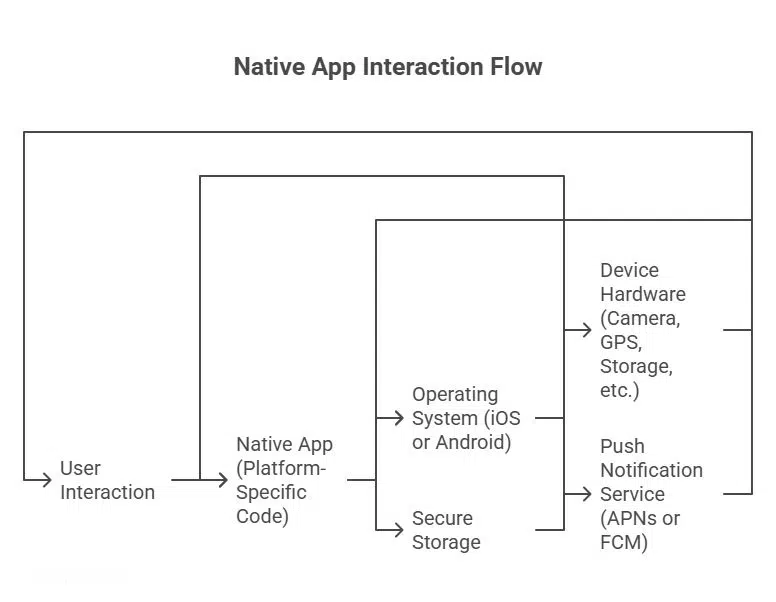
Native apps are device-specific mobile applications designed to run on a particular operating system. They offer optimized performance and a seamless user experience which is fully compatible with the operating system for which they are developed. Android apps are typically built using Java or Kotlin; whereas, iOS apps Development are designed & developed in Swift to support Apple devices. This specialization is why many businesses hire developers with expertise in platform-specific programming languages. Native apps are commonly used in industries where data security, platform-specific features, and robust infrastructure are key priorities. For example, the Facebook application was initially written in HTML5 and used a single codebase across iOS, Android App development, and the mobile web. However, iOS users experienced slower performance, prompting Facebook’s developers to create two separate codebases, one for iOS and another for Android. This approach optimized the app experience for Apple users while maintaining performance for Android users. Here’s a flow-chart illustration showing how native apps are deeply integrated with the device’s Operating System and hardware:

Advantages 

High Performance: Native apps are optimized for specific platforms which translates to faster load times, better animations and overall superior app performance. Full Access to Device Features: Native apps leverage all hardware & software functionalities such as camera, GPS, contacts, sensors, and notifications without compatibility issues. Enhanced User Experience: Native apps follow more stringent design principles (like Apple’s Human Interface Guidelines or Google’s Material Design) delivering better UX. Better Security: Native apps offer better built-in security features such as data encryption, biometric authentication and secure APIs making it more reliable. Offline Functionality: Native apps can function without the internet connection on the platform on which they operate delivering uninterrupted experience.

Disadvantages 

Higher Development Cost: It costs relatively more to code a native app for iOS and Android which includes the cost of development & maintenance. Longer Development Time: Since individual apps are built on different coding platforms, it takes relatively longer to code, test and deploy each app. Complex Maintenance: Maintenance and upgrades such as adding a new feature requires separate built-release for different platforms. Large Storage Requirements: Native apps typically require less storage space because of high-quality graphics and integrated resources. Limited Cross-Platform Reusability: Code written for one platform cannot be reused for another which limits scalability & efficiency.

Hybrid Apps 

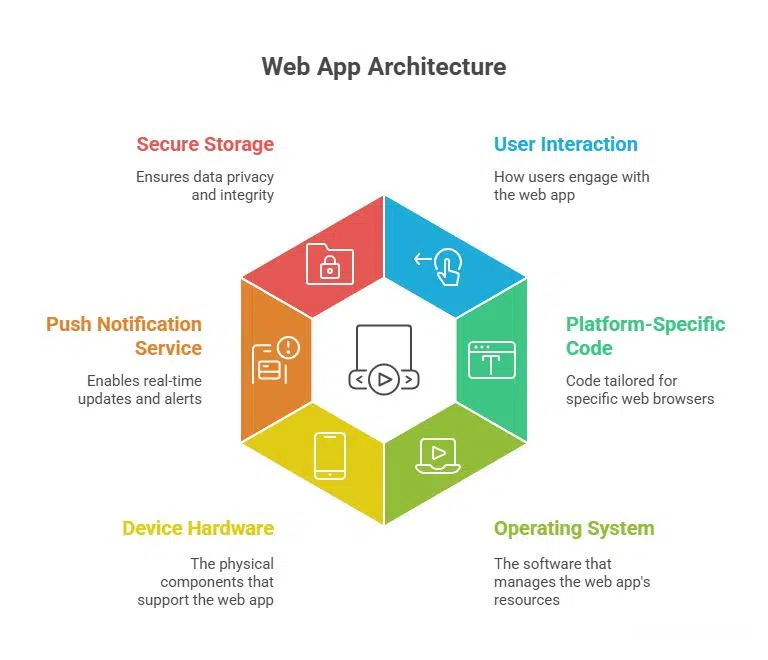
Hybrid apps serve as a convergence point between web and native technologies. They are developed using the standard web languages such as HTML5, CSS, and JavaScript; however, they are encapsulated within a native build which makes them capable of running across multiple platforms. In hybrid apps, developers maintain a single codebase for both iOS and Android. Apps are designed on frameworks such as React Native, Flutter and Iconic with further advanced hybrid app development features. These frameworks act as bridges, allowing hybrid apps to leverage device-specific features such as camera & geolocation capabilities reserved for native applications. For example, both Instagram and Uber adopted hybrid frameworks during their early stage of development to establish consistency across platforms. The strategy gave them enough room to scale rapidly while maintaining a unified code base delivering better user experience. App launched in a hybrid environment run inside a WebView (an embedded browser component) which renders app’s content while bridging the communication between the web code & device’s native capabilities through APIs. These APIs help hybrid apps to access core device functionalities easily. Take a look at how the Power of Hybrid App Architecture is built for performance: Hybrid App Capabilities

Advantages 

Cross-Platform Compatibility: Hybrid apps come with a single codebase which works across both iOS and Android which takes the burden of development time off developer’s shoulders. Cost Efficiency: Since hybrid apps have a single codebase, it requires a relatively lower overall development and maintenance cost making them more cost-effective than native apps. Faster Time-to-Market: You don’t need to deploy apps across multiple platforms when it comes to hybrid app experiences which ultimately accelerates release schedules. Device Features: You can establish native bridges through APIs in hybrid apps which adds up to its additional functionalities such as camera, GPS and push notifications. Simplified Updates: You can continuously run updates applied to the shared codebase without having to go through launching separate updates for different platform releases.

Disadvantages 

Reduced Performance: Compared to native app experiences, hybrid apps may experience slower load time which translates to less smoother animations. Limited Advanced Functionality: They may not be well equipped to support high-performance or graphic-intensive features which may be difficult to implement. Dependency on Frameworks: Since hybrid apps heavily depend on frameworks, its performance & compatibility can get compromised because of the framework bugs. Inconsistent UX: Certain platform-specific interactions may not feel entirely native which will lead to potential gaps in user experience.

Web Apps

Web apps do not require installation from an app store. They entirely run within a web browser and are developed using standard web technologies such as HTML5, CSS and JavaScript. They can be accessed across any device as long as it’s powered by a compatible browser making them versatile and platform-independent. Web apps rely on browser APIs for functionalities such as geolocation tagging, camera access and offline storage. It can ultimately limit their capabilities to delivering native like experience & require relatively less maintenance. Updates can easily be deployed centrally without requiring users to download new versions of the app. Web apps are most suitable for businesses who want to push rapid updates in a cost efficient manner. It works better in environments with less demand on intensive hardware integration. PWA or progressive web apps are the modern evolution of web apps, and they offer additional capabilities such as push notification, offline functionality, home screen installations & more. A few decent examples of web apps are Google Docs, Trello, and Slack are web-based solutions which offer complete functionalities through a browser accessible from desktop, tablets & mobile devices without the need for specific platform installations whatsoever.

Advantages 

Platform Independence: Web apps can run on any device with a compatible browser (which means you don’t need separate versions). Low Development & Maintenance Costs: A single web application serves all users without platform specific adaptations. Faster Updates: You can easily launch updates and fixes in real-time by deploying it centrally with no user action required. Wide Accessibility: Users can use web apps via URL, with or without downloading or installing which makes it accessible for multiple devices. Scalability: Web apps are easily scalable to accommodate the growing user base or expanding the overall functionality for its users.

Disadvantages 

Limited Device Integration: Web apps cannot maximize the use of device hardware or native features because of their restricted functionality. Performance Limitations: They may run through a web browser which often leads to slower load time, if they are resource-intensive or complex in design. Security Vulnerabilities: Browser-based execution often exposes web apps to potential security risks like cross-site scripting (XSS) and phishing.

Which App Type Should You Choose? 

If you’re a business planning to build your next mobile app experience, then choosing the right type of app depends on your specific priorities. When price shouldn’t be a concern, then you want your app to be high-performance and stable. A native app in such scenarios can work most accurately. While, you may find plenty of freelancers out there, but if you are looking for a more well-rounded development experience, hire a dedicated software development team. It will help you build a stronger reputation by delivering a bug-free experience. However, if you’re limited in your budget and want a more quick experience designed, then hybrid & web apps are relatively suitable.

FAQs 

Do hybrid apps offer the same experience as native apps?  Not exactly. Native apps are optimized for specific operating systems (iOS or Android) to utilize maximum resources and follow stringent rendering processes leading to superior performance especially in terms of graphics. Hybrid apps run their core code inside a WebView which introduces a slight layer of abstraction leading to minor performance dips and choppy animations compared to what native experiences deliver. Why do businesses choose native apps if they are expensive to develop?  Businesses choose native apps because they deliver a more wholesome platform-specific experience to end-users. Certain industries like finance, healthcare or high-end gaming cannot compromise on performance and reliability. It’s why they invest in hardware specific software solutions such as native apps to make their one-time investment worthwhile. Besides, native apps are much more secure & have deep device integration which makes them a great asset for businesses. Will PWA (progressive web apps) replace Native apps entirely? While PWAs are rapidly growing within the ecosystem, they are quickly closing the gap for features like offline functionality and push notifications. But, they are still not going to fully replace native apps despite their cloud-based performance functionalities. Native apps will still take the lion’s share because certain industries will always require sophisticated background processing or apps capable of working seamlessly on the newest, cutting-edge hardware features like AR/VR. Although better positioned, PWAs will never meet the complexity that native & hybrid apps offer. If I launch a Hybrid App, can I easily switch to a Native App later? Yes, you can. But, it’s a significant undertaking. Hybrid frameworks (such as React Native) allow some code reuse, but if you decide to go fully native for performance, you will essentially have to rebuild the majority of the user interface and platform-specific logic. The initial hybrid investment buys you speed to market but it doesn’t eliminate the future cost of a native rebuild.
Frame 1410094693
Mobile App Development

How Branex Develops Your Custom Enterprise Mobile App Development?

branex-logo Team Branex
In today’s day and age, enterprises have become bigger, better and astoundingly more ambitious. Everyday, there’s plenty of opportunity and unbelievable potential moving into the enterprise realm day after day. According to Mordor Intelligence, the market capital for custom enterprise mobile applications stands approximately at 168.45 billion dollars for 2025. Future forecasts further reveal an expected growth of up to 303 billion by the end of 2030. Yet, the market is overly saturated, & many enterprises still experience a hurdle in developing enterprise mobility solutions to increase productivity & boost business operations. Branex removes the burden from your shoulders by bringing custom enterprise mobile app development services. We design your robust/high-quality mobile app solution with absolute coding precision. What makes our mobile app service a class-apart? Our mobile app team brings ample knowledge & experience in mobile app development tools and technologies to give you the app of your dreams. From integrating APIs to developing infrastructures, we can do everything on your behalf. We can add feature sets and functionalities within your enterprise app down to your requirements. Our teams can code exceptionally well and have previously done ample times for businesses of all sizes. Whether you’re looking for a native enterprise app solution for Android, iOS or you want a hybrid cross-platform solution, or simply a web app, we can design it all for you. We can also build PWAs to work on space-constraint devices.

What is Custom Enterprise Mobile App Development? 

Businesses, big or small, have consistently been experiencing a positive/negative setback. With COVID hitting hard and the great market dumps, it's no secret if your business isn’t online, it’s not visible to your target audience. But is going online enough? Not exactly. Times have changed and so have the solutions that sets your enterprise apart. Gone are the days when businesses would merge a few interactive features and name it a decent software. Enter 2025, custom enterprise mobile app development introduces personalized app experiences for customers and businesses of all sizes. A custom tailor made app that fits your business like it was meant to be. It’s the process of putting together a custom enterprise mobile app that directly engages with customers addressing their pain points & the business challenges which they are facing. The process includes planning, testing, and deployment ensuring the final product compliments the core internal strategies, inspires innovation and solidifies market presence.

How We Design & Develop Custom Enterprise Mobile Apps? 

At Branex, we are a team of talented mobile app developers bringing a cumulative experience of decades in building enterprise mobile app solutions. We have experience in planning the comprehensive enterprise application development lifecycle. Our teams will sit down with you to understand your project requirements and understand your enterprise end goals. Once we understand your requirements, we will create the outline and initiate a custom mobile application development process personalized as per your organizational culture. Our process for mobile app development includes: Strategy - We start with defining the why behind your app. To understand your requirements better, we study your business goals, understand your app user needs, study the ROI, & problems that you wish to solve. We then study your stakeholders (internal users, external users, business owners and end customers). Based on their behaviors, we decide which platform technology native (iOS/Android) or cross-platform will best serve the device type. We further assess what systems to integrate such as ERP/CRM/legacy, or data flows, etc. Requirement Planning - In the next phase, our project managers and key account executives work with your enterprise to gather functional requirements of the app. It will include what feature set you will want, what the app will do and how it will perform its functions. On the non-functional edge, we understand what security requirements your enterprise needs. What are the performance metrics you follow, and whether you wish to scale your app in the future. It assists us in defining scope, acquiring resources, setting budget & timeline. Design & Prototype - The design phase is where our mobile app developers start with the initial UI/UX design of your enterprise app. We start with putting together a wireframe and building initial mockups. We share them with your enterprise bodies to review and iterate. As our stakeholders, you provide us with your valuable feedback to refine solutions before we move with the heavy development stages. We also suggest the architect for backend, databases, servers, cloud instances, and device management integrations. Development - Our mobile app developers build the app’s front-end (mobile UI), and integrate backend services. We also configure relevant APIs and add any third-party integrations of existing enterprise systems with our custom enterprise mobile app solution. Our security teams will then add device management setups (MDM/EMM) and establish security layers by adding authentication and encryptions. At Branex, we follow agile methodology for developing enterprise mobility solutions which heavily depends on iterative releases & continuous feedback. Testing & QA - To check whether the app’s functionalities and feature sets are working optimally, our quality assurance engineers run multiple functional tests to test the app features. We also run performance tests to identify and eliminate any performance bottlenecks occurring in the software application. We understand how poor performance can lead to poor user experience and therefore, we run tests across different devices and platforms. Our enterprise specific tests follow complete compliance/regulation checks & device management compatibility. Launch & Support - Once the development phase is complete, we move the custom enterprise mobile app to the next rollout stage which is training users to adapt. During this stage, we sharply monitor the adoption and track performance using analytics. Our teams also study crash reports & collect user feedback to better understand what end-users need. As the user base grows, or business processes change, we scale the backend and add necessary integrations. We also launch new features, bug fixes, security patches and OS updates.
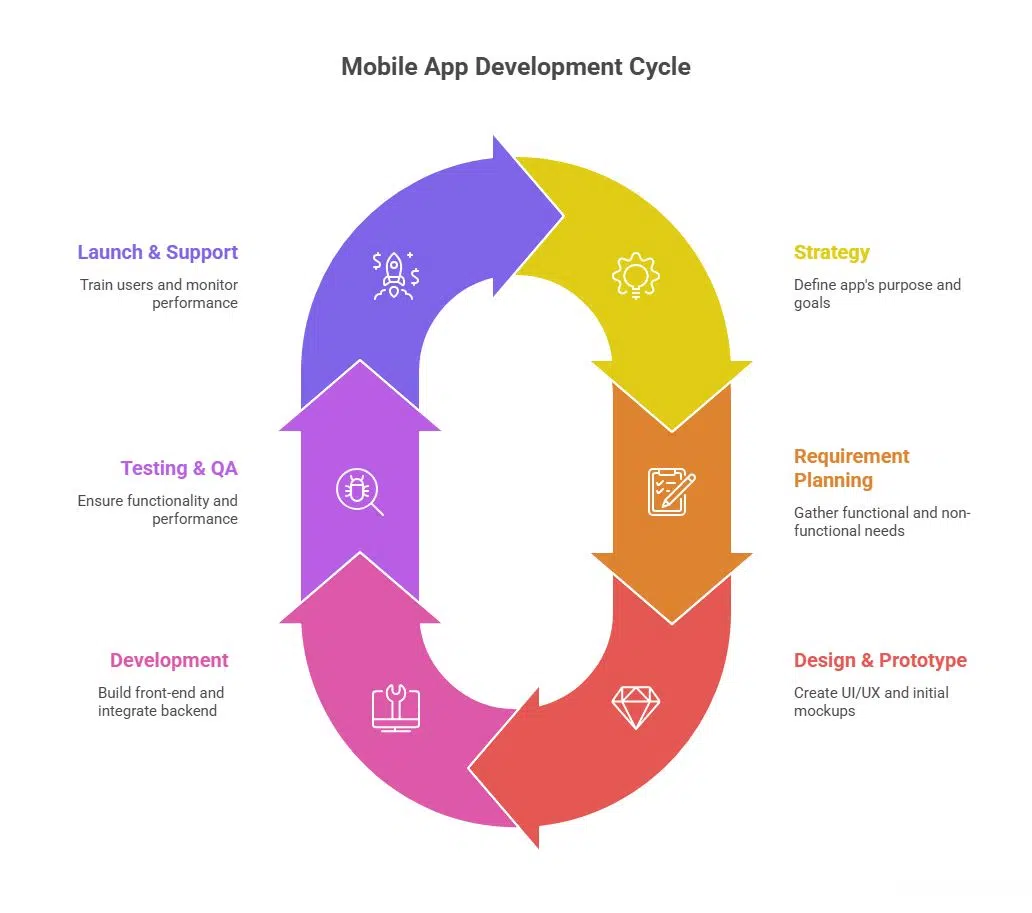
Why Custom Enterprise Mobile App Development Better than Traditional Development Practices? 

Traditional mobile app development practices offer a one-size-fits all approach. As an enterprise, you want to establish a digital presence that distinguishes your business from the rest of the market. A custom enterprise mobile app development offers a tailored app development approach, one that meets your unique organizational requirements. To explain it more clearly, here’s what custom enterprise mobile app development has to offer:
  • Ownership - You own the enterprise solution. Every feature, every document, every patent.
  • Better Control - Every pixel, every code, you take the reins on developing your solution, your way.
  • Transparent Cost - You have complete exposure to where your dollars are going, which means no hidden charges.

How Custom Enterprise Mobile App Development Benefits Your Business? 

Since enterprise mobile apps are designed to serve specific businesses, here’s how they can benefit any enterprise looking to invest in a mobility solution. Better User Experience - Custom mobile apps aren’t just tools, they are aesthetically appealing and can offer a remarkable experience. With a user-friendly design and an intuitive interface which keeps customers coming back, Apps like Slack, Amazon, Uber, & others. These are some great examples of enterprise app solutions which offer enhanced customer experience. Improve Productivity - Custom mobile apps often improve productivity by centralizing your system data, automating mundane tasks and managing your workflow overall. This way, a streamlined enterprise app reduces management burden and increases your overall productivity levels which (more or less) is directly proportional to your business growth. Data Driven Decision Making - When you invest in an enterprise custom mobile app, you get insights in numbers. Most enterprise apps have analytic tools to track data/collect real-time insights from users. They also have robust feature sets to study customer behavior which gives them a chance to make smarter decisions especially for bringing more business. Brand Building - Your app is the face of your brand. When you hire custom mobile app developers, you get a team of professionals who are skilled in solidifying your brand identity. Your app is more than just a useful mobility solution, it’s a great way to market your product or service directly to your customers. You can also run campaigns, promotions and do much more.

Our Approach to Custom Enterprise App Development 

When you come to Branex with your custom enterprise app development requirements, we instantly become your partner and provide you with the solution that you’ve always been looking for. Our teams strive not just for operational excellence in all your projects, but we aspire to provide you with the best 1% talent from around the world to build you, your next generation mobile app. We promise to always deliver no matter how tough or complex your subject matter is. It’s what we are ingrained and in-built to do and here are a few ways how we do it: Dedicated Teams - We know how much you urge to work with a team of professionals who can specifically work with you. It’s why our dedicated teams are available to take that relentless burden off your shoulder. Our autonomous dedicated team will work in sprints with you to turn your vision into a winning reality meeting all of your business objectives as per strategy. IT Staff Augmentation - If you can’t afford to work with a dedicated team, it’s alright! You can always have a team of your own, an entire club of mobile developers working as an extension of your in-house IT team. Our IT staff augmentation staff enables you to manage tasks in bulk when it comes to mobile applications. You take the lead, while we develop your app. Software Outsourcing - Don’t want to hire people to do the job? Want to outsource your software development to a team of specialists who can build your digital solution, brick-by-brick? Outsource your software development to a company of specialists like Branex to provide periodical development of your custom enterprise mobile app just the way you want.

Branex - Your Ultimate Stop Shop for Building Your Custom Enterprise Mobile App 

We boast a track record of experience and a portfolio that speaks volumes of our success. Branex has served companies across different industries and we have significant experience in almost every business vertical. That’s why, when you come to us, we assure you that you’re getting into business with a mobile app development company who knows what they are doing. You can count on us with the immense technical knowledge we possess, our expertise in mobile technologies, trends, systems, platforms and tools. Our mobile development experts can work with any framework or language your project requires. We can take care of all front-end & back-end projects and we know our way around cloud platforms, APIs and server-side technologies. Whether you want us to code in Java, C++, Python, R, Swift, Go Lang, Kotlin, or any other platform language of your choice, we can do it. We are skilled in working with multiple frameworks including but not limited to Laravel, Django, CodeIgniter, Ruby on Rails, etc.

FAQs 

How Much Does it Cost to Develop a Mobile App?  There is no precise cost mentioned anywhere to build a mobile app. It normally lies between $5,000 to $50,000+ or more based on your distinct app needs. Besides, the cost of mobile app development varies depending on factors such as app requirements, app complexity, architecture, design, visuals, and testing frameworks. Marketing also plays a significant factor in determining an app’s overall costs. How Long Does it Take to Build a Mobile Application? When it comes to determining the time to build a mobile app, it normally lies between a few months to several years based on the app’s complexity & functionality. Simple apps take 1-3 months, on the contrary, complex apps take anywhere from 4-9 months or so. We recommend you to connect with a reliable app development company & get an estimate for your project. Which is the Best Company for Mobile Application Development? When seeking the best mobile app development company, Branex stands out as a reliable choice. With a team of skilled mobile app developers and a strong track record, Branex excels in delivering high-quality solutions. What are the Benefits of Outsourcing Mobile App Development? No doubt, Outsourcing mobile app development has several advantages. You can access to a large talent pool who are versatile in their field. They are skillful to deliver apps that are carefully-made & have a know-how of launching app faster in markets. Our premium services keep businesses of all domains in mind, so that anyone can avail it. Is it Worth Hiring a Mobile App Development Agency? Yes, hiring a mobile app development company is worth it. Their expertise ensures a well-crafted app, efficient development process, and access to a skilled team of mobile app developers. You’ll receive a tailored solution that aligns with your goals, ultimately saving time and costs while delivering a high-quality app. What Kind of Technologies and Tools do Mobile App Development Companies Typically Use? Application development companies employ diverse technologies and tools for creating top-notch, user-friendly mobile apps. At Branex, we use top tools to create exceptional mobile apps. Our developers work with Java, Swift, Objective-C, and JavaScript for seamless development across Android, iOS, and cross-platform apps. Testing is done using Appium and Selenium, with deployment automation through Jenkins. To track app performance and user behavior, we integrate tools like Google Analytics and Firebase. What Industries Do You Cater? At Branex, we cater to a wide variety of industries. Some of the top industries we have extensive experience across include healthcare, finance, education, retail, logistics, and many more. Our development team understands the unique needs of each industry, hence, they create customized apps that solve specific problems and add value to your business. No matter what your niche is, we will help you out in achieving your business goals. What is the Difference Between Native and Cross-Platform Development? Both the technologies have certain pros and cons. Native development can function online due to its effortless integration with the operating system. Besides, they are easy to build and less time taking, but they got failed when you want to launch on multiple platforms at a time. At that time, cross-platform apps wins, since, they use a single code-base to launch apps simultaneously. Plus, they are cost-effective, too. Does Branex Offer NDAs for App Development Projects? We can understand how challenging it is to protect your app idea. Thereby, at Branex, we sign an NDA to protect your intellectual property and assure confidentiality. Set back and invest in our app development services right now and see how we can help you with a revenue-generating product. Does Branex Offer Ongoing App Maintenance Services? Our services do not stop at the launching stage. We provide consistent ongoing maintenance services that includes bug fixes, regular updates, and feature improvements. Our veteran experts take all the necessary measures to keep your app secure and upto date.
How to Create a User-Friendly Mobile Application
Guide Mobile App Development

How To Create A User-Friendly Mobile Application in Easy Steps

branex-logo Team Branex
Everyone knows where digitalization is going. It is going in the right direction and taking over more businesses worldwide as we speak. Numerous leading publications indicate that the global digital transformation market will grow to around USD 1,009.8 billion by 2025. Though the market does seem to be oversaturated, users still desire to see innovative products. Companies must develop their platform if they also think of starting businesses online. They should make it as functional and user-friendly as possible. Hence, they should also check the tips to make a user-friendly mobile application from ground zero.

What is a User-friendly Mobile Application?

User-friendly Mobile Application Those who want to create a successful business must first have a good look at both recognition and reputation. They should achieve and take care of the former, and improve the latter among a wider audience.  Marketing helps advertise a business. If the business has an app/software, it will help them sell and interact with buyers at any time of the day. It is true that people pick up and check their phones on average around 2600 times a day. This is why a mobile application comes in quite handy. They are a viable solution for not just existing companies but for startups too. Creating an app is a complicated task. It requires a lot of preparation, perseverance, and development.

1. What does the creation of user-friendly mobile apps entail?

The creation of user-friendly applications and software is a unique combination of market analysis, market research, observing current trends, determining users’ issues, and other factors. Any digital product development company would do this with proper diligence and care.  Hence any detail present in the user interface can either prompt a user to take the needed action or push the user away.  This is the very reason most entrepreneurs hire entire tech teams comprising the following roles:
  • Business Analysts.
  • User Interface (UI), User Experience (UX), and Software Designers.
  • App and Software Developers.
  • Quality Assurance (QA) professionals.
Moreover, the support of various specialists from various areas can help contribute to the completion of the analysis of various factors. That can help in the creation of a furthering strategy where the app’s release can become a reality on a promising footing.

2. Is in-house app development gaining momentum?

Helpful app development platforms and software programs are present. They are able to do a lot of work. This is why a lot of small and medium-sized businesses (SMBs) are now developing mobile apps through in-house teams. This trend has made it easy for both startups and entrepreneurs to make their apps without the need to learn extensive coding. As a consequence, more companies are hence embracing mobile application development for either customer use, internal purposes, or both. Though app development can initially be a daunting and challenging task, it can still be quite a rewarding experience.

Factors to Identify Before Developing a Mobile App

Factors to Identify Before Developing a Mobile App Developing a mobile application can sound quite straightforward but planning a tactical digital solution is complex. There are various factors associated with the process and they should be considered before any company endeavors to embark on developing such an app:

1. Defining and Understanding the target audience

A good understanding of the target audience and persona is a must. Understanding the target users' objectives, behaviors, preferences, and platforms and devices they use is helpful. This is where the app’s marketing can begin. The App should be customized as per the audience’s needs to help the audience enjoy the app. This is where the app development company also considers the kind of app that can serve users in the best possible way. Regardless of whether it is a native app, a hybrid one, or a web app; product discovery and market research helps a lot. This is where developing detailed user personas and carrying out market research work quite well. This helps identify the kind of app the audience needs. This tactic also helps companies create products that resonate well with their intended audiences and users. The app will certainly provide them with a top-notch user experience (UX) on numerous devices and screen sizes.

2. Researching competitors and competition

Conducting research helps ensure the idea’s readiness in the market. No company wants to end up making the same app as the competition or an app with almost 60% of the features same as that of others. App cloning can at times result in lawsuits and hefty penalties. No company wants to make their efforts redundant.  They should also analyze Apple’s App Store, and Google’s Play Store to understand the landscape and the competition. App development companies must also ensure that their app’s strategy is unique to them, their company, and their employees too. It should not be copied from others.  Companies developing apps specific to them should check out the competition. This can help them understand how their app will perform against others. They should examine the following factors to find areas needing improvement:
  • App’s functionality.
  • User Interface (UI) Design.
  • Users’ Reviews.
This is where the usage of App Store Optimization (ASO) research tools comes in handy. They help in analyzing the following to help identify gaps in the market for the app to be made:
  • Competitor Rankings.
  • Functionality.
  • User Reviews.
Not only would this help with the app and inform the app’s idea but also would help how competitors use app descriptions, keywords, and screenshots to attract users.

3. Choosing the operating system

Two primary operating systems exist in the market namely: Android and iOS. For either of the two, companies should ask themselves if they want to make an app for either of those two operating systems. Or do they want to develop a native app? Decisions regarding software compatibility can directly affect an app’s functionality and the overall performance of an app. Professionals providing mobile application development services in the Dallas metro area explain that a cross-platform framework is an easy-to-set-up app for sustained success. Why? Because more users can access it. A cross-platform app is a hybrid app that works on both Android and iOS. Those who are unable to decide should review their app’s development objective and audience’s preferences. Here are some options to consider:
  • Those who want to work on developing Android apps can use either Java or Kotlin with Android App Studio.
  • Working on developing iOS apps requires the use of either Objective-C or Swift programming languages with an Xcode development environment on Mac PCs or Macbooks
  • Working on cross-platform app development is also lucrative. It requires the usage of frameworks like Flutter or React Native for creating apps on both platforms.

4. Incubating the app’s idea

Taking the actionable steps of app development can be put on hold. Companies must consider whether or not their app can solve an existing problem. If it can, they should think about how it can help them.  But if their app is specific to their company, they must consider how the digital solution tactic can help the company achieve its objectives. Pausing to reflect at this stage enables companies to think about their app futures through a road map. They can also prioritize priorities for it too ensuring they and their team agree on the topmost objectives.

5. Planning the app’s design and security

The app’s design is the key to its success. It must have a user-friendly interface. Users will be inclined to download it provided that it is really a user-friendly app. A wireframing mockup tool (Figma or Sketch) can help visualize the app’s interface and flow. Best practices for mobile application design should be followed. Various screen sizes and devices should be considered when developing the app. Moreover, push notifications and social media integrations are features that should also be thought of early in the process.

Tips For Creating a User-friendly Mobile Application

Tips for Creating a User-friendly Mobile Application Now that you have understood what should be considered before making an app and what is considered as necessary prerequisites, it is now time to explore the steps required to create a user-friendly mobile application in the best possible steps:

1. Making the app a useful one

The mobile application in development should be helpful to users, first and foremost. It should be helpful to them in realistic ways, especially in terms of saving their time and money, and hence making their lives easy. One of the best places to start is incorporating the value proposition in the elevator pitch. If the business has addressed an important feature people face then the app can be tested in a focus group having friends and family first then the public and the target audience eventually.

2. Understanding the target users

Understanding users is a must. Developers usually skip due to impatience and lack of time. The result becomes a problem and that is why they take time to understand them. They need to have people involved in testing the app before they go live. The people who will test them should not be involved in the product development process in any way possible.

3. Ensuring onboarding is easy

Users no longer need to register in an app. It is now a thing of the past. This created very high bounce rates. Now companies have decided to remove all barriers and allow users to onboard themselves easily. If the app wants their personal or debit/credit card details, it can do so later on.

4. Using best practices of mobile app development

There are many apps present. Only a handful of them are successful. Hence it is wise to follow the footsteps of the apps that are successful. It doesn’t imply that apps need to copy one another, they should avoid repeating the mistakes of apps that flopped. This is true in terms of app design as the app has to be functional. Then the mobile app development cost can be considered.

5. Avoiding unnecessary redirects

A very good and user-friendly app should have everything a user needs. Meaning they should not have to excessively navigate through the app to solve their issue. Thus linking and directing users to external pages from the app is a very bad habit that should be avoided.

6. Designing Users’ touch points in the app

App developers must consider certain situations when users want to use the app and be ready accordingly. Push notifications are a worthwhile tool from a technical viewpoint. App developers should experiment with them. When these notifications are applied correctly, push notifications can attract people back into the app at the right when they need it the most.

7. Add integrations whenever possible

Integrating payment systems, chatbots, file-sharing options, social media options, and the like requires tools people are familiar with (PayPal, ChatGPT, etc.). App developers can integrate them into the app at a fraction of the cost. This makes it easier for both users and developers alike, especially when the latter works together with top-notch systems people love using.

8. Ensuring both aesthetics and functionality go hand in hand

Both the app’s design and function contribute to a top-notch user experience (UX). Making the product look good counts a lot. It is tested when the app is launched via either the Apple App Store, Google Play Store, or both. Good-looking apps are downloaded more than average-looking ones.

9. Making a safe environment for users

No user wants their data to be compromised. Data privacy is important and is tested when the apps are launched via app stores.

10. Don’t stop listening to users in making the app grow

The advancement of technology is exponential. New operating systems make new possibilities for mobile apps to avert past errors. Screen sizes of smartphones change constantly and they require adjusting the product’s layout. User behavior changes too. What worked well yesterday may annoy users tomorrow.

Over to You

Making a user-friendly mobile application is indeed fun. It however still requires diligent and accurate research to be conducted to ensure the app is user-friendly and also, unique and free of features competing apps have. Apps need to be original, authentic, pleasant, and functional at the same time. This is how they can also be user-friendly whilst maintaining their uniqueness.
Cross-Platform vs Native Mobile App
Guide Mobile App Development

Cross-Platform vs. Native Mobile App: Which is the Best Framework in 2024?

branex-logo Team Branex
In just over a decade, smartphones have become more than just tools for establishing effective communication. They have become a ready choice of entertainment, one that’s predominantly used for its support for applications, including both cross-platform and native mobile app. Whether you’re looking to entertain yourself by playing a game, or you simply want to purchase stuff off an eCommerce app solution. You want to keep track of the weather conditions within your city or anywhere around the world. Smartphones have introduced us to a myriad of digital applications designed to deliver the best user experience. However, when we talk about mobile app development, there are different operating systems in the market such as iOS and Android. Which of them is actually worthwhile? That totally depends on the type of phone technology you prefer. Now, there are two ways of developing mobile applications:
  • Native mobile app development that focuses on one particular operating system.
  • Cross-platform app development, one that targets multiple operating systems. 
Are you wondering which mobile app solution is the best option for you? Unsure which solution you should choose? In this article, we are going to shed light on both development solutions. We will talk about the benefits & implications, the type of technologies used to create these solutions, and the type of users who can access them.

How to Choose Between Native & Cross Platform App Development? 

Native and Cross Platform Mobile App A fundamental difference between native and cross-platform app development has its roots in the type of operating system you need to develop the mobile app for. Native mobile app development gives you a chance to build mobile app development for a particular operating system - for instance Android or iOS. There are plenty of advantages of having native mobile app development such as optimizing app performance, leveraging platform-specific features, and providing a consistent user experience across many devices. On the contrary, native apps also tend to be more reliable because fewer components are involved in their development process. The cost of development ultimately becomes flexible. Cross-platform app development allows users to build apps that target several operating systems at the same time. As the name suggests, cross-platform allows developers to build apps that can run on different operating systems, including iOS, Android, and any other available. Such apps are built on cross-platform frameworks which use a platform-specific SDK from a single API. It enables the app to work across both platforms, iOS and Android at the same time. 

What Makes Native Mobile Apps Are Favorable Choice? 

Native Mobile App A native mobile application is coded in programming languages such as Java or Kotlin Java is one of the first programming languages used to create Android app solutions for the Play Store market. Later on, in 2017, Google released support for Kotlin-powered applications. And today many Android apps in the market are supported by Kotlin. One of the best things about Kotlin is its support for object-oriented and functional programming. While Java is limited to object-oriented programming alone. Kotlin supports both object-oriented and functional programming, offering greater flexibility compared to Java, which is primarily object-oriented. At the same time, Java focuses on classes and objects for structuring programs. Kotlin includes robust functional programming features like higher-order functions, lambda expressions, and immutability. This dual paradigm approach in Kotlin allows developers to choose the best tool for the task. This approach enhances code readability and maintainability and enables more concise and expressive code. Consequently, Kotlin can handle a wider variety of programming tasks more efficiently than Java. Some renowned examples of natively developed mobile applications are:
  • Google Maps
  • Pinterest
  • Spotify
  • WhatsApp

Pros and Cons of Native Mobile App Development 

Pros and Cons of Native Mobile App Development 

Advantages

When you are aware of the benefits of a particular mobile app type, it becomes easier for you to understand its capabilities and create a mobile app solution that offers a seamless user experience.  Let’s explore the main benefits of native app development & see why it’s worth considering for your next mobile app project. Here are a few advantages of investing your budget in a native mobile app: 
  • Performance: Native apps are optimized for the specific platform, resulting in faster performance and smoother user experiences. They can fully utilize the device's processing power and native APIs.
  • User Experience: Native apps provide a superior user experience by adhering to the specific platform’s design guidelines and UI/UX standards, leading to more intuitive and responsive interfaces.
  • Access to Device Features: Native apps can easily access and integrate with the device's features such as the camera, GPS, microphone, accelerometer, and more, offering richer functionality.
  • Security: Native apps can leverage the platform’s built-in security features, providing better protection against vulnerabilities and ensuring more secure transactions and data handling.
  • Offline Functionality: Native apps can offer better offline capabilities, allowing users to access and interact with the app without an internet connection.
  • Scalability: Native apps are generally more scalable, as they can efficiently handle growing user bases and increasing feature sets with fewer performance issues.
  • Push Notifications: Native apps have more reliable and immediate access to push notifications, ensuring timely communication with users.
  • Development Tools: Native app development benefits from the use of robust and sophisticated development tools, such as Xcode for iOS and Android Studio for Android, which offer extensive debugging, testing, and performance optimization features.
  • Community and Support: There is strong community support and extensive documentation available for native development, making it easier to find solutions and best practices.
  • Monetization: Native apps often have more straightforward integration with app store monetization options, such as in-app purchases and subscriptions. And they can take advantage of platform-specific promotional opportunities.

Disadvantages

Just like there is a list of benefits of having a native mobile app. There are a few downsides as well to creating one from the business standpoint. 
  • Higher Development Costs: Native apps are developed on multiple platforms (iOS and Android) which requires maintaining separate codebases which eventually leads to increased development costs. You may want to hire React Native app developers from different teams with different skill sets for each platform, which adds up to the final cost of the overall app development. 
  • Longer Development Time: Since native apps need to be developed separately for each platform. The overall development timeline can be longer compared to cross-platform or web apps.
  • Maintenance and Updates: The update and maintenance of native apps for different platforms can be complex and time-consuming. This is because implementing changes on each version of the app is implemented separately leading to greater app development time for each version of the app. 
  • Resource Intensive: Native development requires specialized knowledge in different programming languages and tools (e.g., Swift/Objective-C for iOS and Kotlin/Java for Android), which can be harder to find and more expensive to hire.
  • App Store Approval Process: The app store approval process for native apps can be time-consuming. Submitting apps to app stores involves an approval process that can be time-consuming and may result in delays or rejections, eventually resulting in extending release schedules.
  • Market Reach: Developing separate apps for different platforms can limit market reach initially, especially for businesses with constrained budgets or timelines. They may need to prioritize one platform over another.
  • User Acquisition Costs: Marketing and promoting native apps on each individual & multiple platforms can be costly, requiring separate strategies and potentially doubling the effort needed to attract and retain users on each individual platform.
  • Version Compatibility: A native app is compatible with different versions of the operating systems & devices which can initially become challenging. It requires additional testing and potential adjustments to maintain a smoother functionality of the app. 
  • Risk of Platform Dependency: Relying heavily on a specific platform’s ecosystem can be risky, as changes in platform policies, market trends, or user preferences can magnanimously impact a native app's success and its overall business strategy.

What Makes Cross-Platform Apps a Popular Option? 

Cross Platform Mobile App A cross-platform app, on the other hand, is created from a single codebase.  The goal of cross-platform app development is to target different operating systems and launch an app that works through cross-platform frameworks, which use platform-specific SDKs (Android SDKs & iOS SDKs) from a single unified API. It enables you to access platforms from different SDKs & libraries.  Private organizations usually invest in such frameworks; for instance, here are a few brand names that leverage cross-platform as a popular option for their respective business. 
  • React Native by Meta - The platform uses JavaScript as a programming language. 
  • Flutter by Google - It uses Dart as a programming language. 
  • .Net MAUI by Microsoft (formerly Xamarin) - It uses C# and XAML as a programming language. 
A good thing about cross-platform mobile apps is that they're compiled to use native UI elements. It makes the app look, feel, and appear the same as a native mobile app. However, this app can easily work across a multitude of platforms. It provides an abstraction to the underlying platform SDKs.  Some of the well-known app examples of cross-platform are: 
  • Instagram, Skype, Walmart, and Airbnb (React Native)
  • Google Ads, My BMW App, eBay Motors, and the New York Times (Flutter)
  • The World Bank, Fox Sports, Alaska Airlines, and BBC Good Food (Xamarin)

How Cross-Platform Apps Work Across Multiple Platforms? 

Cross Platform Apps Work Multiple Platforms There are different tools and frameworks which are commonly used for cross-platform development. These tools are, namely, React Native which uses JavaScript and React to build native-like apps.  Another reliable tool is Flutter, developed by Google which uses the Dart language for fast & expressive UI; Xamarin, backed by Microsoft, allows developers to code in #C and .NET. Similarly, Ionic technology allows developers to code using programming languages such as HTML, CSS, and JavaScript All these tools allow developers to write the code once and then deploy it on multiple platforms. 

Pros and Cons of Cross-Platform App Development 

Pros and Cons of Cross Platform Mobile App Development

Advantages 

  • Cost Effectiveness - Cross-platform apps are run on a single codebase for multiple platforms reducing the overall development cost compared to developing separate apps for iOS and Android. 
  • Faster Development - a leading benefit of having a cross-platform app is its shared codebase which accelerates the development process. It allows for quicker deployment across multiple platforms. 
  • Consistency - Also, cross-platform apps offer uniform user experience across iOS and Android which contributes to maintaining brand consistency and establishing effective user familiarity. 
  • Easy to Maintain - Because it is powered by a single codebase, updating and maintaining a cross-platform app becomes relatively simpler and less time-consuming, an added benefit which you don’t receive in native mobile apps. 
  • Greater Audience Reach - Since cross-platform solutions allow the app to operate across multiple platforms. It maximizes the app’s potential user base and increases its overall market reach.
  • Resource Efficiency - An app with a single code database not only performs well across multiple platforms. But also reduces the need for a specialized skill set and streamlining project management. 
  • Reusable Code - The code is also reusable across all platforms which eventually minimizes the chance of code redundancy and increases the overall functionality of the cross-platform app. 

Disadvantages

While there are benefits to investing in cross-platform development. It also has its fair share of disadvantages from a business standpoint. 
  • Performance Problems: Cross-platform apps may not offer you the same level of performance as native apps, particularly for apps that are graphic intensive or highly complex applications. 
  • Limited Access to Platform-Specific Features: Many cross-platform apps have advanced features and unique APIs for different platforms, potentially leading to a less polished user experience. 
  • User Experience Compromises: Giving your website a truly native appearance can be a bit of a challenge, especially with cross-platform apps. You can have an app that’s less polished offering the best user experience. 
  • Higher Initial Complexity: Cross-platform apps have layers of complexity in terms of tools, libraries, and integrations which require specialized knowledge. 
  • Dependency on Framework Updates: Businesses often rely on cross-platform framework developers to keep tools up to date with the latest platform changes, which cause delays if updates are not timely. 
  • Debugging Challenges: With cross-platform apps, identifying and fixing platform-specific bugs can be more difficult because of the abstraction layers used in cross-platform frameworks. 
  • Potential for Larger App Sizes: Cross-platform apps might have larger file sizes due to the inclusion of additional libraries and abstraction layers, which can affect download and install rates.
  • Security Concerns: Ensuring security across multiple platforms can be more complex, as vulnerabilities in the framework or platform-specific implementations need to be addressed. 

How Much Does it Cost to Build a Mobile App?

Cost of Mobile App Development When it comes to native mobile apps, the cost of mobile app development depends on several factors. A few basic ones such as features, device type, and OS support. 
  • Simple Native App - An app with basic functionality like logins and a clean interface can cost anywhere from $30,000-50,000. At an estimate, it can take up to 11 weeks to complete. 
  • Complex Native App - An app with a complex set of features typically offers a more engaging experience. It costs around $100,000-250,000 to develop from start to end. 
  • Advanced Apps - Advanced Apps are the best available; they offer a myriad of advanced features and interesting capabilities, generally where the aim is to become a service or platform. Such an app can go up to $250,000 due to its complexity and the rich feature options it includes. 

Cross Platform or Native - Which One Should Enterprise Choose?

Cross Platform vs Native App Since, it's pretty clear now that both native and cross-platform app development have their own set of pros and cons, which one is the best enterprise mobile app solution for your business?  If you want to pick the right one, here are a few key considerations: 

1. How Much Time Do You Need to Market? 

Ask yourself, when you’re investing in a mobile app, how much time will you need to put it out in the market and gain enough traction so it starts generating revenue?  With native mobile app solutions, the relative time to market is eventually greater compared to what you have to pay for a cross-platform mobile app service.  Let’s say, if you want to go live with your app instantly, then a cross-platform app is your best option as it allows you to collect user feedback, deploy the app quickly & start obtaining results. 

2. Test Whether Your Cross-Platform App Will Function Properly or Not? 

Without proper testing processes, your enterprise mobile app will not function properly. As is the case with native apps, you can have different app versions working on a variety of operating systems.  Cross-platform apps, compared to native apps, are easier to test because quality assurance engineers only have to test a single codebase. With native apps, you can’t rely on a single SQA but you will have to make due investments in a proper native app testing company, as they will have the time & resources. The only downside is overpromising third-party SQA engineers who lack resources and simply want to quickly ship the product without following the necessary quality checks. 

3. How Much is the App Development Budget? 

It’s settled that cross-platform is a much more cost-effective option compared to native mobile app development. With native apps, you have to deploy two standalone apps especially when you’re targeting both operating systems and this will eventually require more developers, more resources & ultimately investing more money. So assuming that you’re an enterprise, we are sure that you’re not tight on budget. However, having to pay an entire team to develop two separate versions of the same app doesn’t sound like it’s a wise choice. Cross-platform app development will eventually be the best solution.  That’s because, 
  • You only have to communicate your requirements to a single developer. 
  • A single codebase will be quite suitable for implementing active maintenance. 
  • You will get a more flexible mobile app solution that will work marvelously across all platforms. 

4. Checking for App Performance 

So how do you want your mobile app to perform?  That will also influence the choice of whether you are looking for cross-platform or native mobile app development. Mobile applications often have high computing requirements because of the number of dynamic elements you introduce within the mobile app. With native apps, you can have an experience and an app solution that delivers excellent performance & a reasonable user experience. Mobile apps such as games often require more computing power; however, if you are an enterprise then you may be looking for a mobile app that streamlines your processes.  When it comes to performance, it all comes down to what is the end goal of making due investment in a mobile app. Whether you want to reach a wider audience or want to quickly market your app. An SQA team will ensure that your app offers greater performance overall. 

5. How Secure Do You Want Your Mobile App To Become? 

While the app’s performance and testing are essential for enterprise solutions, it’s important to emphasize the app’s security as well. Your app’s security is paramount because your app stores and manages large amounts of data. When dealing with massive data, adding security can often become complex. In such cases, a native app is better as developers can tighten security measures and integrate it with the OS environment. Also, with native apps, encryption becomes a whole lot easier compared to cross-platform mobile apps. If you want to prioritize maintenance and want to come across a mobile app that’s easily maintainable and has a shared codebase, then cross-platform is one such solution. 

In Conclusion 

Choosing whether you want to invest in native app development or cross-platform app development, totally depends on your specific requirements.  Cross apps are not as costly as native apps and are relatively quicker to develop, offering broader market reach with a single codebase. Though there might be compromises on performance and relevant features, it can help you achieve your strategic goals proficiently.  While a native app takes more cost to build and a rather diversified team of developers. It offers better customizability, greater app performance, and meeting all security requirements.  Weigh the trade-offs; see which one works best in your case.  At Branex, we offer custom mobile app development services as well as native app development for all our customers. Want to achieve the best outcome? Contact our experts and discuss your project. 
Augmented Reality App Development Cost
AR/VR Mobile App Development

Augmented Reality App Development Cost 2024 – [Complete Breakdown]

branex-logo Team Branex
Augmented Reality (AR) apps are transforming the way we experience the world around us, and with the massive growth of AR users in the USA (expected to reach over 1.7 billion by 2024), it's no wonder businesses are jumping on board. Imagine trying on that new shade of lipstick virtually before you buy it, or seeing how those sleek new couches would look right there in your living room – all from your phone! But here's the real question - how much does it ACTUALLY cost to create an augmented reality (AR) app?  Well, you don’t have to worry about future AR innovators.  In this article, we are going to break down the costs, complexities, and cool features that go into building your very own piece of AR magic, helping you estimate the best budget. 

What is an AR App and Why Should You Care?

Augmented Reality App Forget everything you think you know about interactive experiences –  Augmented Reality (AR) apps are here to revolutionize the way you do business.  Just think for a moment, a potential customer walks into your store, holds up their phone, and sees a 3D model of your latest product displayed right there on the shelf.   They can change the color, and size, or even see how it would look in their own home, all without ever leaving the store. That's how powerful AR apps can become eventually. AR apps are software programs that use your phone's camera to overlay digital content in the real world.  It creates an interactive experience that allows users to engage with your brand in a whole new way. Why do we believe it’s necessary to invest your budget in an AR app?  Here are just a few reasons why you should consider Augmented Reality (AR) apps for your business in the USA. 
  • Boost Sales and Conversions: AR apps let customers visualize products before they buy, leading to more informed purchasing decisions and increased sales.
  • Enhance Customer Experience: AR apps create a fun and interactive way for customers to learn about your products, leading to greater brand loyalty.
  • Stand Out from the Competition: Be an early adopter of AR technology and wow your customers with a cutting-edge shopping experience.
  • Improve Training and Efficiency: Use AR apps to train employees on complex procedures or visualize maintenance tasks, leading to increased productivity and reduced costs.
AR apps are no longer a futuristic fantasy – they're a powerful marketing and sales tool within your reach. So let’s dive in and explore the associated cost of building such AR apps.  

What is the Average Cost of Developing an AR App? 

Augmented Reality App Development So, how much does this AR app magic cost?  That's a fantastic question, and the truth is it depends. Just like building a house, the final price tag depends on the size, features, and all the fancy features you want to include. Here's the general range to set your expectations - developing an AR app in the USA can cost anywhere from $10,000 to $200,000. Don’t worry! We will break down this range into sections.  For now, just remember the cooler the features, the more complex the app will be, and the better the price tags will be accordingly. So without further ado, let’s read all that we know. 

1. The Cost of AR App Development Based on Complexity 

The cost of an AR app will depend largely on its complexity. An AR app development project is pretty much similar to building stuff with Legos. A simple design takes less time to snap together than a complex spaceship.  Similarly, a basic AR app with a single overlay might take a few hours to develop, while a feature-rich game with custom characters and interactions will require months. More complex apps mean more developer hours, which translates to higher costs. Here's a breakdown of Augmented Reality app development costs based on complexity levels:
AR App Complexity Estimated Cost Range (USD) Features
Simple $10,000 - $50,000 * Single core function * Pre-built AR tools & templates
Intermediate $50,000 - $200,000 * Multiple features * Object recognition * 3D animations * User interaction
Complex $250,000 - $800,000+ * Groundbreaking features * Custom algorithms * Cutting-edge technology * Extensive development

2. The Cost of AR App Development Based on Region 

The cost of an AR app also differs based on which region you reside in. The average hourly rate for AR developers varies greatly across the globe. Regions with a high cost of living often have higher developer rates. For example, hiring an Augmented Reality developer in North America or Western Europe will likely cost more compared to someone in Southeast Asia or Eastern Europe. Here's a ballpark range of how much the price varies on the region for hiring AR developers:
  • North America: $150 per hour and upwards 
  • Western Europe: $70 - $100 per hour 
  • Eastern Europe: $25 - $30 per hour
  • Southeast Asia (including India): $15 - $30 per hour
As we can see, there’s a potential difference of $120 or more per hour between North America and Southeast Asia. Here’s a breakdown of the cost based on the region level: 
Region Average Hourly Rate (USD) Estimated Total Project Cost (USD) Factors Affecting Cost
North America $150+ $100,000 - $500,000+ High developer rates, complex projects common
Western Europe $70 - $100 $50,000 - $300,000 High developer rates, a mix of project complexity
Eastern Europe $25 - $50 $25,000 - $150,000 Lower developer rates, potential communication challenges
Southeast Asia (including India) $15 - $30 $15,000 - $100,000 Lowest developer rates, project complexity may be limited
South America $65 - $150 $40,000 - $200,000 Varied developer rates, project complexity mix
Australia & New Zealand $60 - $100 $40,000 - $250,000 High living cost, skilled developer pool
Central Asia $30 - $60 $20,000 - $100,000 Emerging AR development market, potential talent limitations

3. The Cost of AR App Development Based on Category 

Just as much as the location and the complexity of the app play a role in cost estimation, so does the fact of what you want to achieve with your augmented reality app solution.  To develop an augmented reality app, you will need to consider the goals you want to achieve with your application. Here's a breakdown of estimated costs for different Augmented Reality (AR) app categories:
Category Description Estimated Cost Range (USD) Key Cost Drivers
Simple AR Filters Fun and basic filters for social media or entertainment (e.g., animal ears, silly hats) $5,000 - $20,000 Limited development time, basic 3D models/textures
Product Visualization Allows users to virtually place furniture, clothes, or other products in their environment $20,000 - $50,000 Object scanning/modeling, integration with e-commerce platforms
Educational Apps Interactive learning experiences with AR elements (e.g., exploring the solar system, or dissecting a frog) $30,000 - $100,000 Educational content creation, potentially complex AR interactions
AR Games Simple to moderately complex AR games with basic characters and environments $50,000 - $200,000 Game design, character animation, potential multiplayer functionality
Complex AR Games Highly immersive AR games with intricate characters, environments, and advanced features (e.g., location-based experiences) $200,000+ Extensive development time, high-quality 3D assets, potentially using real-time data integration
AR Business/Industrial Apps Apps for maintenance, training, or data visualization in professional settings $50,000 - $500,000+ Specialized features, potential integration with existing enterprise systems

Augmented Reality (AR) App Development Cost Formula 

While there's no single perfect formula to pinpoint the exact cost of your AR app. Here's a comprehensive breakdown to help you estimate the development cost:
Total Cost = (Development Time * Hourly Rate) + Additional Costs

Here's a Breakdown of Each Variable:

  1. Development Time: This refers to the total number of hours required to develop your AR app. It encompasses various stages like:
    • Planning & Design: User interface (UI) / User experience (UX) design, storyboarding, and feature planning.
    • Development: Coding the app functionalities, integrating AR frameworks and SDKs, 3D modeling, and animation (if applicable).
    • Testing & Refinement: Bug testing, performance optimization, ensuring AR functionality works seamlessly.
  2. Hourly Rate: This depends on the region and experience level of your development team. You can use the ranges provided in the previous section (AR Developer Hourly Rates and Project Costs by Region) as a reference.
  3. Additional Costs: These can include:
    • Project Management: Costs associated with coordinating the development process, especially for outsourced projects.
    • Content Creation: Development of high-quality 3D models, textures, animations, or any other visual elements.
    • Backend Development: If your app requires server-side functionality or data storage, factor in backend development costs.
    • API Integrations: Costs associated with integrating with third-party APIs for features like social media sharing or location services.
    • Quality Assurance (QA) Testing: Thorough testing across various devices and scenarios for a smooth user experience.
    • App Store Fees: Submission fees for publishing your app on the Apple App Store or Google Play Store.

Here's an Example of How to Use the Formula:

Imagine you're building a simple AR product visualization app in North America. You estimate the development time to be 300 hours, and based on the region, you target an average hourly rate of $175. Development Cost = (300 hours * $175/hour) = $52,500 Additional Costs (estimated):
  • Project Management: $5,000
  • Content Creation (3D models): $10,000
Total Estimated Cost:    $52,500 (Development Cost) + $5,000 (Project Management) + $10,000 (Content Creation) = $67,500.  Now, this is just a ballpark figure, and the actual app development cost can swing depending on how fancy your app gets. To get a more solid estimate, chat with some experienced AR app developers in the planning stage. They can eyeball your project and give you a better idea of how much time and people you'll need. Always remember, stuff happens! Factor in some extra cash for unexpected bumps in the road or if you decide to add some cool new features along the way.

How Long Does it Take to Build an AR App? 

How Long to Build an AR App The time required to build an AR app totally depends on two factors; how complex the AR app is and what is your team’s expertise. Each AR app differs from one another based on two factors, the complexity of the app and the required team expertise.  Here’s a price breakdown
  • Simple AR Apps (2-3 months): Imagine a basic filter app that adds silly hats or lets you virtually place furniture in your room. These can be built relatively quickly by a small team using pre-built tools and templates.
  • Moderately Complex AR Apps (4-6 months): These apps have more features and functionality, like educational experiences with 3D object interaction or basic AR games. Development time increases as features become more intricate.
  • Complex AR Apps (6 months+): These are highly immersive games with intricate characters, environments, and real-time data integration. Think location-based games or industrial training apps. Expect a longer development timeline due to the advanced features and potential custom app development required.

Factors Associated with How Long It Takes to Build an AR App 

Factors to Build an AR App  When it comes to how long it takes to create an AR app, here are a few important factors that need to be addressed. Since each app is unique, it requires its own specific time to cook up and add those extra special ingredients.  Let’s explore some of the relevant factors that affect the design time of your AR app development. 

1. App’s Complexity

While complexity is definitely a key factor in AR app development timelines, let's not get discouraged! There's a whole spectrum of AR experiences you can create, and some can be built surprisingly fast. Imagine wanting a fun filter app that lets users virtually try on sunglasses or add fantastical creatures to their living room. These "light" experiences, with simpler features and pre-built elements, can be whipped up in as little as 4-6 weeks by a skilled team.  

2. Technical Expertise & Skillset 

The technical expertise and skillset of your chosen dedicated development team significantly influence the timeline for your AR app. Having a team with a proven track record in AR development possesses the knowledge and problem-solving skills to navigate complex technical challenges efficiently.  They've likely encountered similar hurdles before, allowing them to implement solutions quickly and avoid delays. Experienced teams have established development processes optimized for AR projects. It includes familiarity with relevant tools, frameworks, and best practices, leading to a smoother and more efficient development workflow.

3. UI/UX Design and Assets

Think of your app's design as the bridge between the real world and the AR experience. Crafting a user-friendly interface (UI) and intuitive user experience (UX) is of significance. But it also takes time. Developing high-quality 3D models, animations, and other visual assets all contribute to the overall development time. For instance, an app with a simple user interface & pre-made assets is relatively easier and quicker to build compared to an app with a custom UI/UX design, unique animations, and complex 3D models.

4. Features & Functionalities

The more features you pack into your AR app, the more time it takes to build. Simple features like basic object placement might be quick. However, complex features like real-time data processing, intricate interactions, or location-based experiences require significantly more development hours. Let’s say, if you’re aiming to have more complex features such as real-time data processing (such as real-time AR game live updates), intricate interactions with virtual objects in complex ways, or location-based experiences to interact with the user’s physical location, it requires more development hours to implement complex codes & important functionalities. 

5. Testing and Quality Assurance (QA)

You wouldn't want your users to encounter glitches in the AR world, would you? Similarly, a simple app may require rather less time for quality assurance, compared to a more complex app project, especially one that’s bug-free and offers a smoother user experience. The more complex your testing needs become, the longer this stage can take so it somewhat depends on the app development team sequentially.  

Key Takeaways:

  • The cost of developing an AR app can vary depending on the complexity of the app, the region where the app is being developed, and the category of the app.
  • Simple AR apps can cost anywhere from $10,000 to $50,000, while complex AR apps can cost upwards of $800,000.
  • The time it takes to develop an AR app can also vary depending on the complexity of the app. Simple AR apps can be developed in a few months, while complex AR apps can take a year or more to develop.

Why Choose Branex for Your Next Augmented Reality App? 

Branex is your one-stop brand solution for pioneering the next generation of user experiences with Augmented Reality App Development Services. We transform your vision into reality, by seamlessly blending the physical and digital worlds. Our team of AR specialists leverages cutting-edge technology to craft customized solutions that overlay rich digital information onto your real environment. Branex empowers you to unlock the true potential of AR, enhancing everything from training procedures to product visualization. 

Choose Branex to bridge the physical and digital divide and bring your augmented reality vision to life.

How Much Does It Cost to Make a Mobile App
Mobile App Mobile App Development

How Much Does It Cost To Make a Mobile App in 2024?

branex-logo Team Branex
There's a mobile app for that!  We're all acquainted with this statement. Today, mobile apps have taken center stage in the digital spectrum. Thousands of mobile apps fill the market, particularly on both the Play Store and the App Store. According to a recent cost estimate, the total number of apps exceeds 6 million combining both the Google Play Store as well as the Apple Store. Yet, there’s still a lot of opportunity for businesses to develop impressive app solutions which hold the potential to revolutionize the industry. So whether you’re a Baby Boomer, Millennial, or Gen Zer, an app is something we are all familiar with and we all understand the need for one, as it becomes more of a business necessity. In this guide, we are going to explore some of the important mobile app cost factors. Let us explore how mobile app costs can differ based on multiple comparisons. And how one should select the right mobile app development firm for their business.  So without further ado, let's explore everything we know so far. 

Some Important Facts - Why Should You Choose a Mobile App? 

But before we get into how much a mobile app is going to cost. Here are a few important facts about mobile app development and why businesses should consider investing in it.  
  1. 89% of smartphone users shop on their devices weekly. This captures the massive mobile commerce opportunity an app offers.
  2. App users spend 5x more time and make 3x more purchases compared to mobile website users. Apps drive deeper engagement and potentially higher revenue.
  3. 79% of smartphone users will make a purchase using a mobile app in 2023. Customers are increasingly comfortable buying through apps, making yours a relevant touchpoint.
  4. The average user has 30 apps installed on their phone, with 9 used daily. A well-designed app can become one of those trusted daily companions.
  5. Mobile app revenue is expected to reach $613 billion globally by 2025. Investing now positions you to capture a share of this growing market.
Now that we have established that the market embraces mobile applications. You may wonder how it all matters at the enterprise level. To help you understand its significance, here are a few data-backed statistics to confirm and demonstrate why mobile apps offer greater value in the present growing app market. 
  • App-based startups have over 800% higher IPOs than non-app-based startups.
  • A study by IDC found that enterprise mobility solutions can increase employee productivity by up to 30%. 
Such aspects indicate how a mobile app can truly become beneficial, not only for small business-level companies but also for enterprise-level corporations and beyond. 

Factors Influencing Mobile App Development Cost

There are two main stages impacting the cost of mobile app development:

1.  Technical Expertise:

  • Programming Fundamentals: A developer's grasp of core programming concepts (variables, functions, loops) affects development speed and efficiency. Strong fundamentals typically translate to cleaner code and fewer bugs, reducing development time and overall cost.
  • Mobile-Specific Languages: Proficiency in languages relevant to the target platform (Java/Kotlin for Android, Swift/Flutter/React Native for iOS) is crucial. Developers with this expertise can work faster and avoid compatibility issues, minimizing development costs.

2. Planning & Design Complexity:

  • App Functionality: Complex functionalities with extensive features require more development time, pushing the cost upwards. Simpler apps with basic features are faster and cheaper to develop.
  • Platform Selection: Developing for both iOS and Android doubles the workload, significantly increasing the cost. Choosing a single platform (based on the target audience) is a more cost-effective approach.
  • User Interface Design: A complex, feature-rich UI design necessitates more design hours, impacting the cost. A well-planned, intuitive UI can be achieved efficiently, reducing design expenses.
  • By carefully considering these factors, you can make informed decisions that optimize both the functionality of your app and the development cost.

The Formula for Calculating Mobile App Development Cost 

At Branex, we recognize the significance of providing clear estimates for your mobile app project expenses.  Here's a structured approach to help you gauge the approximate cost of your mobile application.

1. Total Development Time (TDT):

This encompasses all phases of app development, such as planning, design, coding, testing, and deployment.

2. Hourly Rate (HR):

This denotes the cost incurred per hour by the development team you engage, which can fluctuate based on factors like location and expertise.

3. Complexity Factor (CF):

This is a variable multiplier that reflects the intricacy of your app's features:
  • Basic Features: CF = 1.0
  • Moderate Features: CF = 1.5
  • Advanced Features: CF = 2.0
  • Extensive Features: CF = 2.5

4. Platform Factor (PF):

This factor indicates the number of platforms your app targets:
  • Single Platform: PF = 1.0
  • Dual Platform: PF = 1.2
  • Multi-Platform: PF = 1.5

5. Design Cost (DC):

This includes the expenses associated with crafting your app's user interface (UI) & user experience (UX), influenced by the desired design complexity.

6. Estimation Formula:

Estimated Cost = TDT * HR * CF * PF + DC
For example, let's consider a scenario where you're developing a moderately complex app (CF = 1.5) for both iOS and Android platforms (PF = 1.2). Your projected development time is 1,000 hours, with a budgeted hourly rate of $50 (HR = $50). Moreover, the design cost is estimated at $10,000 (DC). Plugging these values into the formula:
Estimated Cost = 1,000 hours * $50/hour * 1.5 * 1.2 + $10,000 = $120,000.
This gives you an estimated cost of $120,000 for your mobile app project.

Estimated Development Costs of Successful Mobile App 

Estimated Development Costs of Successful Mobile App  The mobile app landscape is brimming with innovation, catering to a vast array of needs and interests. This chart showcases a selection of highly successful apps across various categories, along with estimated development costs. From social media giants like Facebook and Instagram to productivity tools like Dropbox and Gmail, the range highlights how app development can target different user demographics and behaviors. Interestingly, while complex social networking platforms with massive user bases tend to incur higher costs (over $1 million), some highly engaging games and gamified learning apps can be developed for under $300,000. This underlines the importance of a well-defined concept and target audience even for moderately budgeted apps.

1. Airbnb (Travel & Accommodation):

airbnb This online marketplace allows users to list or book unique accommodations around the world, from apartments and houses to vacation rentals and even castles. Airbnb has over 4 million active listings and is a popular alternative to traditional hotels. Development cost estimation: $30,000 - $150,000 (complex booking system, secure payment processing).

2. Netflix (Entertainment):

Netflix This subscription-based streaming service allows users to watch a wide variety of TV shows, movies, documentaries, and originals. Netflix has over 220 million subscribers worldwide and is a major player in the streaming wars. Development cost estimation: $500,000 - $1,000,000+ (extensive content library, high-quality streaming infrastructure).

3. YouTube (Video Sharing):

Youtube This online video-sharing platform allows users to watch, upload, and share videos. YouTube is the second most visited website in the world and a popular platform for creators and viewers alike. Development cost estimation: $100,000 - $1,000,000+ (content delivery network, video hosting infrastructure). 

4. PayPal (Finance):

Paypal This online payment service allows users to send and receive money online. PayPal is a popular choice for online shopping and peer-to-peer payments. Development cost estimation: $100,000 - $500,000+ (secure payment processing, user account management). 

5. Facebook (Social Media):

Facebook This social networking service allows users to connect with friends and family, share updates, and join groups. Facebook is one of the most popular social media platforms in the world, with over 2.9 billion monthly active users. Development cost estimation: $1,000,000+ (complex social network features, large user base).

6. Snapchat (Social Media):

Snapchat This multimedia messaging app allows users to share photos and videos (called "snaps") that disappear after a set time. Snapchat is popular with young users and has over 332 million daily active users. Development cost estimation: $45,000 - $100,000+ (focus on real-time communication and ephemeral content).

7. Pinterest (Social Media):

Pinterest This image-sharing and social media service allows users to discover and share visual content (called "pins") on "boards." Pinterest is a popular platform for inspiration, recipes, and DIY projects. Development cost estimation: $75,000 - $300,000+ (image recognition, content recommendation engine)

8. Candy Crush Saga (Gaming):

candy crush saga This casual match-three puzzle game has become a global phenomenon. Players match candies to clear levels and progress through the game. Candy Crush Saga is a freemium game with in-app purchases. Development cost estimation: $100,000 - $300,000+ (engaging gameplay mechanics, monetization strategy)

9. LinkedIn (Business & Networking):

Linkedin This social networking platform allows professionals to connect with each other, find jobs, and share industry news. LinkedIn is a valuable tool for career development and networking. Development cost estimation: $300,000 - $1,000,000+ (professional profiles, job search features, secure connections)

10. Gmail (Communication):

Gmail This email service from Google allows users to send and receive emails, manage contacts, and store files online. Gmail is a popular choice for personal and professional email communication. Development cost estimation: $100,000 - $500,000+ (secure communication protocols, spam filtering, large storage capacity)

11. Duolingo (Education):

Duolingo This free language learning app gamifies the learning process, making it fun and engaging for users. Duolingo offers courses in over 30 languages and has over 500 million active users worldwide. Development cost estimation: $75,000 - $200,000+ (gamified learning mechanics, speech recognition technology)

12. Headspace (Health & Fitness):

Headspace This meditation and mindfulness app offers guided meditations, sleep sounds, and other mindfulness exercises to help users improve their mental well-being. Headspace has over 65 million users and is a popular choice for stress reduction and relaxation. Development cost estimation: $50,000 - $150,000+ (audio content creation, guided meditation features)

13. Fitbit (Health & Fitness):

Fitbit This wearable fitness tracker and app allows users to track their steps, sleep, activity levels, and heart rate. Fitbit is a popular choice for people who want to improve their overall health and fitness. Development cost estimation: $100,000 - $300,000+ (integration with wearable devices, fitness tracking features)

14. Amazon Prime Video (Entertainment):

Amazon Prime This subscription-based streaming service from Amazon offers a wide variety of TV shows, movies, documentaries, and originals. Amazon Prime Video is a competitor to Netflix and other streaming services. Development cost estimation: $300,000 - $1,000,000+ (extensive content library, high-quality streaming infrastructure)

15. Dropbox (Productivity):

Dropbox This cloud storage service allows users to store and share files online. Dropbox is a popular choice for businesses and individuals who need to access their files from anywhere. Development cost estimation: $100,000 - $400,000+ (secure file storage, cloud synchronization features)

What Are the Different App Costs Based on Business Categories?

Estimated development cost for mobile app categories Different Apps have different requirements. Some are well detailed and others only have a few useful features. However, a mobile app cost also depends on the different categories in which these mobile apps fall. The chart below shows the different app values based on their average minimum and maximum costs as shown below:  Check out how each app category stands differently in pricing structures below: 
App Category Estimated Cost Range Features Included
Social Networking $50,000 - $200,000

User profiles, news feeds, photo/video sharing, messaging/chat, notifications, privacy settings, friend/follow system, groups/pages, and event management.

Entertainment $20,000 - $500,000 Streaming audio/video content, personalized recommendations, playlists, offline mode, social sharing, user-generated content, in-app purchases, gaming elements (for gaming apps within this category).
Productivity $30,000 - $150,000 Task lists, calendars, reminders, notes, document editing/viewing, cloud synchronization, collaboration tools, time tracking, goal setting, file management, and integrations with other productivity tools.
Communication $50,000 - $200,000 Instant messaging, voice/video calling, group chats, file sharing, emojis/stickers, status updates, voice messages, video conferencing, encryption/security features.
Lifestyle $10,000 - $100,000 Fitness tracking, meal planning, meditation guides, habit tracking, fashion/style tips, travel planning, home decor ideas, event reminders, budgeting tools, and recipe sharing.
Utilities $10,000 - $50,000 File management, device optimization, QR/barcode scanner, flashlight, calculator, unit converter, battery saver, VPN, language translator, screen recorder, widget support.
Education $20,000 - $200,000 Online courses/classes, quizzes/tests, interactive lessons, progress tracking, offline access, discussion forums, video lectures, virtual classrooms, certification programs, and teacher/student profiles.
Finance $50,000 - $300,000 Account management, budget tracking, expense/income tracking, bill payment, investment tracking, financial news, credit score monitoring, goal-based saving, secure transactions, and receipt scanning.
Gaming $10,000 - $1,000,000 Various genres (puzzle, action, strategy, simulation, etc.), levels/challenges, multiplayer mode, in-app purchases, virtual currencies, leaderboards, achievements, social sharing, customizable characters/avatars.
Shopping $50,000 - $300,000 Product browsing/searching, shopping cart, payment gateway integration, order tracking, wish lists, discounts/offers, reviews/ratings, loyalty programs, personalized recommendations, and social sharing.
News and Information $20,000 - $150,000 News articles, RSS feeds, personalized news feeds, offline reading, push notifications, breaking news alerts, topic/category customization, bookmarking/favorites, multimedia content (images, videos), and comment sections.
Navigation and Maps $50,000 - $300,000 GPS navigation, real-time traffic updates, route planning, voice-guided directions, offline maps, points of interest (POI) search, location sharing, alternative routes, public transit information, and augmented reality features.
Health and Fitness $30,000 - $200,000 Activity tracking, workout plans, exercise demonstrations, calorie/step counting, progress tracking, meal logging, sleep monitoring, hydration reminders, heart rate monitoring, and integration with wearable devices.
Photography and Editing $20,000 - $150,000 Photo/video capture, filters/effects, cropping/rotating, retouching tools, collage making, slideshow creation, social sharing, cloud backup, metadata editing, geotagging, and watermarking.
Travel and Transportation $50,000 - $300,000 Flight/hotel booking, itinerary management, travel guides, currency conversion, language translation, reviews/ratings, local transportation information, weather forecasts, offline maps, travel insurance, and loyalty programs.
Weather $10,000 - $50,000 Current weather conditions, hourly/daily forecasts, severe weather alerts, radar/satellite maps, customizable locations, weather widget, UV index, air quality index, sunrise/sunset times.
Dating $50,000 - $200,000 Profile creation, swiping/matching mechanism, messaging/chat, photo verification, location-based matching, privacy controls, in-app gifts, video calling, event/meetup organizing, compatibility quizzes.
Business $50,000 - $500,000 CRM (Customer Relationship Management), ERP (Enterprise Resource Planning), project management, invoicing/billing, employee tracking, analytics/reporting, inventory management, customer support, and secure communication channels.
Real Estate $50,000 - $300,000 Property listings, search filters, mortgage calculators, virtual tours, agent profiles, neighborhood information, price trends, saved searches, appointment scheduling, real-time notifications, contract/document management.
Parenting $20,000 - $150,000 Child monitoring, growth tracking, milestone reminders, parenting tips/articles, family calendar, educational content/games, health records, emergency contact list, chore/allowance management, community forums.

What Are the Different App Costs Based on App Type? 

The app price also depends on the app type. To get a more detailed overview, here’s a curated list outlining the cost structures based on the different types of applications. It shows that prices can vary significantly based on the technology on which they are built.  development cost for different mobile app categories Here’s a data chart based on the app type with estimated cost range and complexity levels
App Type Estimated Cost Range Complexity Level
Mobile App $30,000 - $300,000 Moderate
iPhone App $55,000 - $300,000 Moderate
Android App $50,000 - $300,000 Moderate
Web App $60,000 - $300,000 Moderate
Startup App $40,000 - $400,000 Advanced
Taxi App (Uber) $50,000 - $400,000 Advanced
Game App $60,000 - $250,000 Moderate
Retail App $50,000 - $150,000 Moderate
Augmented Reality App (AR) $100,000 - $250,000 Advanced
eCommerce App $60,000 - $250,000 Moderate
Social Media App (Instagram) $50,000 - $300,000 Moderate
Business App $50,000 - $200,000 Moderate
Learning App (DuoLingo) $60,000 - $225,000 Advanced
Video Streaming App $80,000 - $300,000 Moderate
Restaurant App $40,000 - $150,000 Basic
Community App $18,000 - $150,000 Basic
Shopify App $30,000 - $180,000 Basic
Dating App $50,000 - $350,000 Moderate
Food Delivery App $40,000 - $150,000 Basic
Hybrid App $40,000 - $200,000 Moderate
Healthcare App $55,000 - $300,000 Moderate
Typical App $40,000 - $300,000 -

Prices Based on Regional Difference

Salary discrepancies among programmers can vary based on their geographical location. The cost of hiring a programmer in one region might differ from another based on whichever country you’re located in. Here’s a brief comparison of the programmer’s rates belonging to different regions. 
Region Average Hourly Rate (USD)
North America
- USA $50 - $150
- Canada $40 - $120
Europe
- UK $40 - $100
- Germany $50 - $110
- France $45 - $100
Asia
- India $15 - $50
- China $20 - $60
- Philippines $15 - $40
Oceania
- Australia $50 - $120
- New Zealand $40 - $100
South America
- Brazil $20 - $60
- Argentina $25 - $70
This chart provides an overview of the average hourly rates for programmers in different regions. The rates discussed are approximate values that can vary. Planning a mobile app development process is no easy feat. It requires thorough planning and you may have to bring a lot of things into consideration.  Some of the things which are included are: 
  • Project Management 
  • Business Analysis 
  • Development Process 
  • Front-end & Back-end Development 
  • UI/UX Design
  • App Testing & Optimization 
  • And App Maintenance 
Each of these aspects incur a certain cost which is all included within the package. These factors may vary from region to region depending on what services developers offer within their particular geographical area. 

What are the Criteria for Onboarding the Right Mobile App Development Firm? 

Today, there are several IT firms out there offering mobile app development services. But we often find ourselves questioning, how to find a firm that can become a reliable partner. What are the exact criteria for onboarding a mobile app development firm? First, we will start with conducting in-depth research & ensuring requirements are well met.  

1. Align the Features 

First things first, we need to decide on what are the application requirements, how much funds are to be allocated for development, and the desired timeline for the development as well as the platform on which the app is going to run.  Knowing all such aspects will help you to learn more about the popular technologies associated with mobile application development, explore newer horizons in the mobile app development world, and understand what’s trending.  In this way, you can put together the perfect roadmap to create the perfect application. 

2. Analyze End-to-End Service

Choosing a reputable mobile app development company like Branex offers advantages. Branex has a strong record of creating digital solutions across various industries.  This translates to access to top experts who can handle complex app projects. Established mobile app development companies have the resources to explore separate services:
  • Mobile app design
  • Mobile app development
  • Mobile app testing
Splitting these services allows for specialization & potentially higher quality in each area. 

3. Conduct Personal Interviews

Finding an app developer for your desired app design is one part of the equation, the other is conducting the interview. In this phase, you have to dedicate some time to meet up with the development team and ask them about their experience with the app. You can also briefly share your app idea and see if they understand what you want. Having a thorough conversation can help you understand whether the app developer can take up on your next-generation mobile app idea or not. 

4. Check the Portfolio 

You can always ask the company representative to show you some of their best work. To explore what they have to offer, you can think about whether you like the design of these apps. Whether you find them functional enough or user-friendly or not.  If their portfolio has uniqueness, it means the development firm has a thrill for innovation. Do you find something special about this company? Or are they just another mobile app firm? So don’t shy away from asking them to show you the portfolio. 

5. Security & Compliance 

Last but not least, make sure to discuss the security and privacy features of your mobile application and ensure that your business data is kept secure & private. Ask the developers to sign a confidentiality and non-disclosure agreement to protect your sensitive information. 

How Much Does it Cost to Develop a Mobile App? 

The cost of your mobile app can vary significantly depending on what you envision.  Here's a simplified breakdown:
  • Simple apps with basic features can cost as little as $10,000.
  • Moderately complex apps with more features can range from $50,000 to $150,000.
  • If you're looking at an app with extensive features and functionalities, like social media or gaming apps, the cost can reach well over $1 million.
Here are some ways to save on development costs:
  • Start with a Minimum Viable Product (MVP): This is a basic version of your app that focuses on the core functionalities. It allows you to test your concept with real users and get valuable feedback before investing heavily in a full-fledged app.
  • Target a single platform: Developing for both iOS and Android doubles the workload, so prioritize the platform where your target audience spends most of their time.
  • Consider outsourcing: Look for development companies in regions with lower costs, but prioritize reputable firms with a good track record.
Ready to take your mobile app idea to the next level?  Get a free consultation with Branex expert app developers. We'll help you come up with a cost-effective strategy to bring your mobile app vision to life.

Learn more about modern development technologies at Google Developers .

whatsapp