Blogs

Add the best talent on the market, an agile skilled management & seamless involvement.

Blog Main Image
14 Facebook
Mobile App Development UI/UX

AI-Driven UI/UX Design Trends in 2026 for Mobile Apps

branex-logo Team Branex
2026 is going to change how we interact with screens and user interfaces. According to a McKinsey survey, 71% of consumers expect personalized experiences from digital products in 2026. It will be the era where your interface and UX design communicate with you and adjust based on your unique preferences. Gartner says by 2026, AI-driven UI adaptation will reduce user churn by up to 30% in key digital sectors. What it means in user design is that it will no longer rely on traditional principles of creativity alone but will also incorporate a layer of algorithmic understanding. Interfaces will evolve based on user expectations in real time and it’s backed by research from Forrester that shows real-time UX personalization increases customer satisfaction scores by up to 25%. The shift is an important one for the global UI/UX design community, creating opportunities to build anticipatory and intuitive experiences that truly resonate with users. In fact, IDC forecasts that global spending on AI for customer experience optimization will exceed $110B by 2026. In today’s article, we’ll explore AI-powered UI/UX trends that go beyond simply predicting user behavior and instead focus on delivering exceptional, personalized experiences.  So, without further ado, let’s begin.
What is AI-Driven UI/UX Design? 

Imagine AI stepping into your app’s design layer and continuously adjusting the experience to deliver true hyper-personalization for every user. This is the very essence of AI-driven UI/UX design. It represents a shift from static interfaces to autonomous, intelligent systems that shape experiences in real time based on user behavior and context. Powered by adaptive layouts and machine learning models, these interfaces evolve dynamically, creating responsive designs that feel intuitive and deeply engaging for every visitor.

2026 AI-Driven UI/UX Design Trends to Follow 

More Sentient Designs In 2026, the concept of a "standard" user interface will vanish.  Hyper-personalization and adaptive interfaces will shift UI/UX from static designs to more "sentient" systems to  evolve in real-time based on every person's behavior, environmental context & cognitive load. People will move away from pre-designed screens toward Generative UI. Instead of designers creating fixed layouts, they will now build modular component systems that AI assembles on the go. 
  • The dynamic component weight will enable buttons and menus to change size or prominence based on how often a specific user interacts with them. 
  • The "vibe" of an app, its color palette, typography, and density) automatically adjusts. This is called behavioral skinning which will provide a power user a chance to see a high-density, minimalist data dashboard, while a novice receives a "hand-holding" interface with simplified navigation. 
  • The Just-in-Time interfaces will indicate elements will appear only when the user is predicted to need them, eventually reducing visual clutter and cognitive overload. Context Aware “Liquid” UX Anticipatory design will emerge as a UX strategy where it will use data to predict what a user desires before they even inquire. The goal of an anticipatory design is to achieve a zero UI state where the user doesn’t have to go to a different menu at all because the system will already perform the task for him/her. It will reduce cognitive overload and make the technology much more safer and helpful for the users. For example, if you have a meeting scheduled somewhere afar and you’ve already set the date on your calendar, your navigation app will already have the directions ready the moment you step into your vehicle. Your forms and applications can entirely fill themselves based on how you filled them earlier with a secure data sharing feature. Instead of sending out a notification for a bill going due, the app can simply ask, “How would you like me paying your pending bills on your behalf using your default card? Emotional UI More emotional UIs are going to emerge in 2026. While most UI/UX designs focus on functionality, emotional UI will focus on giving a more deeply resonating and emotionally connecting experience to end-users. Design will no longer be limited to using pretty colors or adding animations, it will be more about understanding human psychology and building interfaces which respond to the user's emotional state.  Imagine a meditation app which detects stress through biometric data and adjusts the interface to become more calming. Or maybe an educational platform which offers encouraging feedback to a student when sensing frustration levels rising up. These are all design elements with thoughtful micro-interactions leading the brand to create a more genuine connection, increasing loyalty and overall satisfaction.  Why will emotional UIs work? People forget what your app did, they remember how it made them feel.  Generative AI as a Co-Designer  Generative AI in 2026 will no longer be a tool to chat and explore options. By creating agentic AI systems, you can expand the generative AI capabilities to become your “thinking partner,” understand intent, & reason with you on the design constraints and eventually communicate them.  Here are some of the ways how a Generative AI will assist you as a co-designer: 
    • They will solve the “blank canvas” problem by effectively synthesizing vast amounts of data and turning it into actionable design artifacts. 
    • Designers will require less time to research and can depend on AI to generate detailed user personas, empathy maps and journey maps in seconds. 
    • They can leverage tools like Miro Assist or FigJam AI to generate dozens of design concepts or “How Might We” statements based on a simple project brief. 
    • AI co designers can comb through hundreds of user interview transcripts to find recurring pain points and summarize them all into a single design requirement. 
    • A designer can simply prompt an AI to “to create a 3-step onboarding flow for a fintech app focusing on security” and receive a fully editable UI draft. 
    • Instead of searching for stock photos, the co-designer can generate unique icons, illustrations & background textures to match the project specific design system & brand voice. 
    • AI can critically analyze your UI/UX design and provide you with detailed insights, tips and tricks to make them more interactive and intuitive. 

    A Practical Use Case - AI-Powered Smart Home Dashboard Using an Adaptive Bento Grid

    The "Bento Grid" is inspired by the traditional Japanese lunch box, where a single container is divided into several compartments of different sizes to hold different types of food. In UI and UX, it translates into a single screen structured into asymmetrical, well-rounded rectangles that fit together like a puzzle. Now imagine this layout powered by AI in your smart home app in 2026. Instead of a fixed arrangement, the Bento Grid becomes fluid and intelligent. The interface does not just display information, it prioritizes, resizes, and rearranges cards in real time based on your behavior, habits, and immediate context. The “Hero” card, shown as the large rectangle in the top left corner, is no longer static. AI determines what deserves the most attention at that moment. In the evening, it might display a live HD feed from your front door camera when motion is detected. During the day, it could expand to show energy consumption insights if unusual usage patterns are identified. The “Data” card in the top right adapts to your interests. If you frequently check sustainability stats, AI keeps your solar production graph front and center. If weather impacts your home energy efficiency, the card may switch to predictive insights instead. The “Quick Action” cards in the middle remain small but smart. AI learns your routines and surfaces the controls you are most likely to need. Your Living Room Lights toggle might appear at sunset, while the Garage Lock button shows up near your usual departure time. The “Status” card becomes a glanceable intelligence. Rather than static temperature readings, it highlights anomalies, like humidity rising above comfort levels or air quality dropping, only when your attention is actually needed. Finally, the “Contextual” card at the bottom evolves with your environment. It might show a music player when you are home, a delivery tracker when a package is arriving, or a cleaning robot’s progress when a scheduled task is running. In an AI-driven UI, the Bento Grid stops being just a layout and starts becoming a living interface that continuously reorganizes itself to match your life in the moment, not just the structure of an app. Branex Insider At Branex, we see AI driven UI/UX as less of a trend and more of a future adoption. It's a new design paradigm where our approach is solely focused on creating high-powered design interfaces which are more emotionally attuned and connect with users on a personal level. "When we tested adaptive layouts on our smart home dashboard prototypes, we noticed users engaging with critical controls 40% faster. It’s clear that AI doesn’t just make interfaces smarter — it changes how people interact with them in real time," says Fahad Maqsood, Lead UX Designer at Branex. Our approach to every project is unique, whether fintech apps or wellness platforms, but we ensure our designs are both intelligent and intuitive and not just visually appealing.

    FAQs

    What is AI-driven UI/UX design? AI-driven UI/UX design uses artificial intelligence to personalize and adapt interfaces based on user behavior, preferences, and real-time data. How will AI change user experience in 2026? AI will enable hyper-personalized, adaptive interfaces that predict user needs, reduce friction, and improve engagement through intelligent automation. What is Generative UI in modern design? Generative UI allows AI to dynamically create and arrange interface elements instead of relying on fixed layouts, making experiences more flexible and personalized. Can AI replace UI/UX designers? No, AI acts as a co-designer that assists with research, prototyping, and optimization, while human designers focus on strategy, creativity, and emotional experience.

    Concluding Thoughts 

    As 2026 approaches, the shift from static to sentient design is inevitable.  By integrating AI-driven adaptability and emotional resonance, UI/UX moves beyond simple utility into the realm of meaningful connection. The future belongs to interfaces that don't just wait for input but anticipate the needs of every individual. Are you ready to dive into design trends? Partner up with Branex to build you a winning AI-driven interface, one that connects with users in real-time.  Let's create experiences that don't just look good, but also think, feel and perform for every individual. 
UI/UX Designer A Good Career
UI/UX Web Design & Development

Is UI/UX Designer A Good Career In 2024? Benefits and Opportunities

branex-logo Team Branex
Now we have entered 2024. A lot of people still remember 2023 but are somehow raising the ante for adapting to the new year. Some think about switching careers and taking a ride down a new path whether or not they are in the tech industry. UI/UX design is one of those career paths that have become an attractive option for many professionals. Many are wondering how they can become a UI/UX designer. First, the definition of a UI/UX designer will be explained along with their roles and responsibilities. Then what qualities can they bring to the desk? They will be considered important factors before graduates and aspiring professionals embark on this career path.

A UI/UX Designer - what are they and what do they do?

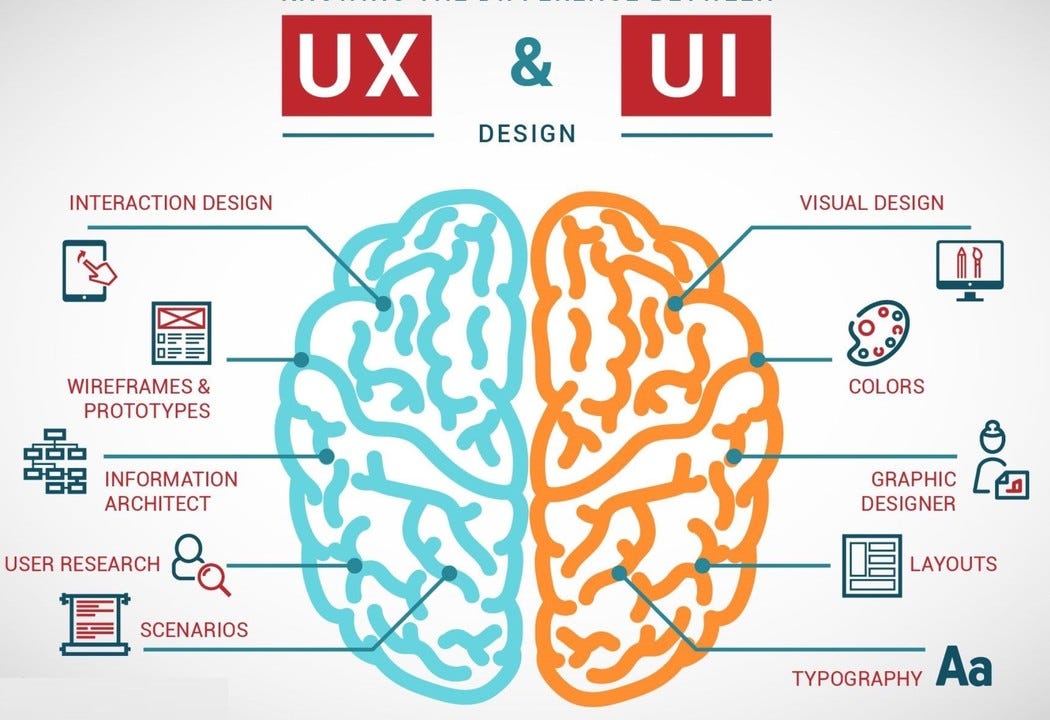
ui ux designer Making a user interface from scratch is not an easy job. Planning, research, design, and innovation are key pillars helping create top-class user interfaces. User Interface (UI) and User Experience (UX) design entail many responsibilities and tasks. At times, they both are segregated into two separate fields. User Interface (UI) design encompasses the creation of visual elements that attract users. UI designers are artists of sorts. They help determine the best typography, font, space, layout, animation, and logotypes plus other associated elements. Their job is to create an aesthetically pleasant, and functionally engaging end-product. Whereas, professionals from a UI/UX design agency in Dallas explain that User Experience (UX) design focuses on the initial stages of planning and design of frameworks and structures needed for apps, web apps, and websites. UX designers research and create the whole experience after obtaining insights from the following:
  • Client surveys.
  • Questionnaires.
  • Other forms of feedback from clients and users alike.
UX designers are constantly fine-tuning their end product. This helps ensure clients are satisfied provided the end product is user friendly, and is interactive when used.

Are both UI and UX design the same thing? Or are they both different?

In all honesty, both UI and UX are two different disciplines but are grouped as one position in terms of design. The same is done in development. Yet, it depends on the company and project that designers can be assigned to concentrate on either one of them or on both. UI/UX designers are versatile professionals who have a mastery of many skills.

Understanding the responsibilities of a UI/UX designer

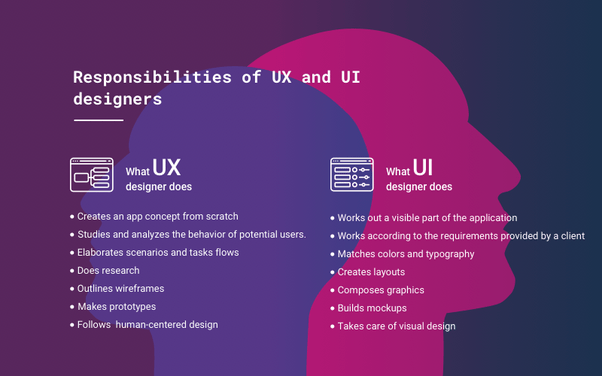
responsibilities of a ui/ux designer Previously we treated both User Interface and User Experience as two distinct entities. Yet they have also been intertwined many times. It is a complex discipline without a doubt. But first, let us have a good look at the responsibilities and tasks of UI designers:
  • Creating the visual design elements: Many considerations and decisions are part of the UI design process. They all work together to make an end product. Buttons, Color Palettes, Fonts, Pictures, Typography, and other aesthetic elements are chosen with the key objective of satisfying client requirements and those of users’ too.
  • The interactive factor: Numerous aspects are present in visual design elements. One of them requires that people interact and become engaged with the interface. This is where interactive elements come into action. UI designers can raise the product’s engagement and satisfaction with the help of these very elements.
  • Making the layout’s design: Some professionals may not give an app’s or site’s layout due consideration in visual terms. Yet it is a key part of the process. UI designers should give due consideration to the page layout, plus the entire framework & structure of the end product. 
  • Branding efforts: Some companies have an established presence in their respective markets. Some are new and require assistance in making their brand identity. That can be done with the creation of consistent design elements across numerous platforms. UI designers help support creating a brand image that is not only pleasant but also a strong one.

UI Designers vs. UX Designers

UX designers have more complex responsibilities and tasks than UI designers. Let us now have a good look at them:
  • UX designers start their work with proper research in the beginning. They also take client’s feedback. This helps them connect with users, take their feedback, and conduct interviews. Information and insights obtained from them help UX designers in making the correct product.
  • User personas are generated too. UX designers use it to create top-notch products after having a thorough understanding of clients. They make the personas as a base for the way users will interact with the app.
  • Prototype creation can never be skipped. It is a difficult process and it helps product testing and lays the basis for the product before its testing.
  • User testing is serious. Users are a key part of digital products because they are made for them. The users testing the products in the product design process determine the way the product fares in the intuitiveness, user-friendliness, engagement, and satisfaction. Like the research they conduct, user testing provides insightful feedback.
  • Making the appropriate layouts and wireframes are among the main goals of UX designers. This helps them make a functional and intuitive layout for the digital product they are creating.

In what ways can graduates and aspiring professionals become full-fledged UI/UX designers?

ways-for-ui-ux-designer Tech professionals must understand the responsibilities and duties UI/UX designers will have when it comes to creating the best digital product. Their job is difficult yet fascinating. We will first understand the qualities needed in a UI/UX designer.

1. Soft Skills and Technical qualities needed in UI/UX designers

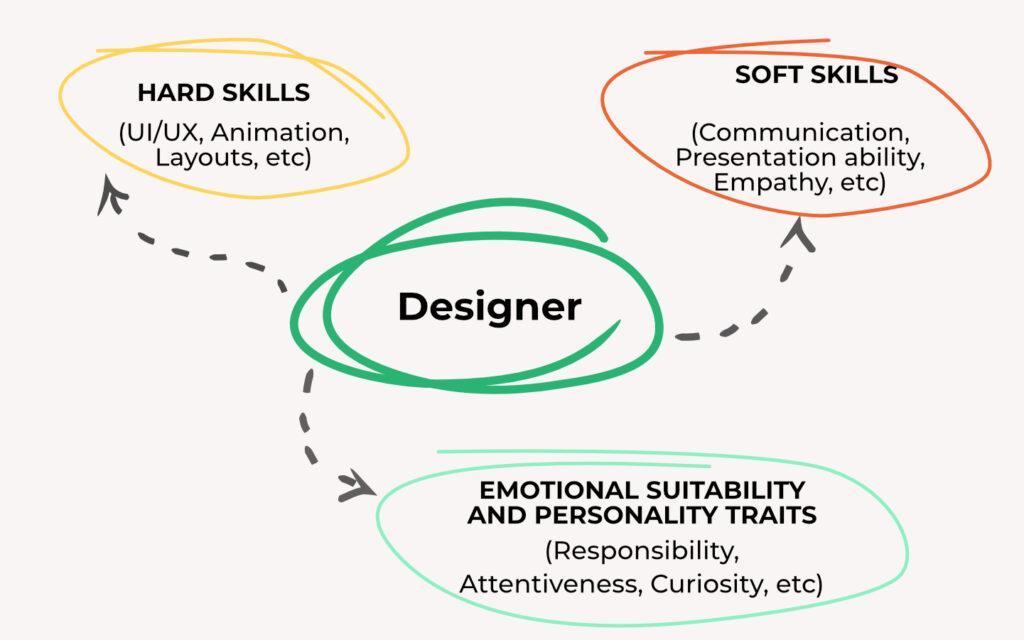
skills-for-ui-ux-designer When companies look to hire UI/UX designers, they do understand that each profession is a combination of numerous hard and soft skills candidates learn via educational and professional experiences. Soft skills are transferable qualities from the experiences and careers of others and UI/UX designers themselves. Here are some skills to help UI designers excel in their careers:
  • UI designers need to have top-level creativity and innovation in their blood. The world today copies a lot of mainstream trends and UI designers need to become trendsetters. Alternatively, they should also create original designs themselves first.
  • UI designers should pay attention to detail. Hard work, creativity, and grit work well when developing interfaces for apps and sites. Designers must ensure they give attention to detail to ensure they have developed the best interface and product. This is where each visual design element creates a difference to form the best product ever.
  • UI designers should have adaptability. A lot of trends come and go. Clients may not like some elements of the design. Cooperating and collaborating with them helps them and designers adapt to their needs. This also helps reach a consensus on the final design.
Here are some soft skills that will come in handy for UX designers provided they wish their careers to blossom further:
  • UX designers should have an emotional connection with their users and be empathic with them. Humans are emotional beings after all. When they interact with an interface, they feel different emotions and they tune into them. 
  • UX designers should not hesitate to learn more about the product their clients, and users, desire. It is wise to be curious. UX designers take on the responsibilities of research and data analysis. They also need to be motivated to learn more about what their clients and users love, want, and expect.
  • UX designers should have top-notch communication skills as they are in constant contact with clients, team members, users, and other stakeholders. They should know how to communicate with them effectively. Strong communication skills are key to making effective user surveys, and questionnaires. This hence leads to meaningful interviews.

2. Intellectual and Educational Qualities Needed in UI/UX Designers

qualities-for-ux-ui-designers Everyone knows that certain professions require certain educational backgrounds and credentials. UI/UX design is a multidisciplinary profession and is also an interesting career path. Recruiters from a custom website design agency in Alabama have decided to briefly explain the intellectual and educational qualities needed in UI/UX designers:
  • Higher education of at least four years: There was a time when UI/UX design was only offered via certified courses and diplomas. Today, many universities offer degrees in graphic design, web design, and other design-related fields. They serve as the foundation of UI/UX design as a career and help prospective designers gain experience by working on practical projects. 
  • Courses and certifications: Many online courses are available to help curious yet aspiring professionals acquire the prerequisite skills. It is wise to take those offered by credible sources and sites (Coursera). Developing expertise in many disciplines is possible via both free and paid courses.
  • Books, videos, and other resources also count: Some people love sharing their experiences and knowledge with others. Books, handouts, videos, and other materials are some of the ways they do so. YouTube has proven itself to be very good thanks to many channels and videos on UI/UX design tutorials, projects, and examples. Local bookstores are also noteworthy in this regard.

Over to You

Becoming a UI/UX designer may be a tough path. That path is worth following as the career itself in this area is rewarding. The world today is becoming digital and creating top-notch digital products is quite beneficial and rewarding at the same time.
7 Reasons Why You Use Atomic Design
UI/UX Web Design & Development

7 Reasons Why You Should Use Atomic Design for a Better UI

branex-logo Team Branex

Adopting atomic design improves both the design process and the user experience by delivering a structured, flexible, and visually consistent UI.

The web design industry is constantly evolving and brands have to tweak their websites to adapt to the wavering needs of the times. When users land on your website, it must be a top priority of web designers to provide an amazing user experience across all devices, screen sizes, and mediums at the same time. Sadly, many web designers complicate the design and create websites, apps, or products by keeping only the page or screen size in mind.

Here is where Atomic Design comes into play.

Atomic design is a robust method for creating design systems in which everything starts with the smallest detail of the user interface in mind. It’s not simply limited to colors, fonts, text, visuals, or how a logo can be positioned. It is rather a design approach that guides both designers and developers to come up with a perfect and cohesive website or app.

This modular design approach is the brainchild of Brad Frost, conceived in 2013. The process of atomic design involves breaking down a website into simple and easy elements and leveraging them throughout the website. When the smallest details work in concert with their larger counterparts, it creates an awesome and unified experience.  It helps companies focus on developing design systems, instead of individual pages.

The best part of this modular dynamic design system is that it allows UI/UX designers to understand what they are creating, and the processes involved in the design and the development of interfaces. Atomic design is composed of five distinct layers:

  • Atoms – the basic building blocks
  • Molecules – groups of atoms, which serve as the backbone of the design systems
  • Organisms – a group of molecules combined together to create a complex, distinct user interface
  • Templates – a group of organisms that function together to create pages
  • Pages – the last stage of the atomic design hierarchy that basically involves specific instances of templates

Have a look at this video to understand the concept of atomic website design.

How Atomic Design Can Create Better UI and Improve UX

Implementing an atomic design methodology while developing websites and mobile apps will allow designers to improve the overall UX. By keeping the smallest and most fundamental web and app components in mind. A clear and simple methodology of atomic design helps web design teams craft design systems, not pages.

According to Brad Frost,

Atomic design gives us an ability to traverse from abstract to concrete. Because of this, we can create systems that promote consistency and scalability while simultaneously showing things in their final context. And by assembling rather than deconstructing, we’re crafting a system right out of the gate instead of cherry-picking patterns after the fact.”

https://vimeo.com/109130093

Here are some reasons why using atomic design methodology in your interface design is a sensible approach and how it can help you make a great impact in the end.

1. Create a System of Components

Atomic Design Methodology

When you break down a system into basic and small parts. It will become easier to figure out which components of a website can be reused and how you can mix and match those components to create molecules and organisms. By duplicating and combining atoms, you can create molecules that serve as the backbone of the design systems.

2. User-Friendly Layout

With the atomic design approach in mind, you can create more intuitive layouts that are easy to code. This will make the web development process easier and allow designers to make web design tweaks if needed in the future. In addition, it makes it a lot easier for amateur developers to understand the codebase language. The code of an atomically designed website allows developers to see what atoms, molecules, and organisms are being used and what each part of the code epitomizes.

3. Fewer Components

When requirements are clearly known beforehand, it becomes quite easier for designers and developers to use atoms, molecules, and organisms that already exist. It allows designers to create new components with minor variations while keeping the design consistent and simple.

4. Keep Your Website Up-to-date

One of the major benefits of creating atomic web designs is that it makes it relatively easier to keep your website up-to-date. You can update every single atom the way you want or simply remove certain design features. The best part is, that when you change one element, the change cascades like an avalanche throughout the interface.

5. Make Your Branding Tone Consistent

Atomic design is the philosophy of combining the smallest design details in a more organized way to give birth to large elements. Those elements combine into web templates and in turn pages. Creating a website according to the atomic website design principles gives you the complete freedom to incorporate all the atoms and molecules into your brand style. This will keep your website design visually cohesive and your brand message consistent across all platforms.

You can even extrapolate basic elements from a design that is not atomic and bring them under one umbrella to create more pages. It is highly advised to develop your website atomically right from the beginning, rather than trying to incorporate an atomic web design approach to your website down the road.

6. Facilitate Prototyping

When you have accumulated a comprehensive list of atoms right before commencing the process of website design and development, it’s easier to create mock-up pages quickly. You simply need to choose and combine the required elements of the layout. Best of all, the mockup can easily be customized and refined for the final project.

7. More Consistent Code

Atomic design allows you to capitalize on predefined atoms to create your interface design. It is quite easy to see which elements are already used for different parts of the site. This serves to alleviate the chances of code duplication. Pattern Lab helps you build thoughtful and pattern-driven user interfaces with the help of atomic design principles. It is a static site generator that stitches together all the UI components, allowing you to create front-end codes for atomic design systems.

To Conclude it All

To put it in a nutshell, the atomic design is a unique and effective design and development methodology that can construct a better UI. If truth be told, this design approach deals with crafting user interface design systems, irrespective of the technology used to create them. In today’s competitive world, our custom web design company should use atomic web design principles to create practical, lively, and evolving design systems, better products, and improved UIs, which can easily be understood by their target users.

TED Talks For UX Designers
UI/UX Web Design & Development

10 Interesting TED Talks For UX Designers You Must Watch

branex-logo Team Branex
Design is deeply ingrained in TED’s DNA. Even the D in TED spells out “design”. From its inception in 1984, TED has been a voice of authority on design inspiration, churning out stellar short talks that make us see our world in a whole new light. UX design in particular has matured in tandem with the TED audience, which is why it hardly comes as a surprise that the non-profit is replete with motivational talks on ways to improve UX design outcomes and processes. After all, Experience is an expansive, subjective field, influenced by a wide array of factors. What ticks me off can leave you in raptures. We have all found ourselves wondering at times how we experience things around us, how we can craft all the desired experiences, and in turn, how to create experiences that would resonate with others. TED talks in all their wisdom, offer nuggets of wisdom that UX designers can take away from. From wonderful musings on how to craft a user-focused team to talks on the future of prototyping user interfaces, TED’s online platform has something for every UX innovator and designer to take UX design processes to unprecedented levels. If you are a UX designer on the lookout for some web design principles, fascinatingly creative ideas, stellar design strategies, or out-of-the-box design inspiration, here are some incredible TED talks to rekindle your fire:

1. The First Secret of Great Design - Tony Fadell

https://www.ted.com/talks/tony_fadell_the_first_secret_of_design_is_noticing Tony Fadell is a designer, entrepreneur, investor, and originator of the iPod and the Nest thermostat, who possesses an in-depth knowledge of great design. In this comical, yet enlightening talk, Tony Fadell discusses how noticing the tiniest details can help designers fabricate a better product. He shares the well-hushed secrets of design and explains how to drive positive changes in design. Through this video, he is trying to push designers to come up with out-of-the-box and mind-numbing design ideas!

2. The Three Ways That Good Design Makes You Happy - Don Norman

https://www.youtube.com/watch?v=RlQEoJaLQRA&list=PLR84EITvtzM3iCs3PWHBli8SuXtqvuhwE In this talk, Don Norman, the director of “The Design Labs” and the author of “Emotional Design”, wants nothing more than to show us how to bridge the chasm between products and their end users. He explains how design can make people feel happy in three ways and highlights three emotional cues that a well-designed product needs to incorporate to succeed. According to Norman, his theory of emotions constitutes three important components: reflection, functionality, and beauty. As he says, “pleasant design works better”, he aims to delve into the difference between “outside-the-box” or breadth-first thinking and depth-first thinking which comes into existence when we are anxious or scared. Specific, relatable examples peppered throughout his talk, in addition to hints of humor, make the video more interesting and engaging till the end.

3. Design is in the Details - Paul Bennett

https://youtu.be/7g0O003kufA Paul Bennett, a design expert and chief creative officer at IDEO, beautifully explains in this video how design can help solve overlooked and universal, even minute problems, and doesn’t have to be all about grand gestures. Bennett claims that with empathy at the heart of design, you can transform the ordinary into extraordinary. He explains the concepts behind several fun, different, and captivating products designed by his firm IDEO and the processes his team has capitalized on to design those products. He concludes his talk on a thoughtful note: “Pick battles big enough to matter, small enough to win.”

4. How Giant Websites Design For You - Margaret Gould Stewart

https://youtu.be/quJdL9ggETI Margaret Gould Stewart, Facebook’s director of product design, shares some great insights on UX design and explains how even the most seemingly insignificant details can sometimes have a massive impact. Intelligently drawing on the like and share buttons of Facebook, the two most viewed UI elements on earth, as an example of a design on a great scale, she shows how something so small can lead to more than 22 billion impressions a day. She truly believes that one needs humility and audacity to design across such a massive scale. She further describes that the most fundamental thing which helps to create a great UX design is to clearly understand the audience you are designing for so that you can improve and evolve your products. With the help of real-world examples, she shows you how to design stellar user interfaces for a diverse audience.

5. Design for All 5 Senses - Jinsop Lee

https://www.youtube.com/watch?v=N6wjC0sxD2o&t=64s Jinsop Lee, an industrial designer and founder of the firm “Uncle Oswald is My Hero”, truly believes that great design should appeal to all five senses. He shares his five-sense theory with a handy graph and some great real-life examples. He reflected back on how he started to evaluate every experience of his life with his famous five-senses theory, which has led him to discover true gems of design.

6. Designers Think Big – Tim Brown

Tim Brown, the CEO of IDEO, explains how design has unwittingly shrunk down from the ambitions and skyrocketing aspirations of engineers to modern design centered on fashion, aesthetics, and objects. However, design is on its uphill journey once again. He stresses the fact that focusing on the small stuff in design is not working anymore and it is high time to make the shift to design thinking, a problem-solving process of testing, rapid prototyping, and listening, to create new human-centric solutions. By giving some inspiring examples of design thinking, Brown highlights the major benefits of thinking big in design.

7. The Complex Relationship Between Data and Design in UX - Rochelle King

https://youtu.be/YTRIeWI0EGQ Rochelle King – the senior designer at Spotify, explains the process of redesigning a website and shares some best practices for fostering a strong relationship between designers, data, and the target audience. She highlights the importance of data and design and explains why you should leverage these two to create seamless experiences. King highlights all the right questions that designers need to ask if they are looking to extract the pertinent data before stepping foot in designing. She reflected on how at the launch of each new user interface, she further explores the prototype testing and user research process that takes place at the company. This amazing case study unravels the potential and power of UX design and inculcates in designers the best valuable practices.

8. Reinventing User Experience - Kes Sampanthar

https://youtu.be/k0wK9MX6cRA Kes Sampanthar believes that when it comes to creating engaging products, instead of thinking about design and usability, you have to focus on encouraging your users. The design industry can greatly benefit from this motivational design theory of Sampanthar. In his talk, he shares a murder mystery story in the Louvre and some other amusing stories to intelligently explain the psychology behind motivational design and how capitalizing on human pleasure can help you create products that your users will fall for.

9. The Power of Time Off - Stefan Sagmeister

https://embed.ted.com/talks/stefan_sagmeister_the_power_of_time_off# Stefan Sagmeister, a senior graphic designer, shares his experience on how he decided to cut five years from his retirement and how well he spent those years. On the completion of seven years, he shut down his design studio and dedicated another year to his personal projects. He highlights how this time off boosted his creativity and prepared him for his impending paid work phase.

10. The Beauty of Data Visualization - David McCandless

https://youtu.be/5Zg-C8AAIGg David McCandless is a creative director, designer, and artist. In this TED talk, he explained how good design can completely change the world. He elucidated how he transformed complex data sets such as Facebook statuses and military spending into simple and beautiful diagrams that gave rise to unseen patterns and connections. He believes that converting complex data into digestible and understandable chunks can do wonders.
Power of UX Design
UI/UX Web Design & Development

Power of UX Design: How Simple Triggers Can Influence Large Audiences?

branex-logo Team Branex
Can incorporating a little bit of fun influence your users' buying behavior? Meteorologists did a little experiment on the stairs with UX design, to see how people would respond to it. Instead of the normal staircase that people are accustomed to, they transformed the staircase into a piano. Check out the video: https://www.youtube.com/watch?v=2lXh2n0aPyw Did you like it? Can you relate to it? Yes, you can. Why? Because instead of a simple flight of steps, it is now a well-designed masterpiece. The same goes for the UX design of websites. If you alter the UX design of the website, keeping functionality intact but tweaking the aesthetic appeal, it piques the curiosity of new users and forces them to take a sojourn through your web space. When you provide your users with an enhanced user experience, it gives them a reason to trust you and stay with you for a longer period. "On the web, usability is a necessary condition for survival."  - J Nielsen Now the question arises. What triggers the behavior of users to buy online? Certainly, everyone is an Entrepreneur. But not everyone is the same. A professional custom website design agency can surely put your apprehensions to rest, but if you want to stay in the business for long, you need to ensure that the UX Design of your website is engaging enough to convert visitors into customers. Coming back to UX Design – the real purpose of UX Design isn’t just providing the end-user with a dazzling experience, it is about designing a digital experience that replicates the physical experience. The goal of a great UX Design is to enthrall and capture the users, not drive them away from the website. UX design to engage audiences Without wasting more time, let's dive into the world of UX Design & how you can design an experience that users will love to refer to their friends.

Let’s Start with Scarcity

The principle of Scarcity states that people tend to want what they don’t have. We value things that have a mortal lifeline and are prone to be unavailable to us soon. Thus, we tend to undermine those that are in abundance. In a study conducted by Achewole, Lee, and Worchel in the year 1975, we tried to figure out how people would respond to cookies placed in two identical jars. Jar A was filled with ten cookies, while jar B contained only three. People were asked to take one cookie from any Jar that they liked. Which Jar do you think people found more attractive? Even though the jars were identical and so were the nature of their constituents, people made a grasp for Jar B. Perhaps even more interesting, the researchers also concluded: “Cookies were rated as more valuable when their supply changed from abundant to scarce than when they were constantly scarce.” This is basically a common supply & demand problem. As availability takes a hit, the demand soars up. The same goes for UX Design.

How You Can Apply Scarcity To Your Design

Time-sensitive Deals

Set Sales Deadlines, limited-time discounts on abandoned cart items, or time-bound purchases for next-day shipping. Time-bound Purchases Similarly, adding a stock list is the most efficient way to grab user’s attention Amazon Post

Principle of Reciprocation

An ancient seed of wisdom still holds true centuries down the road. Do something good for someone, and they will happily do something for you in return. Give your users something useful first, and then ask them for a favor. I can happily venture that they will be happy to oblige! Randy Garner – a social scientist conducted a study in the year 2015, on whether hand-written notes can increase the response rate of a survey. One-third of the participants were presented with a survey with a personal hand-written note, asking them to complete the survey. The other was sent a blank post-it note without any preamble. The response: Not only were the hand-written surveys completed with a double response rate, but the quality of the answers was better as well. Author and psychologist David Straker said, “The inner tension created in the gap between receiving and giving is often so powerful that we will give anything in return just to reduce this discomfort.”

How to Leverage Reciprocation in Your Design?

Give valuable information for free. This can be in the form of eBooks, tips, checklists, cheat sheets, podcasts, or videos. Or you can even ask for information from the user and they will love to take part in the competition. Glasses Box Consumer Center

The Salience Principle

In a website, users are drawn to information that is most relevant to them. By identifying those moments which turn users towards you, you will be able to upsell things by influencing the users with additional offers. Imagine if you go to Sears.com to look for a brand-new refrigerator. When you visit the website, what will catch your fancy: an ad for their financial plan, or finding the right fridge? So, while fridge shoppers are not interested in the financial plan of the company, they are most likely to turn their gaze toward relevant information pertaining to the specifications of the new fridge.

How to Use Salience in Your Design?

The best kind of up-selling is during the checkout process. When the customer seems ready to finalize a purchase, it presents the perfect time to add something extra that won’t bother the customer. Amazon Recommendation Post

Social Proof

When people aren’t sure what to do, they look for clues, and they seek out other people to clear their doubts. This is what we call social proof in action. According to Robert Cialdini, the NY Times best-selling author, “Whether the question is what to do with an empty popcorn box in a movie theater, how fast to drive on a certain stretch of highway, or how to eat chicken at a dinner party, the actions of those around us will be important guides when it comes to defining the answer.” If you want those confused users to buy from you, you can always try to influence those customers by revealing the reviews of other users.

How to Use Social Proof in Your Design?

You can start by selling on the big brands, and show your affiliations with the high-octane brands. Social Proof for Design Customer reviews: Customer Reviews Or even social counts work wonders!

To Conclude it All

If you want your UX Designs to accomplish your business goals, you need to master the art of persuasion. Using the triggers above gives you infallible influence over your users and turns those design experiences into leads. If you know any other ways in which UX Design influences users, feel free to share your valuable tips.
UX Experts to Make Web Design
Infographics UI/UX Web Design & Development

15 Tips From UX Experts To Make Outstanding Web Design

branex-logo Team Branex
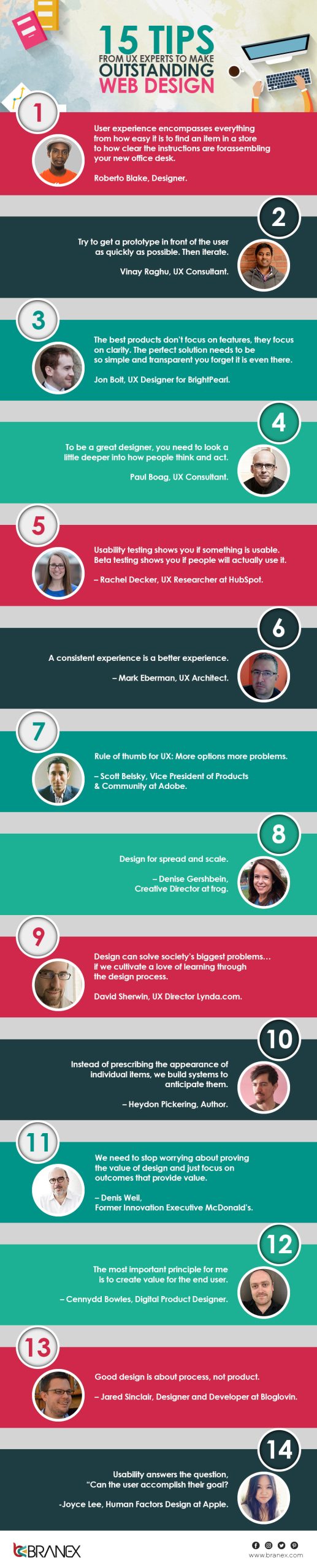
Nothing fascinates a designer more than to see a blank canvas where they can go crazy with their creativity and play around with colors. It also holds true for designing websites from scratch. Unfortunately, most UX or web designers focus on creativity but neglect how it would affect the overall user experience. At the end of the day, the user will use your website. The user experience they have with your website will determine its success or failure. You should ask yourself how users will perceive your website and how they will interact with it. This would help you to deliver an immersive user experience to your website visitors. Is your website easy to navigate and understand for new users? Does it mention what your business is all about and the products and services you offer? Is your website easy on the eyes of new users? All these considerations and much more take you closer to creating truly memorable web experiences. In this infographic, you will get expert advice from the best UX designers, which will assist you in impressing your web audience with a UX design and increasing sales. Here is what the top UX experts have to say about creating wonderful web experiences. Tips From UX Experts To Web Design
UI Design Trends For Websites
UI/UX Web Design & Development

5 Must-Follow UI Design Trends For Websites

branex-logo Team Branex
Design trends are happening at an exponential rate, and it is important to keep up with that speed. Even if you are not one to follow the trends, as a designer, it is necessary to stay up-to-date with the latest trends in the market. In the last couple of years, there has been an increase in new ideas and UI design trends, with all the big browsers giving support to HTML5 and CSS standards, along with the Javascript engine. UI web design trends usually don’t last that long, and each year new trends are introduced. There is a necessity to stay in touch with all the happenings in the design industry to stay ahead of your competition. To help you do that here are some UI design trends which you need to follow for the year 2017

1. Responsive Web Design is Necessity for Your Business

Although responsive web design is not new, experts predict that both small and big businesses will focus on making their online responsive web presence. This change is for two main reasons, firstly cost-effectiveness of building a single site that is capable of both delivering content and device usability of that content. Secondly, Google updated its ranking algorithm for the need to have responsive websites. Responsive UI Design

2. Businesses Focusing on Mobile-first Websites

As the name implies, mobile-first UI design is solely focused on mobile devices first and then on any other larger screen devices. Just like responsive UI design, this is not a new thing. However, mobile devices have become the primary tool used for browsing the internet. With a small screen comes the art of rearranging the design to fit the needs of any handheld device. A great example is of Etsy website. Open Etsy both on the desktop and on a mobile phone, and you will get to know the difference. The site is beautifully optimized for mobile devices. Etsy Designs for Mobile

3. Grid-based UI Designs

One of the hottest UI design trends that arose from material design guidelines is the use of grid-based UI. Web Design agencies are charging quite a high price to put your ideas in a grid Grid-based UI Designs format. With the attention span of users decreasing day by day, the grid is a marvelous way out. All your data can be manageable and searchable in the grid format. Tech giants such as Facebook, Google, Twitter, and even Pinterest have popularized their content in a grid format. Below is a brilliant example of how data can be efficiently organized in a grid without losing essential elements from the design.

4. Parallax Scrolling in Demand

Once upon scrolling was used to browse specific elements of your website, now scrolling is used by website designers as a creative way of displaying and sifting through the content. Parallax scrolling is a technique which gives a 3d look, with background and foreground moving at different speeds. When used well, Parallax scrolling creates a mind-blowing variety to deliver content over the internet. However, most websites overuse this effect and in turn, make it worse for design usability. Parallax Scrolling Designs

5. Bold Colors and Big Fonts

For the past few years, we have seen over-saturated rich-colored websites with vibrant hues and gradients. This change is due to advancements in screen technologies by which bold colors and big fonts look pretty awesome in almost every screen size. The best example is the redesigning of the Instagram logo, which was once flat, and now it is a lot more vibrant and colorful. It is safe to assume that more brands will move towards testing different color and font combinations to make their sites stand out from the crowd. Colors and Fonts in Web Design

Wrapping it Up

Whilst we think everything on this list is pretty great, don’t try and fit every single one of these trends into your new website. Web Design companies are using these trends and making some good money out of it. Study these trends yourself and make them work for your brand too.
User Interface Tweaks
UI/UX Web Design & Development

7 User Interface Tweaks That Can Boost Your ROI

branex-logo Team Branex
A good user interface is beyond just appealing graphics and trendy fonts. It’s all about adding a professional tone and compelling brand presence. It’s a matter of developing websites that users actually love to browse and use. But what type of user interface changes marketers can make to improve their website conversion rate? Here I’ve listed a few user interface tweaks that can help you improve user experience while doubling your ROI.

1. Call to Action

Call to Action for User Interface With the arrival of mobile apps, having a dedicated clickable area on your call-to-action buttons is vital to so that users click on them. Since many buttons are totally based on graphics, there are still some buttons that insert small link text as opposed to a more responsive and intuitive option. Small links may look sleek and sophisticated on a desktop website, but are a painful eye exercise on a smartphone. In addition, creating captivating taglines is the key, perhaps you have only 2-3 seconds to grab the attention of users, especially when they first visit your website. And in such a short amount of time, your value proposition has to quickly resonate with your prospective clients. If your visitors clearly understand the main USP (unique selling point), then more likely you will be getting more leads and conversions. Therefore, it is always a worthwhile idea to use persuasive taglines for better results.

2. White Space Matters Most

White Space for User Interface White space plays a key role in user interface design that many designers overlook often because, to them, white space is just a screen real state that needs to be filled. And when you limit screen space, such as designing for mobile or smartwatches, it can be tempting to fit as much as possible into that small space. Also Read: Top 9 Graphic Design Trends to Follow The proper use of white space not only increases focus but also leads the eye to key visual graphical elements, CTAs, and other important areas of your website that you want visitors to focus on. It basically presents your site as a more welcoming, pleasing, open, and accessible place.

3. Focus on Providing Results

User Experience Design When it comes to providing a seamless user experience, it is important to ask yourself, what the user needs, and whether your website fulfills users’ demands. And then make website tweaks to fulfill their needs and wants. Users want to get their desired product with as little frustration as possible, they probably don’t focus on web design. So, the easier you make the process, the more comfortable the user experience will be, and the more likely they will become your returning customers. Moreover, chances are they will tell their friends about their seamless user experience.

4. Use Icons Wisely

User Interface Icon Believe it or not, symbols help users as a point of reference, especially when it comes to navigating a site or when scrolling over a website. Using small, identifiable icons is meant to inform the reader at a glance; in fact, it might be the best choice, especially when you are targeting a global audience where more creative or abstract icons might not be instantly recognizable. If you want to use abstract icons, make sure to label them clearly to facilitate users to understand where clicking on those icons will take you. It should be kept in mind, that icons must be used to support your navigation, they are not meant to replace it.

5. Using Sliders is a Good Choice

Sliders in User Interface Design Sliders are commonly used in many modern websites for several reasons. Because they are trendy and have a real power to attract the audience with visual design. They inform readers above the fold and allow you to focus on special areas such as sale offers, special products, new arrivals, stock clearance, etc. But it is important to carefully consider the speed of sliders, because sometimes they scroll so fast, or contain a lot of things in them, resulting in defeating their main purpose of sharing information that is tailor-made to get users’ attention. Sometimes readers find it difficult to read them at once, getting less information, or being unable to click on them. Therefore, make it as simple as possible, so that it will become easier for readers to navigate. Reduce the number of images and use the text concisely to clearly communicate the ideas with clear meaning. Moreover, carefully think whether your website actually needs sliders or a static, appealing banner that serves its purpose of communicating the message to the audience. Running a split test between both options is the best idea to figure out which option works best for your website performance.

6. Craft a Brand Story

How to Create a Brand Story Keep in mind that you are promoting your website, improving UX, and creating engaging content for real people, so give your audience a real reason to stay on your website, and tell them your brand story. Most websites are unwelcoming, corporate places with little time for real emotion. People connect with feelings, emotions, humor, and empathy. Breathe new life into your content, images, videos, and infographics, and then stand back and watch your online conversion spike.   Also Read: How to Increase Brand Engagement through Powerful Storytelling

7. Create Valuable and Engaging Content

Valuable and Engaging Content The main purpose of your website is to connect and resonate with the target audience for your products/services. Creating your website content that is jargon-free and to the point, while enabling you to present the main purpose of your website. Just forget about the long, boring, complicated words, stick to the engaging, interesting information, and you will be able to grab your prospects.

Final Words

Making these user interface tweaks will certainly improve your website traffic, conversion rate, and ultimately sales. We are Branex, a responsive website design agency, are here to make user interface fixes so that your website can provide an intuitive UX while helping you to boost sales and ROI.
Website Design Techniques
UI/UX Web Design & Development

7 Website Design Techniques That Improve User Engagement

branex-logo Team Branex
The first impression that a website projects to its online visitors is of its design. Beautiful website design tends to attract more visitors than websites that lack the beauty of designing them. But this initial good impression lasts for a very short time. Beautiful website designs that fail to impress online visitors due to their lack of usability, fail miserably on the totality of retaining a user’s interest. The question that arises here is how website designers can create designs that not only look beautiful but also bear the capability to attract the user’s attention and retain it. Let’s have a look at some ways of web designing that can improve user engagement:

First Impression Counts Always

Make First Impression for Website Design Every day, your website is visited by a myriad of online visitors. As a professional website design company, your main aim should be to first explain what your website is all about. After explaining your business, you need to motivate them to act, and after the motivation is done, you need to lure them into taking the action you desire. If someone lands on your web app and doesn’t understand how to sign up right away, that’s a huge problem. It should be obvious to the user what your site does and how they can be a part of it.

Make Use of Hero Images

Hero Image in Website Design A popular trend among website designers is the usage of hero images. Hero images are basically used for responsive websites. It’s a page-fit size image with a few headlines to draw the customer’s attention. Being a website designer, you need to be sure that the hero image suits your website's look and feel perfectly. The need to capture the visitor’s attention is getting extremely important in the fiercely competitive times of today, therefore, the smart use of hero images will at least pause your reader for a while and can provide a go-ahead to your reader to continue checking out the rest of the web page.

Parallax Scrolling Effect

Parallax Scrolling Effect The parallax scrolling effect is a good concept that has the advantage of storytelling. Parallax effects are commonly used to assemble products right in front of the web visitor’s eyes as they scroll down the page in an artistic and intuitive way. Parallax scrolling, due to its aesthetic creativity, captures the users and completely absorbs their attention.

Include CTA Buttons Strategically

CTA Buttons Effective CTA buttons and banners can pull incremental business to your business website. When coupled with striking graphics and colors CTAs are known to perform miraculously on business websites. for a CTA it's always about size, color, and placement, so make your choices wisely.

Keep the Design Strong

Strong Website Design Landing pages are the premium version of website designs. Since they are there to attract leads, their design is always the best in terms of visuals, content, and other elements. Your business website design should, by every means, be on par with the design level of a landing page. Your website is there primarily for the same purpose and you must keep a strict lookout for how it is being designed.

Add Social Media Widgets

Social Sharing Button Widgets Social Widgets increase traffic and user engagement on your website. They have the capacity to gather new customers or expand newly created communities by allowing users to connect with them on social media like Facebook and Twitter to bring more referring visitors. Did you know Dropbox has spent very little on advertising? They’ve implemented many growth hacks. For example, one growth hack is to incentivize some of your current users to refer others. This incentive may come in the form of company swag or a free month of your service.

Responsive is the In-thing

Responsive Website Design Make it easier for users to interact with your site on a smartphone. Things like using a font size that is legible on small screens, or making it possible for them to call you with a single click, go a long way towards improving user experience.

Final Word

The above-mentioned website design techniques are the important ones to follow but are only a few among many. To receive a detailed walk-through of a business that can engage in an efficient and effective website design process, get in touch with a web designing agency to learn more.
Effective Website Design Principles
UI/UX Web Design & Development

Easy Tips For Effective Website Design Principles

branex-logo Team Branex
Website usability determines the success or failure of a website design. Since the web visitor is the very person who is going to do the clicks and thus holds much importance in the eyes of the businesses, user-centric website design has taken to the first-row position when it comes to inculcating important elements in a web design, for profitability. In this article today, I am not going to discuss the implementation details, such as the placement of the search box and all, but the main principles and approaches for effective web design.

Effective Web Design Principles

In order to effectively use the principles, we must first understand how a web user thinks and interacts with websites. Website Design Principles

How a Web Users Think?

Basically, the way a user acts at a website is similar to the way he acts when at a store. Visitors land on a website and they put in a glancing gaze at about everything. They only happen to stay when they find something that interests them. If they don’t, they will simply move on.

What Do Users Appreciate?

Users basically look for information. they don’t really care how is it coming to them. Through the content or through the visuals. This is the very reason behind the success of websites that offer users a chance to acquire relevant information through lots of content and in such cases users are ready to compromise a little on the quality of the overall website design.

How Do Users Analyze?

When a user lands on a webpage, they instantly look for some anchor points which would guide them through the content of the page. The process starts with scanning. Even wondered why we have highlighted text and fancy fonts lying in the middle of many web pages. These are the anchor points that help users build attraction and relate to the topic. The engagement begins here and onwards. Also Read: Single Page Website Design vs Multi Page Website Design

When Do Users Leave?

When the website fails to deliver what the user is looking for, both in terms of design and content, is the time when the user intends to navigate away.

Don’t Make Them Think

Any website design that is created keeping the users’ engagement in mind should be as obvious and self-explanatory as possible. If the navigation and site architecture are not intuitive, the number of questions in the user’s mind will increase and it will get hard for him to comprehend how the system works, thus agitation will build up in his mind and induce him to leave. Also Read: 7 Website Design Techniques That Improve User Engagement

Work To Build Up Attention

A website provides a mix of both static and dynamic content to the user. However, there are certain elements that attract more attention than others do. Images are of them. Eye-catching, interactive images work wonders when we use them to build up visitor’s focus on any one web element. The human eye is a highly non-linear device, and web users can instantly recognize edges, patterns, and motions. This is why video-based advertisements are extremely annoying and distracting, but from the marketing perspective, they perfectly do the job of capturing users’ attention.

Expose the Core Features

Modern web designs are usually criticized for their approach of guiding users by steps, along with large buttons or visual effects. But if we see them from the design perspective, these elements are all but bad. Such step-by-step guidelines for fulfilling any task are extremely important as they lead the visitor, and the business owner wants them to be led in a user-friendly way. Letting the users know what functions are available is among the primary principles of a successful user interface design. And as long as it's achieved, it doesn’t really matter how it’s done. It’s the end result that matters the most.

Keep it Simple and Silly.

The keep it simple, silly (KISS) principle should be the primary goal of every business owner who chooses to get a website designed for his/her business. although the website design is important, however, it just works as an eye candy for the entire experience. In most cases, the web visitor is looking for information than the design only, and it is the design that compliments the information transmittal process. A user-friendly content-rich website that is well-designed serves the purpose exactly right.

Conclusion

So these are the few effective web design principles that I think should be included in any website design if the main aim is to please web visitors and induce them to make a sale or fill a lead. Please do note that these principles are the important ones, but not the only ones to be followed. There is a long list of them, and including all of them will make the post very lengthy and less interesting. I will come up with similar posts soon that will enlighten you on factors that can help you in creating beautiful yet performing website designs.
whatsapp