As of December 2025, the Google Play Store had about 2.26 million apps.
Believe it or not, the average user interacts with 10 apps a day and around 30 a month. A typical smartphone has nearly 80 apps installed, but most of them just sit there, unused.
Creating a mobile app isn’t just about writing code. It’s a high-stakes gamble in a cutthroat digital world.
Nearly 1 in 4 users abandons a newly downloaded app after just one use, and within 30 days, almost half of all Android apps get uninstalled.
If your app doesn’t deliver value fast, it’s probably headed for the graveyard.
When brands build apps with purpose, strategy, and real user empathy, they are not just coding. They are creating something people actually want to keep on their phones.
If you’re a founder curious about making that happen, let’s walk you through the full journey of building a mobile app that actually sticks.
Mobile App Market Growth (2025-2033)
The mobile app market is massive and evolving fast. It’s not just getting bigger, it’s transforming.
Most of the growth is coming from e-commerce, banking, and gaming.
Here’s a quick roundup from some of the well recognized internet sources:
| Metric | Statistic | Source |
| Global Market Size (2025 Est.) | $264.96 Billion (App Development Market) | Mordor Intelligence |
| Projected Market Size (2032) | $777.4 Billion (Mobile Application Market) | Allied Market Research |
| Compound Annual Growth Rate (CAGR) | 14.4% (2023-2032) | Allied Market Research |
| Total App Downloads (2024) | 136 Billion (Note: A slight decrease, -1% YoY) | Sensor Tower |
| Monetization Insight | 98% of mobile app revenue comes from free apps utilizing in-app purchases, subscriptions, and advertising. | Buildfire, Netguru |
| Top Revenue Categories | Gaming ($196.1 Billion) and Social Networking ($153.4 Billion) together make up over two-thirds of the total worldwide app market. | MobiLoud (2024) |
| Fastest Growing App Subgenre | AI Chatbot Apps saw a 112% year-over-year growth (2024). | Sensor Tower |
| Leading Growth Region | Asia-Pacific is expected to exhibit the fastest CAGR (around 18-19.71%) and is the largest market by revenue share. | Allied Market Research, SNS Insider |
Different Approaches to Mobile App Development
There are basically four main ways to build a mobile app:
Native App Development
Native apps are built for a single platform like iOS or Android using platform-specific languages and frameworks. Native app development ensures high performance, fast speed, strong security, and full hardware integration, making apps reliable, scalable, and user-friendly.
Hybrid App Development
Hybrid apps use a single codebase to work on multiple platforms, like iOS and Android. They combine web technologies such as HTML, CSS, and JavaScript with a native “shell” so the app can run across devices.
Also Read: The Three App Types Explained: Native, Hybrid & Web Apps
Cross-Platform App Development
Cross-platform apps also run on multiple operating systems, using frameworks like Flutter or React Native. Unlike hybrid apps, they don’t rely on a web-based shell, which makes development simpler. However, performance can sometimes be a bit slower compared to fully native apps.
Progressive Web App (PWA) Development
PWAs are web apps that feel like native apps on any device or operating system. They’re built with HTML, CSS, and JavaScript and give users an app-like experience without needing to download anything from an app store.
The 8 Essential Steps to Building a Winning Mobile App Experience
Find Your Purpose
The best mobile app ideas are the ones that actually solve a real problem for your users. Apps that offer solutions nobody else has managed to deliver often make the biggest impact on the Apple Store and Google Play Store. Think back to a time before Google Maps. Remember how painful navigation used to be? Everything changed once Google Maps launched, and now every GPS-powered device relies on it to get around.
When you’re building a mobile app, start by thinking about its purpose. Ask yourself:
- What problem or need does my app solve?
- Does it actually make life easier for people?
- Who is my target audience and what do they expect?
- What’s the end goal for this app? Are you trying to build a community, provide a service, drive revenue, or something else?
- Why would someone choose this app over websites, competitors, or even pen and paper?
Focusing on these questions will help you create an app that’s truly useful and meaningful.
Study the Competition
Honestly, pretty much every problem you can think of already has some app trying to solve it. So before you get hyped about what you hope will be the next big hit on the Google Play or App Store, take a little time to see what’s already out there. Scrolling through and checking out apps one by one will give you a clear picture of what makes them stand out.
You can also ask yourself some key questions about the competition:
- Will my app actually solve the problem the way I imagine, or could I do it better?
- How do they price their app? Should I go freemium or full-on premium?
- Does my app look and feel better than what’s already out there?
- Are there any UI/UX issues my app could avoid?
- Who are these apps aimed at, and is that the same audience I’m going after?
Answering these will give you a solid sense of the market and whether your app will stand out or just blend in with all the others.
Choose Your OS
Before diving deeper into building your app, it’s important to figure out which platforms you want it to run on. Different types of apps call for different development approaches. For example, a native app is built specifically for one operating system, while a hybrid app can run on multiple platforms.
Let’s break it down: the two big players are Google’s Android and Apple’s iOS. Each has its own coding language, most Android apps use Kotlin or Java, while iOS apps are usually built with Swift or Objective-C. The main tools developers use are Android Studio for Android and Xcode for iOS. These tools let you build the app and connect it with the device’s features, like the camera or GPS.
Choosing which platform to focus on early will save you a ton of time and money. You can either build separate apps for each platform or go with a hybrid solution to cover both.
Ultimately, your decision comes down to your budget and what makes the most sense for your app.
Decide on Features & Functionality
So here’s what you need to do next!
You need to think about the features and functionality of your mobile app.
- Think about the functionality your mobile app has?
- What will the screens be like?
- How will you design the user journey and interface?
We have put together simple schematics to help you space out and design the feature set.
Also Read: How Branex Develops Your Custom Enterprise Mobile App Development?
| Category | Focus | Key Questions | How to Handle It |
| Core Functionality | App’s main purpose | Does this actually solve the user’s problem? Is it essential for the app’s goal? | Start with the MVP—get the must-haves in first. Don’t overstuff with extras. |
| User Experience (UX) | Overall usability & satisfaction | Is the app easy to use? Do flows feel natural and friction-free? | Test with real users. Focus on speed, smooth performance, reliability, and keeping steps to a minimum. |
| Performance & Reliability | Speed & consistency | Does the app load quickly? Does it run without crashing? | Optimize load times, fix bugs, and handle errors gracefully. |
| Accessibility | Everyone can use it | Can all users, including those with disabilities, navigate it easily? | Add readable fonts, strong color contrast, voice-over support, and touch-friendly elements. |
| User Interface (UI) | Visual design & layout | Is the app easy on the eyes and simple to navigate? | Keep layouts clean, spacing consistent, icons/buttons clear, menus intuitive. |
| Interaction Design | Gestures & taps | Are taps and swipes predictable? | Stick to standard gestures (tap, swipe, long press) and give feedback via animations or highlights. |
| Branding & Aesthetics | Look & feel | Does the app reflect your brand and feel cohesive? | Use consistent colors, fonts, and design elements that match your brand identity. |
| Feature Prioritization | Must-have vs nice-to-have | Which features are critical, which are optional? | Focus on core features first; add extras gradually based on user feedback. |
| Technical Feasibility | Development & maintenance | Can this be built efficiently? Will it scale? | Keep backend complexity in check, know platform limits, and plan for future updates. |
| User Feedback | Iteration & improvement | What do real users like or struggle with? | Run usability tests, collect reviews, track analytics, and refine features continuously. |
Come Up with a Development Plan
No mobile app really comes together without a solid development plan behind it.
Before you start building, you need to make a few key decisions. You have to choose which programming language you want to use and what development approach fits your goals.
The right tech stack is not about picking whatever is most popular. It depends on what you want your app to do, your budget, and the team you plan to bring on. There is no single best technology for every situation. The best choice is the one that actually supports your project needs.
At Branex, we do not just pick a random tech stack and move forward. We take the time to figure out what fits your project so you are set up for long-term success.
You have plenty of options when it comes to languages like Java, JavaScript, Python, Ruby on Rails, and more. You can also choose from different development methodologies like Scrum, Agile, DevOps, Lean, Prototyping, XP, or RAD before you begin your project.
A few other things to take care of include a timeline with specified milestones. It also further includes stakeholders information as well as the initial marketing ideas.
Summing it all up will give you a proven development plan.
Build Your First Prototype
Once you have a clear plan in place, the next step is to build an initial version of your app, also known as a prototype. This part is honestly pretty exciting because now you have something real to show to reviewers, investors, and even manufacturers.
Here is the moment when people look at it and say, “Okay, this actually feels like an app.”
A solid prototype works like a blueprint for everyone involved. It helps stakeholders understand the flow, the features, and the overall direction.
Simply said, it sets the foundation the rest of the app will build on, almost like laying down the first link in a chain the final product will follow.
Test Your App
A mobile app is not truly ready until it makes it through all the testing phases.
Mobile app testing usually focuses on five main areas: functional testing, performance testing, security testing, usability testing, and compatibility testing.
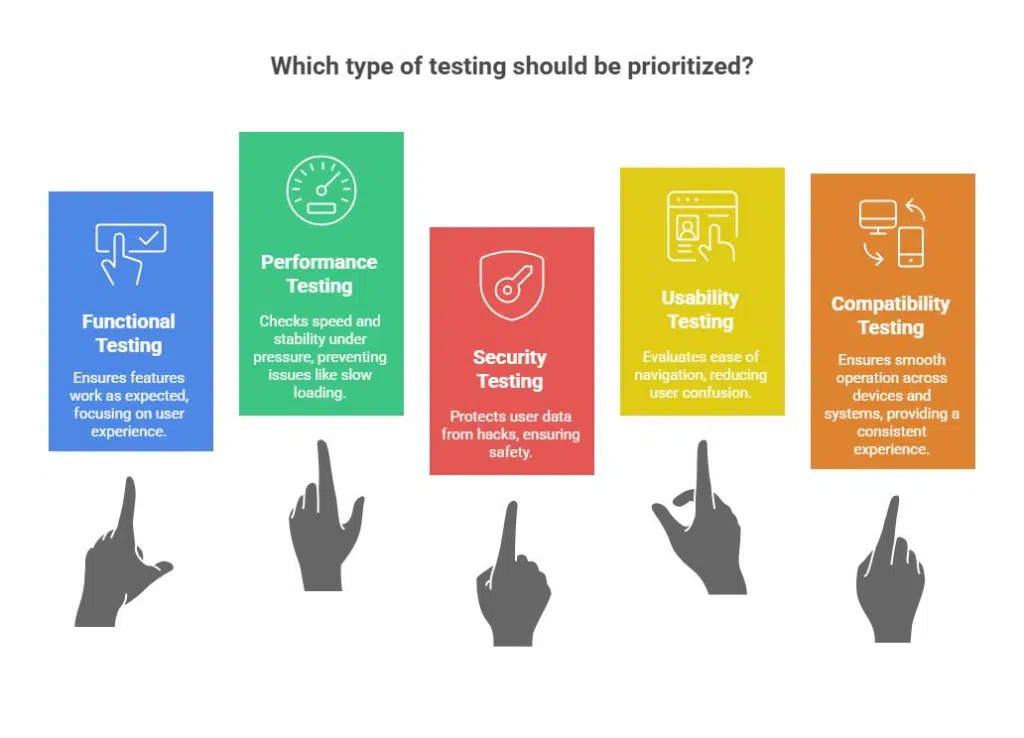
These tests can be done through manual testing, automated testing, and beta testing across different devices, networks, and operating system versions.
All of this helps make sure the app is high quality, reliable, and easy for people to use. Quality assurance plays a big role because it confirms the product meets the standards set by everyone involved.
Stakeholders include employers, clients, and actual users who give feedback. Having a mobile app properly QA tested can save you time, money, and boost your brand’s reputation.
Technical testing alone won’t cut it. Your customer’s feedback is super valuable but you need more info to honestly build an app that’s satisfactory. You can try it out by sending them simple survey asking:
- What did you enjoy about the app?
- What did you not like about the app?
- Did you find any issues while using the app?
- How was the overall vibe?
- If you want to change one thing, what would it be?
Such feedback will help you understand what works and what needs to be improved before launch.
Launch & Promote
Everything is set!
Finally, it’s time to launch your mobile app.
You can take this time to study the requirements and instructions for publishing Google Play Store and Apple App Store. Once, your app is available at these locations, take a moment to savor your accomplishment. Now, you can start with the marketing process for exposure.
There are different ways how you can best promote your app, including but not limited to:
- Creating a website which discusses the app and its benefits.
- As a bonus, launch a video and push it through YouTube shorts or TikTok.
- Create an account on all major social media website fronts & broadcast messages.
- Introduce your mobile app to influencers who can spread the word in circles.
- Use every opportunity to request reviews & be sure to respond to both positive & negative.
Concluding Thoughts
Once you have successfully designed, launched and promoted your mobile app, it’s now time to have adequate support running at the backend to support users.
Make sure that once your app is live, if users are sending some kind of queries, your team is ready to report to all user requests.
If you’re unable to do it right away, send a decent note letting them know you’ve received their request and you’re working on the problem.
Times as such have a mobile app maintenance team can be of significant assistance.
Learn why having a mobile app maintenance is crucial for your mobile app development strategy.
Also Read: Why Mobile App Maintenance Is Crucial For Your Mobile Strategy
At Branex, we don’t just build apps, we design experiences that turn memorable.
Ready to take your next big app idea and turn it into something people actually use and love?
Get in touch with us today and start building your next hit app.
FAQs
1. How long does it take to develop a mobile app?
The timeline depends on the app’s complexity, features, and platforms. Most apps take 3–9 months, including planning, design, development, testing, and launch.
2. What’s the average cost of building a mobile app?
Mobile app development typically ranges from $20,000 to $150,000+, depending on the tech stack, features, design complexity, and whether you’re building for iOS, Android, or both.
3. Do I need a maintenance plan after launching my app?
Yes. Once your app goes live, it requires regular updates, bug fixes, security patches, and performance improvements. A maintenance plan ensures stability, user retention, and compliance with new OS updates.
4. What’s the difference between native, hybrid, and cross-platform apps?
Native apps: Built specifically for iOS or Android; best performance.
Hybrid apps: One codebase for both platforms; faster to build.
Cross-platform apps: Built with frameworks like Flutter or React Native; balance of speed, cost, and performance.
 Read More Blogs